
VideoWizardTools is a practical blog for creators and casual editors who want to edit faster, learn the right workflow, and stop getting stuck.
If you’ve ever opened an editing app and thought, “Where do I even start?” — you’re in the right place.
I write simple, step-by-step guides you can actually follow, with clear settings, real examples, and the small details most tutorials skip.
Okulu Ebubechukwu

I’m Okulu Ebubechukwu — a video editing enthusiast, a Computer Science graduate, and someone who genuinely enjoys learning creative tools.
I studied Computer Science in school, and we also touched graphic design — that’s where the spark started for me. I began playing around with design and editing (back then in Adobephotoshop) mostly for fun… then I realized something:
- Video content is now everywhere.
- Creators are growing fast.
- A lot of editors are searching for help, but many guides are confusing, incomplete, or outdated.
So I built VideoWizardTools as a part-time project and hobby to help people edit with confidence — whether you’re creating for fun, for social media, or for work.
My Editing Journey (5+ Years)
I’ve been on the video editing scene for about 5 years.
I started out mostly on Android, learning by trying things, breaking things, and testing what actually works. Over time, I transitioned fully into desktop editing, where I can work faster, use better controls, and build more consistent workflows.
This blog is where I share what I learn — in a way that’s clear, honest, and easy to apply.
My NYSC Year Shaped How I Work
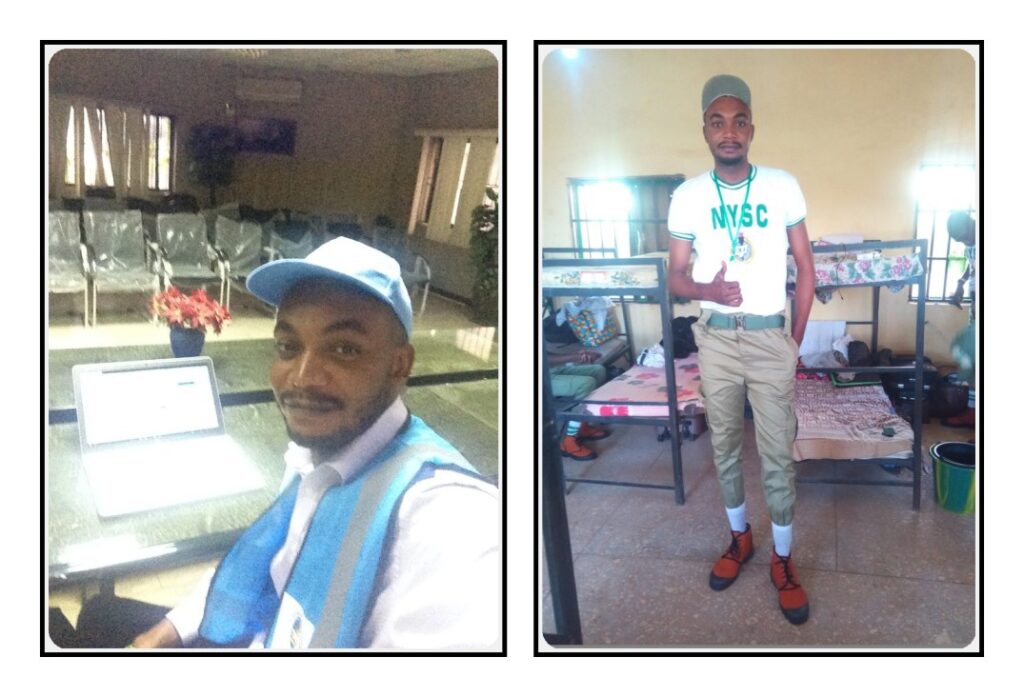
During my NYSC in Nigeria, I learned something that still guides me today: show up consistently, learn fast, and take pride in doing things properly.
That experience trained my patience and attention to detail — and I bring that same mindset into every guide on VideoWizardTools. I don’t just explain tools; I test steps, simplify the process, and write in a way that helps you get results without stress.
What You’ll Find on This Site
Here’s what I publish on VideoWizardTools:
- Step-by-step editing tutorials (beginner-friendly, no skipped steps)
- Video editing software reviews
- Export and quality fixes (blurry videos, wrong settings, file issues)
- Simple explanations of features and tools (what they do + how to use them)
- Troubleshooting guides (when something doesn’t work the way it should)
Over time, I’ll cover more editing tools one by one — but the goal stays the same: clear help that saves you time.
Two guides readers come back to a lot are my full breakdown of CapCut’s pricing plans (so you know exactly what you’re paying for before you subscribe) and my walkthrough on how to export from CapCut without Pro when you just need a clean, watermark-aware export on the free plan.
How I Create and Test My Guides
I don’t just rewrite what other people said.
Before I publish, I try to:
- Test steps myself (so I can explain them clearly)
- Confirm menus/settings so it’s easy to follow
- Mention when something can differ by device, version, or platform
- Update posts when tools change and a step becomes outdated
If something changes and a guide becomes inaccurate, I update it as soon as I can.
Also Published on LinkedIn
I also publish practical video editing software posts on my LinkedIn, covering plan/pricing updates, workflow tips, and clear comparisons. If you prefer reading there (or want quick updates before they become full guides), you can follow my LinkedIn.
A Bit More About Me

I currently work in Access Bank PLC (Nigeria), and I build VideoWizardTools as a part-time hobby outside work.
This is what my routine often looks like — work during the day, then I spend my free time learning, testing tools, and turning what I discover into simple guides anyone can follow.
Affiliate Disclosure
Some pages on this site may contain affiliate links. If you click and purchase, I may earn a small commission — at no extra cost to you.
I only recommend tools and resources that make sense for creators and editors, and my opinions are my own.
Connect With Me
If you want to ask a question, suggest a topic, or point out an update I should make, you can reach me here:
YouTube: Visit my YouTube channel
LinkedIn: Connect with me on LinkedIn
Email: videowizardtools@gmail.com