


CapCut makes it ridiculously easy to create polished videos fast.
That’s why so many creators, freelancers, small businesses, and social media managers use it for everything from TikToks and Reels to product promos and client edits.
But once a video is tied to money, marketing, or a brand, the question gets trickier.
It’s not just about whether CapCut lets you export the video. It’s about whether everything inside that video is safe to use for business.
Music, templates, stock clips, stickers, fonts, effects, and AI tools can all come with their own rules. And those rules matter a lot more when the video is being used for ads, client work, YouTube monetization, or brand promotion.
So before you publish, here’s what you need to know about using CapCut for commercial projects without walking into a copyright mess.
Table of Contents
- Can You Use CapCut for Commercial Use?
- What Counts as Commercial Use in CapCut?
- Can You Use Your Own Videos Commercially in CapCut?
- Can You Use CapCut Music for Commercial Videos?
- Can You Use CapCut Templates for Commercial Use?
- Can You Use CapCut Stock Videos and Images Commercially?
- Can You Use CapCut Pro Features for Commercial Use?
- Can You Use CapCut for Client Work?
- Can You Use CapCut for Ads?
- Can You Use CapCut for YouTube Monetization?
- How to Use CapCut Safely for Commercial Projects
- Frequently Asked Questions
- Final Thoughts
- Official Sources
Can You Use CapCut for Commercial Use?
Yes, you can use CapCut for commercial use, but the rights depend on what you put inside the video.
If you upload your own footage, record your own voiceover, use your own images, and add music or assets you have permission to use, CapCut can work well for business videos, client projects, ads, and monetized content.
The risk starts when your project includes assets you did not create yourself.
That includes CapCut music, templates, stock media, Pro assets, AI-generated content, stickers, fonts, effects, or trend sounds. Before using any of these in a commercial project, you need to check whether the asset is actually licensed for that type of use.
CapCut is the editor. The assets are the legal risk.
Think of it like a kitchen. You can use the kitchen to cook food for your restaurant, but the ingredients still matter.
If one ingredient is stolen, expired, or not allowed for sale, the kitchen does not magically make it safe.
What Counts as Commercial Use in CapCut?
Commercial use means using a CapCut video for business, money, promotion, sales, branding, or professional work.
It does not have to be a huge paid ad or a big brand campaign. Even a short video for a small business Instagram page can count as commercial if it promotes a product, service, brand, offer, or client.
The main thing to ask is simple: is this video helping someone make money, get customers, build a brand, sell something, or promote a business?
If the answer is yes, treat it as commercial use.
Examples of commercial use:
- Client videos
- Business social media posts
- Product demos
- Sponsored TikToks or Reels
- YouTube videos on a monetized channel
- Paid ads
- Brand promos
- Course videos or paid content
- Videos for a company website
- Real estate listing videos
- App or software promo videos
- Event videos made for a business or client
This is where many people get confused. A video can be free to watch and still be commercial.
For example, a TikTok for your clothing brand, a Reel promoting your services, or a YouTube video that earns ad revenue can all fall under commercial use.
The viewer may not pay to watch it, but the video is still connected to business, marketing, or income.
That is why you should be extra careful with music, templates, stock clips, fonts, stickers, and effects when the final video is being used for anything business-related.
If the video helps a person, business, or brand make money, promote something, attract customers, or build an audience for business reasons, treat it as commercial.
Can You Use Your Own Videos Commercially in CapCut?
Yes, using your own videos in CapCut for commercial projects is usually the safest option.
If you filmed the footage yourself, own the rights, and have permission from anyone shown in the video when needed, you have much more control over how the final edit can be used.
That is why original footage is the best choice for client work, ads, product demos, and business content.
Still, make sure you check these things:
- Do you own the footage?
- Do you have permission from people shown in the video?
- Are there logos, artwork, or private locations that need approval?
- Did you use music, fonts, or stock clips from another source?
- Does the final video include templates or assets with separate rules?
The more original your project is, the easier it is to use commercially.
Can You Use CapCut Music for Commercial Videos?
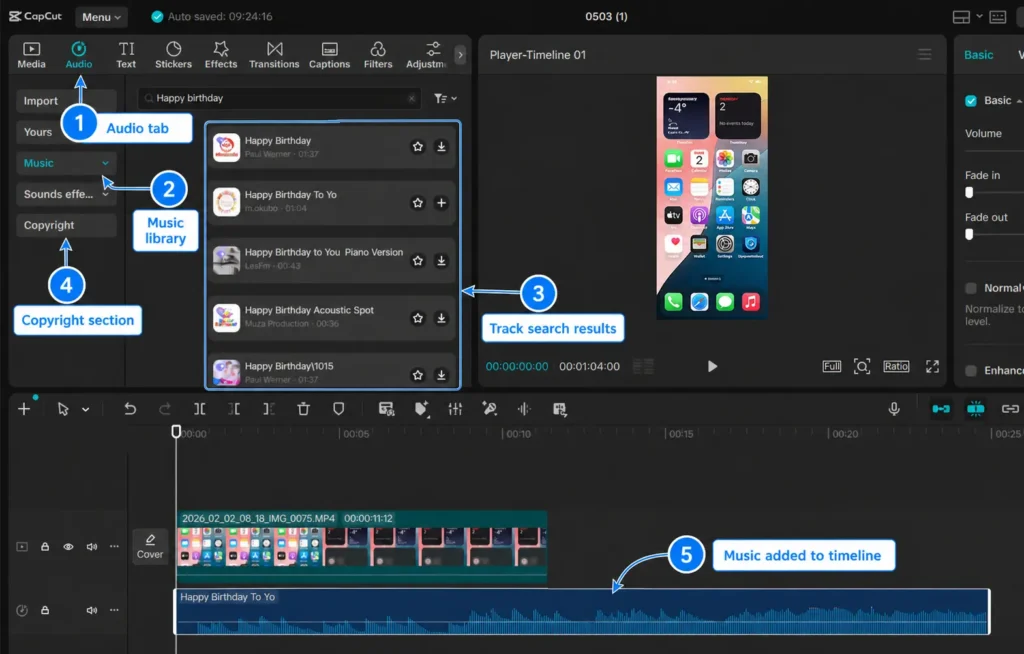
You should not assume CapCut music is safe for commercial videos.
Music is one of the biggest copyright risks in commercial content. A track may be fine for a personal TikTok but not safe for a paid ad, YouTube monetization, client video, or business campaign.
CapCut’s Materials License Agreement says commercial sounds may be used on certain permitted platforms, including CapCut, TikTok, and TikTok for Business. But it also says uses outside the permitted platforms may require separate permission from the rights holders.
Be careful with music if the video is for:
- YouTube monetization
- Instagram business posts
- Paid ads
- Client work
- Product launches
- Business websites
- Sponsored content
If music rights matter for your project, read this guide on whether CapCut music is copyright free before publishing.
Can You Use CapCut Templates for Commercial Use?
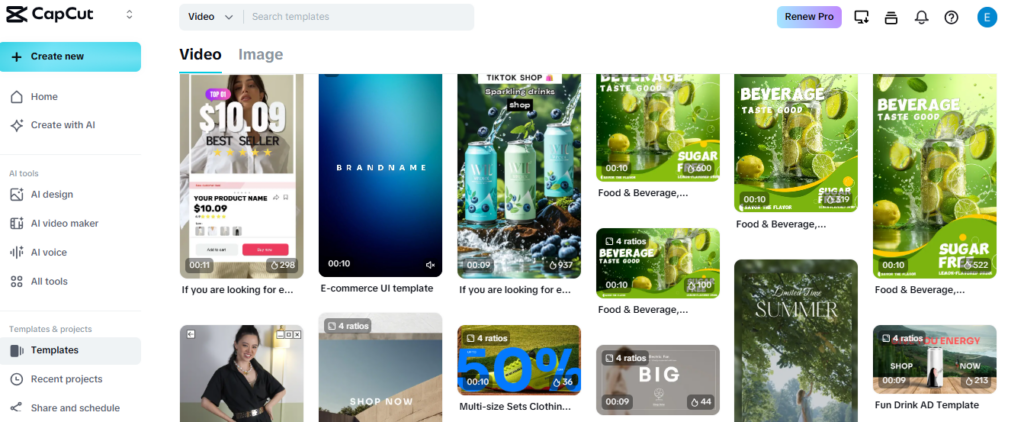
You may be able to use some CapCut templates commercially, but you should check the template assets first.
A template can include music, effects, animations, text styles, stickers, images, creator-made elements, or stock media. Each of those pieces may have its own usage limits.
That means the template itself may look free to use, but one sound or visual asset inside it could create a commercial-use problem.
Before using a CapCut template for business, check:
- Does the template use copyrighted music?
- Does it include stock photos or clips?
- Does it use creator-made content?
- Does the template mention usage limits?
- Are you using it on TikTok only, or outside TikTok too?
- Will the video be used in an ad or client campaign?
If you want templates for social content, this guide on the best CapCut templates for edits may help, but commercial projects still need a rights check before publishing.
Can You Use CapCut Stock Videos and Images Commercially?
Only use CapCut stock videos, images, stickers, and other built-in media commercially when the specific asset allows commercial use.
Stock assets can be helpful, especially when you need quick background clips, visuals, or design elements. But stock media usually comes with rules, and those rules can change based on the asset, platform, region, account type, or project type.
This matters even more if the video will be used in paid ads, client campaigns, product pages, business websites, or monetized content.
Before using stock assets on CapCut, ask:
- Is this asset allowed for commercial use?
- Can I use it outside CapCut, TikTok, or TikTok for Business?
- Does it require attribution?
- Can it be used in paid ads?
- Can it be used for client work?
- Does the license change by platform or region?
- Can I prove I had permission if a client asks?
If you cannot clearly confirm the rights, do not build an important commercial video around that asset.
For business work, it is safer to use your own footage or a stock library that gives clear commercial permission for your exact use case.
Can You Use CapCut Pro Features for Commercial Use?
CapCut Pro can be used for commercial projects, but Pro access does not automatically mean every asset is cleared for every business use.
This is an important difference.
A Pro subscription may give you access to premium tools, effects, templates, AI features, stock assets, exports, and editing options. But access is not always the same as unlimited commercial rights.
CapCut’s terms say the commercial or non-commercial use of Company Content can vary depending on the CapCut product and the Materials License Agreement. So you still need to pay attention to the specific asset or feature you are using.
Be careful with Pro assets like:
- Premium music
- Commercial sounds
- Stock videos
- Stock images
- Premium templates
- AI-generated media
- Brand-style effects
- Stickers, graphics, and fonts
For example, using a Pro editing tool to cut your own footage is different from using a Pro music track, template, or stock clip in a paid ad.
The safest way to think about CapCut Pro is this: Pro may unlock more tools and assets, but you still need to make sure the materials in your final video match your commercial use.
Can You Use CapCut for Client Work?
Yes, you can use CapCut for client work, but you should keep your workflow clean and rights-safe.
Clients may not care which editor you used. They care whether the final video looks good, matches the brief, and does not create copyright problems after publishing.
If a client asks where the music, footage, font, or template came from, you should be able to answer clearly.
Best practices for client projects:
- Use client-provided footage when possible.
- Use licensed music with commercial rights.
- Avoid random trend sounds unless the client approves the risk.
- Keep proof of licenses for music and stock assets.
- Export a clean final file outside CapCut.
- Do not rely only on local drafts for important work.
Can You Use CapCut for Ads?
Yes, you can use CapCut to edit ads.
But ads need the strictest rights check because paid advertising is clearly commercial use.
Every part of the video should be cleared for the way the ad will be used. That includes music, stock clips, templates, voiceovers, fonts, images, product shots, logos, effects, and people shown in the video.
Do not use a trending sound in a paid ad just because it is popular. A sound that works for organic TikTok content may not be licensed for advertising, YouTube ads, Instagram ads, or campaigns outside a permitted platform.
For ads, use safer assets
- Original footage
- Brand-owned product photos
- Licensed commercial music
- Stock footage with ad-use permission
- Approved fonts and graphics
- Voiceovers recorded for the campaign
- Templates clearly labeled for commercial use
When money is behind the video, do not rely on vibes. Use assets with clear commercial or advertising rights.
This is especially important for client ads, product launches, influencer campaigns, app promos, ecommerce videos, and brand campaigns.
Can You Use CapCut for YouTube Monetization?
Yes, you can use CapCut to edit videos for a monetized YouTube channel.
The editor does not stop you from earning money on YouTube. The main thing to watch is the content inside the video. Music, clips, images, and reused media can still trigger copyright claims or monetization limits.
If your video uses your own footage and licensed music, CapCut is just the editing tool.
Before uploading monetized YouTube videos, check:
- Is the music safe for YouTube monetization?
- Do you own or license the clips?
- Are stock assets cleared for YouTube use?
- Did you use any copyrighted TV, movie, or game footage?
- Can you prove you have permission if needed?
For YouTube-specific workflow help, read this guide on using CapCut for YouTube.
How to Use CapCut Safely for Commercial Projects
The safest way to use CapCut commercially is to control your assets.
Use your own footage when possible. Use music with clear commercial rights. Avoid questionable templates in paid projects. Keep client files organized. Export finished videos and save backups outside CapCut.
Commercial-use checklist
- Use original footage or properly licensed stock media.
- Use music that clearly allows commercial use.
- Check template, font, sticker, and effect permissions.
- Avoid TikTok-only sounds for ads or non-TikTok campaigns.
- Keep proof of licenses for client work.
- Export final videos and back them up.
- Review CapCut’s terms if the project is high-value or high-risk.
This keeps the focus where it should be: making good videos without creating problems later.
Frequently Asked Questions
Can you use CapCut for commercial use?
Yes, you can use CapCut for commercial use, but the rights depend on what you put inside the video. Your own footage is usually safer, while music, templates, stock clips, fonts, effects, and other built-in assets may have separate rules.
Can I use CapCut for client videos?
Yes, you can use CapCut for client videos. Use original or properly licensed assets, keep proof of music and stock licenses, and avoid trend sounds unless the client understands and accepts the risk.
Can I use CapCut templates for business videos?
Sometimes. CapCut templates are safer for business use when they are clearly labeled for commercial use. Still check the music, stock visuals, stickers, fonts, effects, and creator-made elements inside the template before using it for a client, ad, or brand video.
Can I use CapCut music in paid ads?
Do not assume so. Paid ads need clear commercial or advertising rights. CapCut Commercial Sounds may be allowed on certain permitted platforms, but uses outside those platforms may require separate permission from the rights holders.
Can I monetize YouTube videos edited in CapCut?
Yes, you can monetize videos edited in CapCut if the content follows YouTube’s rules and you have rights to the music, footage, images, clips, templates, and other assets used in the video.
Does CapCut Pro include commercial rights?
Not automatically. CapCut Pro may give you access to extra tools, effects, templates, music, and stock assets, but access does not always mean every asset is cleared for every commercial use. Check the specific asset before using it in business content.
Can I use CapCut stock videos and images commercially?
Only use CapCut stock videos, images, stickers, and other built-in media commercially when the specific asset allows commercial use. If the license is not clear, use your own footage or a stock library with clear commercial permission.
Final Thoughts
You can use CapCut for commercial use, but do not treat every built-in asset as automatically cleared for business.
The editor itself is not usually the problem. The bigger issue is what you add to the project, especially music, templates, stock clips, stickers, fonts, effects, AI assets, and trend sounds.
For simple business videos, original footage is usually the safest starting point. If you filmed the clips yourself, recorded your own voiceover, and used assets you have permission to use, your risk is much lower.
The safest projects use original footage, licensed music, approved stock assets, and clear permission for templates, sounds, fonts, and visual elements.
CapCut can be a useful editor for business videos, client work, ads, sponsored content, and monetized videos. Just make sure the rights match the way you plan to use the final video.
When in doubt, choose assets with clear commercial permission. It is much easier to check before publishing than to deal with a copyright claim, muted video, takedown, or unhappy client later.
