
CapCut Pro Subscription Review (2026): Worth Paying For?

Have you ever finished editing a video on CapCut… only to hit export and see that annoying watermark staring back at you? Or maybe you’ve seen those clean, cinematic edits on TikTok and wondered, “Wait, how are they doing that?”
I’ve been there. At some point, the free version starts to feel limiting. This is where you will need a CapCut Pro Subscription.
And here’s the thing, more creators are upgrading to CapCut Pro because it unlocks tools that actually make your content look different, not just “edited.”
But is it really worth paying for?
Let’s break it down in a simple, honest way so you can decide if you should stick with free… or finally upgrade.
What Is CapCut Pro Subscription? (Quick Overview)
CapCut Pro is the paid version of the CapCut app, built for people who want more than just basic edits.
If you’ve only used the free version, you already know it’s good. You can cut clips, add music, throw in some effects, and get a decent video out.
But here’s where things change.
CapCut Pro unlocks the tools that actually make your videos look polished. No watermark. Better effects. More control. Faster exports.
It’s still the same simple app. Nothing complicated. You don’t suddenly need to become a professional editor overnight.
Think of it like this:
The free version is enough to get started.
CapCut Pro is what helps you stand out.
So if you’re creating content regularly, or you’re tired of hitting limits, that’s where the upgrade starts to make sense.
CapCut Pro Features That Actually Matter (Not Just Hype)
Let’s be honest. Most “premium features” sound good on paper but don’t really change much.
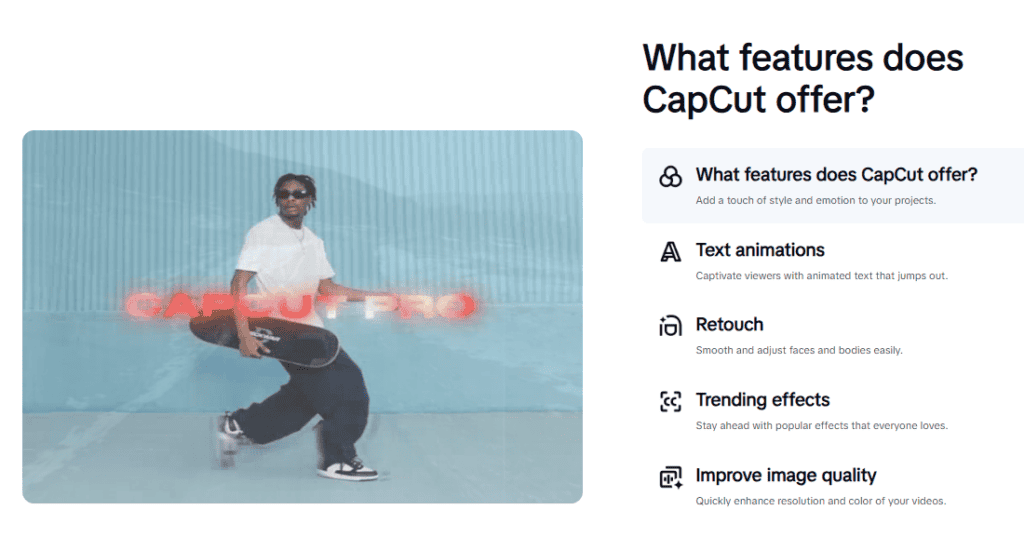
CapCut Pro is different. The upgrades here actually affect how your videos look, feel, and perform.
Here are the ones that make a real difference:
No Watermark (This Alone Changes Everything)
If you’ve ever exported a video from the free version, you already know how frustrating the watermark can be.
With CapCut Pro, it’s gone. Your videos look clean, professional, and ready for any platform. No distractions. No branding that isn’t yours.
Premium Effects and Filters That Make You Stand Out
This is where a lot of creators start to separate themselves.
CapCut Pro gives you access to exclusive effects, transitions, and filters that aren’t available in the free version. These aren’t just “extra options” — they help your content feel more polished and engaging.
Faster Export (Saves You Time Every Single Day)
If you edit often, this one hits hard.
Instead of waiting forever for your videos to render, CapCut Pro speeds things up — especially for high-quality exports like 4K. That means less waiting and more posting.
Higher Quality Exports (Your Videos Look Sharper)
There’s a noticeable difference when you export in higher quality.
CapCut Pro lets you export in 4K and better formats, so your videos look crisp on any screen — whether it’s a phone or a big display.
More Editing Layers (For Creative Control)
If you’ve ever tried to stack clips, text, music, and effects in the free version, you’ve probably felt the limits.
CapCut Pro removes those limits. You get more tracks to work with, which makes it easier to create more detailed, creative edits.
Cloud Storage (No More “Storage Full” Stress)
Running out of space in the middle of a project is one of the most annoying things ever.
With CapCut Pro, you get more cloud storage so you can save projects, media, and drafts without worrying about deleting stuff all the time.
When you put all of this together, it’s not just about having more tools.
It’s about creating better videos, faster, and with way less frustration.
Want the full breakdown? to see which plan actually fits your workflow? Check out this detailed guide on CapCut pricing plans.
CapCut Pro Pricing (Quick Summary)
CapCut Pro keeps things simple when it comes to pricing.
You can choose between a monthly plan or a yearly subscription, depending on how often you edit and how committed you are.
The monthly plan is great if you just need it for a short period or want flexibility. The yearly plan, on the other hand, saves you money in the long run if you’re creating content regularly.
But here’s the smart move:
If you’re still unsure, don’t rush into paying immediately.
You can start with the free trial first and test all the premium features before committing. It’s the easiest way to see if it actually fits your workflow. Start with the CapCut Pro free trial here and see how it works for you.
And if you want a full breakdown of pricing, discounts, and which plan is actually worth it, check out this detailed guide: See the full CapCut pricing plans here.
How to Buy CapCut Pro (Step-by-Step Guide)
If you’re ready to upgrade, buying CapCut Pro is simple and secure. You don’t need any third-party websites — everything happens inside the app or official app stores.
Here’s a quick overview:
Step 1: Open the CapCut App
Launch CapCut on your phone or desktop and make sure you’re logged in so your subscription syncs properly.
Step 2: Go to the Pro or Subscription Section
Look for the “Pro” label or the subscription option in the app, usually on the home screen or in settings.
Step 3: Choose Your Plan
Select the monthly or yearly subscription based on how often you plan to use CapCut.
If you want a detailed walkthrough with screenshots and tips to avoid common mistakes, check out this complete guide on how to subscribe to CapCut: Read the full step-by-step CapCut subscription guide here.
Step 4: Confirm Payment
Complete your purchase through your device’s app store (Google Play Store or Apple App Store). This keeps your subscription secure and linked to your account.
Step 5: Start Using Pro Features Instantly
Once payment is confirmed, all Pro features unlock immediately. You can start editing without watermarks, use premium effects, and export in higher quality.
Always buy CapCut Pro directly inside the app or through official app stores to ensure your subscription is safe, secure, and fully supported.
Not ready to commit? Start with the free trial first to test everything before paying. Smart move.
Can You Buy CapCut Pro Cheap? (Read This First)
We’ve seen a lot of searches like “buy CapCut Pro cheap” or “CapCut Pro account” online. Here’s the truth:
While it might be tempting to grab a discounted account from a third-party seller, it’s risky. Many of these accounts can get banned, lose access, or even contain malware. You don’t want your hard work compromised.
The safest way to get CapCut Pro is directly through the official app or your device’s app store. That way, your subscription is secure, and all features work exactly as promised.
If cost is a concern, here’s what we recommend:
- Start with the free trial: Test the full Pro features for 7 days before spending any money. Try the free trial here.
- Choose the annual plan: If you plan to use CapCut regularly, the yearly subscription saves you money compared to the monthly plan.
- Stick to official channels: Avoid “cheap” accounts from unofficial sources — it’s not worth the risk.
By following these steps, you can safely access CapCut Pro without worrying about losing your work or breaking the rules.
Who Should Actually Buy CapCut Pro?
Not everyone needs CapCut Pro, so let’s break down who will actually benefit the most from upgrading:
1. Regular Content Creators
If you post often on TikTok, Instagram, or YouTube, CapCut Pro gives you the tools to make your videos stand out. Faster exports, premium effects, and higher-quality outputs can save you time and improve engagement.
2. Freelancers and Professionals
For those editing videos for clients, having no watermarks, advanced audio tools, and more tracks for complex edits is essential. CapCut Pro gives you a professional edge without complicated software.
3. Beginners Who Want Simplicity
Even if you’re new to video editing, CapCut Pro keeps the interface simple while unlocking creative options. You don’t have to learn complex programs — the upgrade just makes your videos look better with minimal effort.
Who Might Not Need It
If you only make videos occasionally or are happy with basic edits, the free version is enough. You can still create good content without paying, especially if you don’t mind the watermark.
Overall, CapCut Pro is best for anyone serious about creating high-quality videos consistently — whether for social media growth, client work, or personal projects.ck.

Pros and Cons of CapCut Pro Subscription
Pros
- Rich Features: Access premium tools like unlimited storage, advanced effects, multi-track editing, and more creative options.
- No Watermarks: Export videos without the CapCut watermark for a professional look.
- Higher Export Quality: Export in 4K UHD or HDR for crisp, sharp videos.
- Faster Exporting: Save time on rendering, especially for large projects.
- User-Friendly: Keeps CapCut’s simple interface while adding professional-level tools.
- Flexible Cloud Storage: Store more projects without worrying about space limits.
Cons
- Internet Required for Some Features: Certain Pro tools need a stable connection, which may be inconvenient in offline settings.
- No Lifetime Plan: Only monthly or yearly subscriptions are available, so long-term costs can add up.
- Optional Complexity: Some advanced features may be overwhelming for casual users who only need basic editing.
Is CapCut Pro Worth It?
Here’s the bottom line: CapCut Pro is worth it if you’re serious about creating high-quality videos.
The premium features — no watermark, exclusive effects, advanced audio tools, faster exports, and more editing tracks — make a noticeable difference in your content. It’s not just an upgrade; it’s a time-saver and a creative boost.
Here’s how to decide:
- For Beginners: Start with the free trial to explore all features without paying upfront. Try the free trial here.
- For Regular Creators: The annual subscription is the best value if you post frequently. It unlocks all premium tools and saves you money compared to monthly payments. Check full pricing plans here.
- For Professionals: CapCut Pro gives you everything you need to create client-ready, professional content without complex software.
So in short, if you want faster editing, higher-quality videos, and creative freedom, CapCut Pro is worth every penny. For casual users, the free version works, but you’ll quickly notice the limits when you start posting regularly.
Frequently Asked Questions About CapCut Pro
How do I buy CapCut Pro?
Purchase directly through the CapCut app via App Store, Play Store, or desktop app. Avoid third-party sellers. Follow the step-by-step guide above.
Where can I buy CapCut Pro?
Official channels only: iOS App Store, Google Play Store, or CapCut’s official desktop app. Never buy “cheap accounts” from social media or forums.
Is it safe to buy CapCut Pro accounts online?
No. Third-party account sales violate CapCut’s terms. You’ll risk bans, lost access, and potential security breaches. Stick to official subscriptions.
What’s the cheapest way to get CapCut Pro?
The annual plan at $89.99/year breaks down to $7.50/month—cheaper than monthly billing and completely legitimate. Start with the free trial first to confirm it’s right for you.
Can I cancel CapCut Pro anytime?
Yes. Cancel through your app store subscription settings. You’ll keep Pro access until the current billing period ends. No cancellation fees.
Can I use CapCut Pro on multiple devices?
Yes. Your subscription links to your account, not your device. Log in on mobile, tablet, and desktop with the same credentials.
What happens when CapCut Pro expires?
You revert to the free version. Exports get watermarks, premium effects lock, and cloud storage limits apply. Your existing projects remain editable.
Final Thoughts: Should You Buy CapCut Pro?
If you’re creating content consistently—whether for TikTok growth, YouTube monetization, or client work—CapCut Pro is worth every penny.
The combination of no watermarks, professional effects, and time-saving exports makes it one of the smartest investments for modern creators.
But don’t rush in blind. Start with the free trial. Test the features. Edit a few videos. See how it fits your workflow.
If it clicks (and it probably will), grab the annual plan for the best value. If not, you lost nothing but a week of testing. Ready to level up your editing? Compare the full pricing details or jump straight into the trial. Your future content will thank you.
Final Thoughts: Should You Buy CapCut Pro?
If you’re creating content consistently for TikTok growth, YouTube monetization, or client work, CapCut Pro is worth every penny.
The combination of no watermarks, professional effects, and time-saving exports makes it one of the smartest investments for modern creators.
But don’t rush in blind.
Start with the free trial. Test the features. Edit a few videos. See how it fits your workflow.
If it clicks (and it probably will), grab the annual plan for the best value. If not, you lost nothing but a week of testing.
