

If you’re deciding between CapCut vs Premiere Rush, you’re basically choosing between two “quick editing” tools that aim at different creator types.
CapCut is built for trend-driven short-form: templates, effects, and fast captions for TikTok/Reels/Shorts. Premiere Rush is built for simple editing across devices, especially if you like the Adobe style and want a cleaner, more traditional timeline workflow.
This comparison uses the same checklist throughout: pricing, ease of use, templates, captions, export quality, watermark rules, and workflow fit.
TL;DR Verdict
Pick CapCut if:
- You want templates, trending effects, and faster short-form edits
- You rely on auto captions and quick subtitle styling
- You want a social-first workflow for TikTok and Reels
Pick Premiere Rush if:
- You want a simple editor that works across mobile + desktop
- You prefer a cleaner, more structured timeline workflow
- You want a lightweight Adobe-style editor for basic YouTube and social videos
Biggest difference: CapCut is trend/template-driven; Rush is a simple cross-device editor with a more traditional workflow.
Best for TikTok/Reels: CapCut
Best for basic long-form: Premiere Rush
Best for pro work: Neither, for client-level edits, most people step up to Premiere Pro or DaVinci Resolve.
Table of Contents
- CapCut vs Premiere Rush at a Glance
- CapCut vs Premiere Rush – Pricing and Free Plan
- Ease of Use (Beginner Friendliness)
- CapCut vs Premiere Rush: Templates and Speed for Short-Form
- Captions and Subtitles
- Watermark (What to Expect)
- Features That Actually Matter (Real Editing Depth)
- Performance and Stability
- Where Each One Fits in Your Workflow
- Common Scenarios (Quick Picks)
- CapCut vs Premiere Rush FAQs
- Final Verdict
- Official Resources
CapCut vs Premiere Rush at a Glance
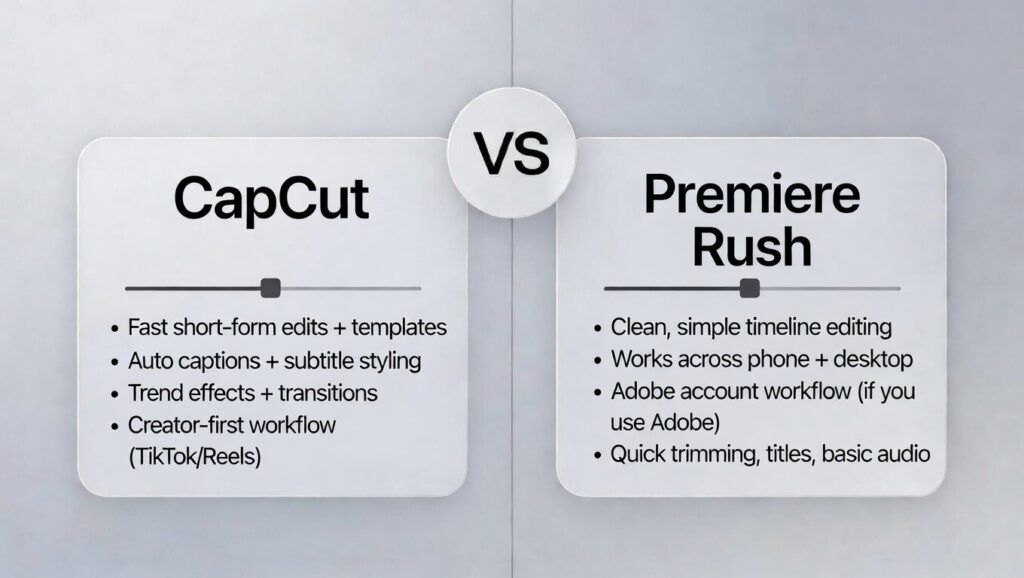
- Price vibe: CapCut is free-first with optional upgrades; Rush has a free Starter plan, but full use is tied to paid plans.
- Platforms: CapCut is strongest on mobile; Rush is designed for a cross-device workflow.
- Learning curve: Both are beginner-friendly. Rush feels more “classic editor,” while CapCut feels more “creator app.”
- Templates: CapCut is template-heavy for short-form; Rush is more manual with fewer trend templates.
- Captions: CapCut is usually faster for auto captions and subtitle styling; Rush is more limited for caption-heavy workflows.
If you’re still deciding, browse the full CapCut comparison hub here.
CapCut vs Premiere Rush – Pricing and Free Plan
CapCut pricing
- CapCut Free: $0
- CapCut Pro (monthly): $19.99/month
- CapCut Pro (annual): $179.99/year
Note: CapCut also offers other options (like a Standard/mobile-focused plan and a Teams plan).
Premiere Rush Pricing
- Premiere Rush Starter: Free plan available with a free Creative Cloud membership
- Adobe Express Premium: $9.99/month (US pricing)
Important: Premiere Rush is being discontinued
Premiere Rush is no longer available for new users to download after September 30, 2025, and Adobe says Rush will be discontinued on September 30, 2026. If you want a tool you can rely on long-term, that matters.
Note: Pricing can vary by region, platform, taxes, and promotions—always double-check the price inside your CapCut app/web account before subscribing.
Which is Better Value?
If you want a free-first editor for TikTok and Reels with templates and fast captions, CapCut is usually better value.
If you already pay for Adobe and want a simple cross-device editor, Rush can still work short-term—but its end-of-life timeline makes CapCut the safer long-term pick.
Ease of Use (Beginner Friendliness)
CapCut Learning Curve
CapCut is easy to learn because it’s built for fast results. You import clips, trim, add effects, generate captions, and export in a few taps.
If you’re making TikTok, Reels, or Shorts, the workflow feels natural because the app pushes you toward quick, social-ready edits.
Premiere Rush learning curve
Premiere Rush is also beginner-friendly, but in a more “classic editor” way. The timeline feels cleaner and more structured than most creator apps, which can be nice if you don’t want a bunch of templates and trend tools in your face.
It’s simple to understand, but it can feel slower than CapCut if your goal is quick, trendy short-form edits.
Best for Beginners
If you want the fastest path to posting, especially for short-form and captions, CapCut is usually easier.
If you want a clean, traditional workflow that feels more like a simple desktop editor on both phone and computer, Premiere Rush can feel easier.
CapCut vs Premiere Rush: Templates and Speed for Short-Form
CapCut is built for short-form speed. Templates, trending effects, and quick styling are part of the core workflow, so you can make TikTok, Reels, and Shorts fast.
If you post often and you want your videos to match current trends, CapCut is usually the quickest option.
Premiere Rush can do short-form too, but it’s more manual. It’s designed for basic editing with a clean timeline, not for template-first trend edits.
That can be a plus if you want a consistent style and fewer distractions, but it usually takes longer to make videos look as “social-ready” as CapCut does in a few taps.
If your priority is speed and trend tools, CapCut wins. If your priority is simple, clean editing without templates, Rush can work well.
Best for short-form: CapCut
Captions and Subtitles
CapCut is usually faster for captions. Auto captions are easy to generate, quick to fix, and simple to style in a way that looks right for TikTok and Reels.
If subtitles are part of your regular short-form workflow, CapCut saves a lot of time.
Premiere Rush can add titles and text, but it’s generally not as strong for quick auto caption workflows.
If you rely heavily on captions, Rush often feels more limited and slower compared to CapCut’s creator-first tools.
Best for captions: CapCut
Watermark (What to Expect)
CapCut is often clean for basic exports, but you can run into restrictions when you use locked templates or premium assets.
The safest habit is to check the export screen and avoid locked items if you want a watermark-free result.
Premiere Rush does not add a watermark to exports in the typical “free app watermark” way. The bigger issue with Rush isn’t watermarking, it’s that the product is being discontinued, which can affect how long you can rely on it.
If watermark stress is your main worry, both can be fine. If long-term reliability matters, Rush’s end-of-life timeline is the bigger factor.
Least watermark hassle: Tie (CapCut for basic edits; Rush generally exports clean)
Features That Actually Matter (Real Editing Depth)
CapCut is packed with creator-focused tools: templates, effects, quick styling, and fast captions. It’s built to help your videos look finished quickly, especially for TikTok, Reels, and Shorts. The tradeoff is it’s not designed for deep editing control or complex projects.
Premiere Rush is simpler and more traditional. You get a clean timeline, basic editing tools, and a workflow that feels more structured than most mobile apps.
It’s good for straightforward edits, basic YouTube videos, and simple projects you want to sync across devices. But it’s also limited compared to pro editors, and it doesn’t match CapCut’s trend tools.
If you want the most creator features and speed, CapCut wins. If you want a clean, simple timeline editor that feels more “classic,” Rush wins.
Best for advanced editing: Neither (CapCut for creator tools; Rush for simple timeline structure)
Performance and Stability
CapCut is usually smooth for short projects on modern phones. It’s built for quick edits and fast exports, so day-to-day short-form workflows often feel fast.
It can slow down when projects get heavy, like lots of effects stacked, long timelines, or large files, especially if your phone storage is tight.
Premiere Rush is generally lightweight, and the interface stays simple. Performance can be solid for basic edits on both mobile and desktop.
The bigger stability concern is long-term support, because Rush is being discontinued, which can affect updates, compatibility, and whether it keeps running smoothly as devices and operating systems change.
For pure editing performance today, both can feel fine for simple projects. For long-term reliability, CapCut is the safer bet.
Runs smoother for most people: Tie for basic edits; CapCut is safer long-term
Where Each One Fits in Your Workflow
Best for TikTok/Reels/Shorts
CapCut is usually better because it’s built for short-form trends, templates, effects, and fast captions.
Best for YouTube (longer videos)
Premiere Rush can be a decent choice for simple long-form edits because the timeline workflow feels clean and structured, especially if you’re editing across phone and computer.
CapCut can do long-form too, but it’s more short-form focused.
Best for client/pro work
Neither is a true pro standard. If you’re doing serious client work, you’ll usually want Premiere Pro or DaVinci Resolve instead.
Best if you edit only on your phone
CapCut is better for creator-style short-form. Rush can be fine if you want a simple timeline and you already use Adobe tools.
Best if you want desktop control
Premiere Rush is better than CapCut for a simple cross-device desktop workflow, but it’s still basic. If you want real desktop control, a pro editor is the better move.
Common Scenarios (Quick Picks)
Pick the line that sounds like you. The winner is on the right.
CapCut vs Premiere Rush FAQs
What is better, Premiere Rush or CapCut?
For most creators making TikTok, Instagram Reels, or YouTube Shorts, CapCut is usually the better pick because it is faster for templates, effects, captions, and social-first editing. Premiere Rush makes more sense if you want a clean, simple timeline and prefer an Adobe-style workflow across devices.
Is Adobe Premiere Rush free?
Adobe Premiere Rush has had a free Starter version, but full access and smoother cross-device use are usually tied to paid Adobe plans. Also, Adobe has announced that Premiere Rush is being discontinued, so it may not be the best long-term editor to build your workflow around.
Is CapCut better than Premiere Rush for TikTok and Reels?
Yes, CapCut is usually better for TikTok and Reels because it is built around short-form editing, templates, trending effects, auto captions, and fast mobile workflows. Premiere Rush can edit short-form videos too, but it feels more manual and less trend-focused.
Is Premiere Rush good for YouTube videos?
Premiere Rush can work for basic YouTube videos, especially simple cuts, talking-head edits, titles, and straightforward exports. If you need deeper control over color, audio, effects, or longer timelines, Premiere Pro or DaVinci Resolve is usually a better choice.
Which is better for captions, CapCut or Premiere Rush?
CapCut is usually better for captions because it has a faster creator-focused caption workflow, easier subtitle styling, and stronger tools for short-form videos. Premiere Rush can handle text and titles, but it is not as convenient for caption-heavy TikTok, Reels, or Shorts workflows.
Is Premiere Rush suitable for professional use?
Premiere Rush can handle simple professional tasks like quick social edits or basic brand videos, but it is not a full professional editor. For client-level timelines, advanced audio, color grading, motion graphics, or serious finishing, Premiere Pro or DaVinci Resolve is a better fit.
Why is Adobe Premiere Rush being discontinued?
Adobe is ending Premiere Rush and shifting focus to other products. For creators, the practical takeaway is simple: Rush may still work short-term if you already use it, but it is not the safest long-term editing choice.
Should beginners choose CapCut or Premiere Rush?
Beginners who want the fastest path to posting short-form content should usually choose CapCut. Beginners who prefer a cleaner, more traditional timeline and already use Adobe tools may still like Premiere Rush, but CapCut is the safer long-term option.
Final Verdict
Pick CapCut if you want the fastest short-form workflow with templates, effects, and quick captions for TikTok, Reels, and Shorts. It’s built for creators who post often and want trend-ready edits.
Pick Premiere Rush if you want a clean, simple timeline editor that works across devices and feels more structured than most mobile apps, especially if you already use Adobe tools. Just keep in mind Rush is being discontinued, so it may not be the best long-term choice.
If you’re mainly making short-form: CapCut wins. If you want a simple cross-device editor and you already use Adobe: Premiere Rush can work, but CapCut is safer long-term.
