

If you have ever typed this question into Google, you are not alone. Parents want to know before handing a phone to their child. Schools want to know before deciding which apps to block.
People managing their own screen time want to know whether time spent in CapCut “counts.” And plenty of users are simply curious about how to categorize an app that feels a little different from everything else on their home screen.
The honest answer is that CapCut sits in a gray area — and that gray area is exactly what this article works through.
You will get a clear verdict, a breakdown of what actually separates social media from other apps, and a practical section covering parents, schools, and screen-time limits that most other articles on this topic skip entirely.
Table of Contents
- Is CapCut Considered Social Media?
- Why This Question Is More Complicated Than It Seems
- What Actually Makes an App Social Media?
- Where CapCut Fits on the Spectrum
- Why Some People Consider CapCut a Social Media App
- Why CapCut Is Usually Classified as a Video Editing App
- Does CapCut Count as Social Media for Parents, Schools, and Screen-Time Limits?
- Is CapCut Safer Than Traditional Social Media?
- Frequently Asked Questions
- Final Verdict: Does CapCut Count as Social Media?
Is CapCut Considered Social Media?
No, CapCut is not a social media platform in the traditional sense. It is a video editing app. Its primary job is to help you create and export videos, not to connect you with other people, grow a following, or hold public conversations.
That said, it does have features that overlap with social platforms, which is why this question keeps coming up.
If someone is asking whether CapCut is social media the way TikTok, Instagram, or Facebook are — the answer is No. But if the question is whether CapCut has any social-style features or community elements at all, the answer is a qualified yes. That distinction matters depending on why you are asking.
Why This Question Is More Complicated Than It Seems
A few years ago, this question would not have existed. CapCut launched in 2020 as a straightforward video editor where you imported your clips, trimmed, added music, and exported. No feeds. No following. No community.
That is not what CapCut looks like today. The app has expanded significantly. It now includes a template discovery feed, public creator pages, a space where users browse and remix content made by others, and a growing suite of AI-powered features that push it further beyond a simple editing tool.
On top of that, it has deep integration with TikTok — a platform that is unambiguously social media. None of that outrightly makes CapCut a social media platform, but it does make the app harder to categorize than it once was.
The other reason this question gets complicated is that most people carry a fuzzy definition of social media.
The assumption is usually: if you can post content and other people can see it, it counts. By that logic, CapCut starts to look borderline. The more reliable approach is to apply a concrete set of criteria, which is what the next section does.
What Actually Makes an App Social Media?
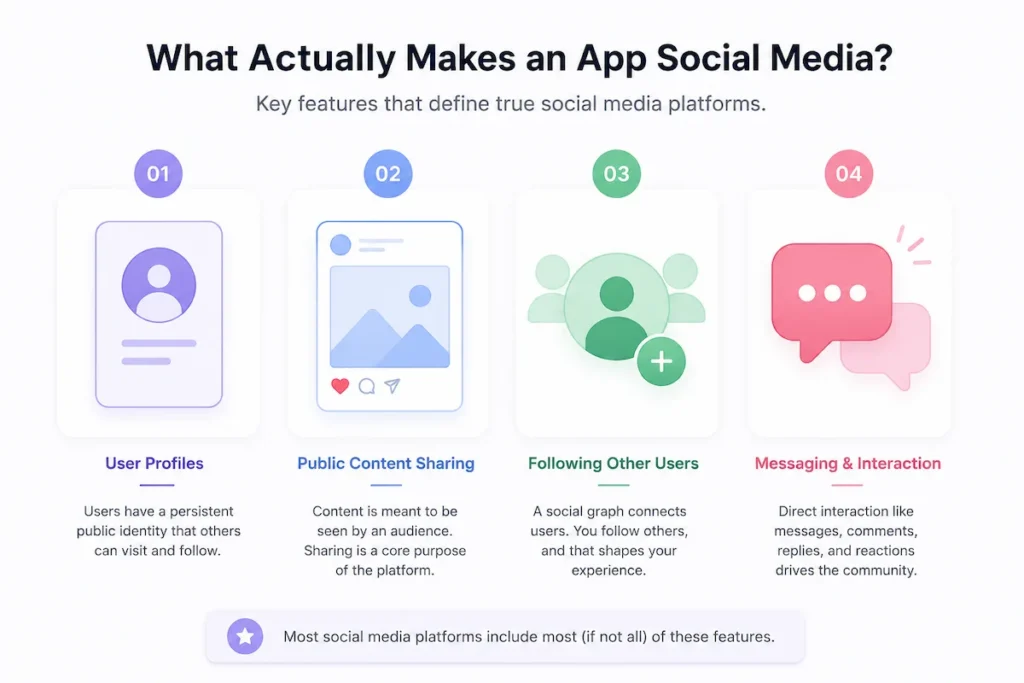
Social media platforms share a recognizable set of features. Not every platform has all of them, but most have the majority. Here is the framework most researchers and digital wellbeing professionals use when classifying apps:
User Profiles
Social media is built around persistent public identities. Your profile is your presence on the platform — other users can visit it, see your content history, and decide whether to follow you. The profile is not just a login; it is the foundation of how the whole platform works.
Public Content Sharing
On social media, the content you create is intended to be seen by an audience by default. Publishing to others is the primary purpose of the platform, not a secondary feature.
It is worth noting that on CapCut, what other people can see depends entirely on your settings — your projects are private by default unless you choose to share them.
Following Other Users
Social platforms are built on social graphs, that is, you follow people, they follow you back, and those connections shape what content appears in your feed. The relationship between users is central to the product.
Messaging and Community Interaction
True social platforms allow direct interaction between users — comments, replies, direct messages, and reactions. The conversation that happens between users is a core part of the experience, not an optional extra.
Now run CapCut through that checklist, and a clear picture starts to emerge.
Where CapCut Fits on the Spectrum
CapCut does not tick all four boxes but it does tick some of them, which is what creates the confusion. Here is how it maps against what genuine social media platforms offer:
| Feature | CapCut | Social Media Platforms |
|---|---|---|
| Core purpose | Video editing and creation | Social connection and content sharing |
| Public user profiles | Limited (creator pages only) | Yes — central to the platform |
| Following other users | Limited | Yes |
| Direct messaging | No | Yes (on most platforms) |
| Community interaction | Minimal | Yes |
| Content discovery feed | Yes (templates and creator content) | Yes |
| Content creation tools | Yes — the primary function | Sometimes, usually secondary |
| Export to other platforms | Yes | Rarely |
The pattern is clear. CapCut has a discovery feed and some creator-facing features, but it is missing the two things that define social media most: direct messaging and a social graph built around following people.
Most users are in CapCut to make something they will then share on a platform like TikTok or Instagram, not to maintain a social presence inside CapCut itself.
In fact, CapCut works completely independently of TikTok. You do not need a TikTok account to use it, which further separates it from the social media ecosystem.
A useful comparison: Canva has a template library where you browse designs made by other creators. Nobody describes Canva as social media. CapCut’s template ecosystem works on exactly the same logic — it is a creative resource built into a tool, not a social network you participate in.
If you want to see how CapCut is actually used as a tool for social platforms rather than as one itself, this guide on using CapCut for social media covers that distinction well.
To understand where the “social media” label gets applied to CapCut — and why it sometimes sticks — the next section covers the features that causes the confusion.
Why Some People Consider CapCut a Social Media App
The classification debate exists for a reason. CapCut has genuine social-style features, and depending on how you use the app, the social media comparison does not feel completely off. Here is what fuels that perception.
The Template Ecosystem
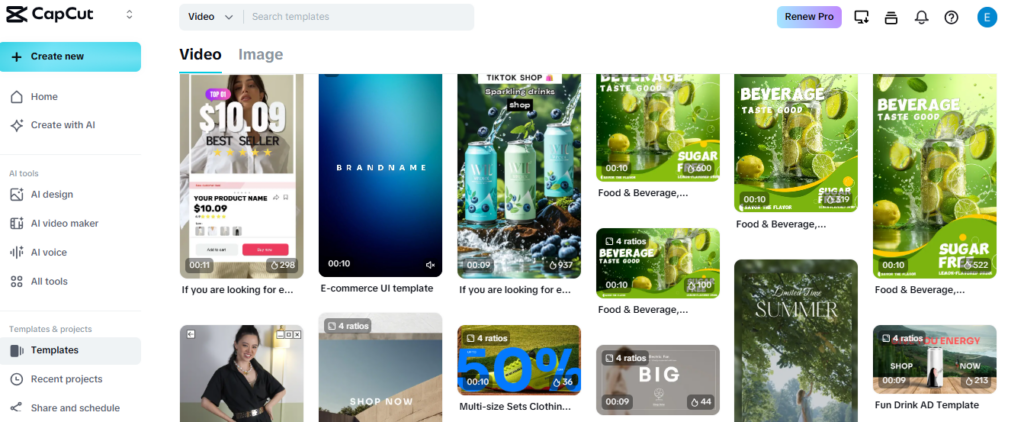
CapCut’s template library is one of its most popular features, and it functions a lot like a content feed.
You scroll through videos made by other creators, pick one you like, and swap in your own footage. The templates are user-generated, publicly visible, and built for discovery. That structure looks and feels similar to browsing a social platform — even if the intent behind it is purely creative.
The Discover Feed
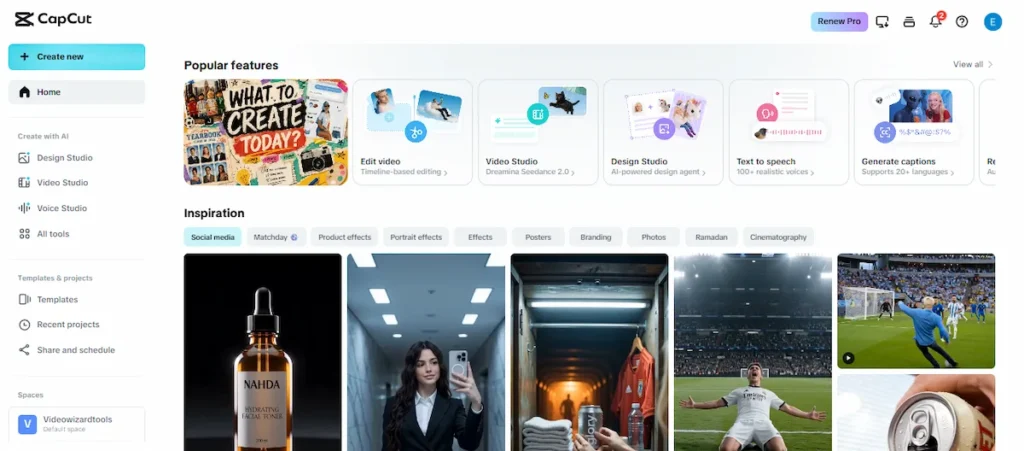
Inside CapCut, there is a dedicated discovery section where trending content, templates, and creator work surfaces to new users. You are not following anyone to see it — the app surfaces it based on popularity and relevance.
This is the feature that most closely mirrors what social media does, and it is the feature most likely to make someone pause and ask whether CapCut really is just an editor.
Creator Exposure
When you publish a template on CapCut, other users can find it, use it, and see your creator profile attached to it.
For creators, that is a form of audience building — even if it is far more limited than what a platform like TikTok or YouTube offers. It is enough exposure to make the app feel social, even if the underlying mechanics are not.
The TikTok Connection
CapCut is owned by ByteDance, the same company behind TikTok. The two apps are deeply integrated — CapCut templates frequently go viral on TikTok, and the apps share a content pipeline that makes them feel like parts of the same ecosystem.
That association alone causes a lot of people to assume CapCut inherits TikTok’s social media classification. It does not, but the connection is real enough to understand why the assumption gets made.
User-Generated Content Discovery
Unlike traditional editing software — think Adobe Premiere or DaVinci Resolve — CapCut is built around content made by its own users.
The effects, transitions, templates, and audio options you browse inside the app were largely created and shared by the CapCut community.
That user-generated layer gives the app a social texture that professional desktop editors simply do not have.
Why CapCut Is Usually Classified as a Video Editing App
Despite the features above, CapCut consistently lands in the “video editing app” category and for good reason. The social elements are real, but they are secondary. The product is built around creation and export, not social interaction.
When you open CapCut, you are taken to your projects. Not a feed. Not notifications from other users. Your drafts. That single design choice tells you everything about what the app is actually for.
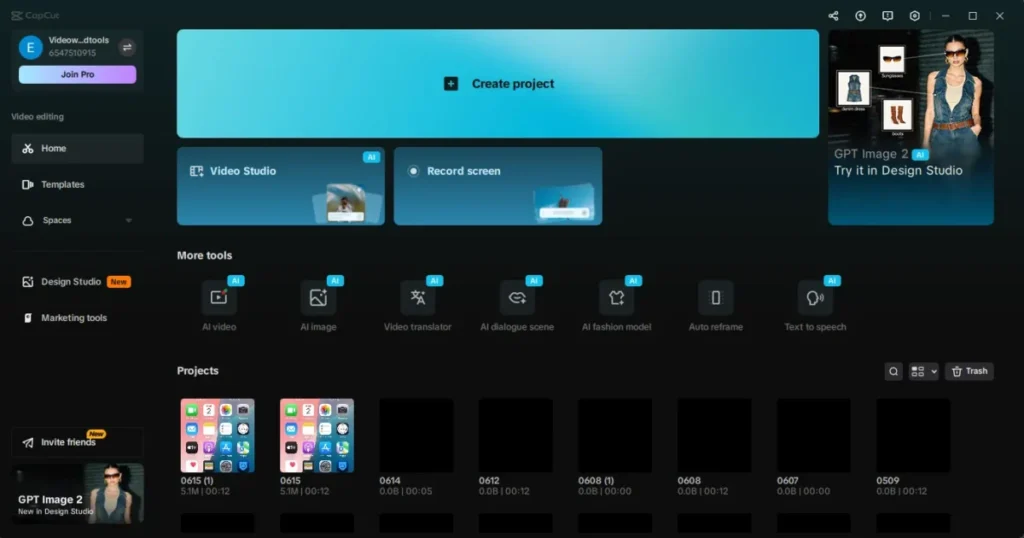
Compare that to opening Instagram or TikTok. The first thing you see is other people’s content. The feed is the product.
On CapCut, your own creative work is the product — the discovery features exist to help you make better videos, not to pull you into a cycle of social consumption.
The other key distinction is what CapCut lacks. There is no direct messaging. There is no comment culture driving you back to the app to check reactions.
There is no follower count sitting on your profile pushing you to post more. Those mechanics are what make social media sticky and social in the truest sense — and CapCut does not have them.
Tools like Canva and Adobe Express have also added community and template-sharing features over the years. Nobody has reclassified them as social media. CapCut belongs in the same category — a creative tool with a community layer, not a social platform with editing features.
Does CapCut Count as Social Media for Parents, Schools, and Screen-Time Limits?
This is the section most articles on this topic do not cover — and it is arguably the most practical version of the question. The classification debate matters differently depending on who is asking.
For Parents
If your household has a rule about social media, CapCut occupies a genuinely gray space. It does not have the features that make social media most concerning for younger users — there is no public comment section for strangers to interact with your child, no direct messaging, and no follower-chasing dynamic.
Projects are private by default, and other users cannot see what your child creates unless they actively choose to publish it.
CapCut is relatively low-risk compared to traditional social media (TikTok, Instagram etc), but it is often a stepping stone to those platforms. That context is worth keeping in mind when making household decisions about it.
If you are also evaluating whether CapCut is safe to use in a broader sense, this breakdown of whether CapCut is safe covers privacy, data, and security considerations in detail.
For Schools
Most school content filters classify apps by their primary function. Under that approach, CapCut would typically be categorized as a creative or productivity tool rather than a social networking app, similar to how Canva is classified.
Schools that block social media by category are unlikely to catch CapCut in that net automatically.
Whether a school should restrict CapCut is a separate question from whether it is technically social media. If the concern is distraction or misuse, those are valid reasons to restrict any app — but the social media label is not the right framework for making that call with CapCut specifically.
For Digital Wellbeing and Screen-Time Tracking
Screen-time apps like Apple Screen Time and Google Family Link categorize CapCut under “creativity” or “photo and video” — not social networking.
If you are trying to limit social media use specifically, CapCut will not count toward that limit under most tracking tools. You would need to restrict it separately if that is your goal.
This also means that people who track their own screen time should make a conscious decision about how they want to count CapCut.
If you are using it purely to edit videos, treating it like any other creative app makes sense. If you find yourself scrolling the template discovery feed for long stretches, that is a different behavior and worth accounting for differently.
Is CapCut Safer Than Traditional Social Media?
On the specific question of social risk, yes, CapCut is meaningfully different from traditional social media platforms, and generally lower risk in the ways that matter most.
There is no public comment section where strangers can interact with you unprompted. There is no direct messaging system.
There is no algorithmic feed designed to maximize the time you spend engaging with other people’s content.
The discovery features that do exist are oriented around creative templates, not personal posts or social profiles.
The main exposure risk on CapCut is the content you choose to make public. If a user publishes templates or creator content, that work becomes visible to other CapCut users.
But this requires a deliberate action, it does not happen by default, and the interaction that follows is minimal compared to what happens when you post on a genuine social platform.
The more significant risk is indirect. CapCut is primarily used to create content for TikTok, Instagram Reels, and YouTube Shorts, and those platforms carry their own social risks once the video is exported and published there.
CapCut itself is the workshop. What you do with the finished video is where the social dimension actually begins.
Frequently Asked Questions
Is CapCut the same as TikTok?
No, they are two separate apps — but they are made by the same company. Both CapCut and TikTok are owned by ByteDance. CapCut is a video editing tool you use to create and polish videos. TikTok is a social media platform where you publish and share those videos with an audience. Most people use them together as part of the same workflow, but they serve completely different functions. You can also use CapCut without ever touching TikTok.
Is CapCut still owned by ByteDance (TikTok’s parent company)?
Yes. As of 2026, CapCut is still owned by ByteDance, the Chinese tech company that also owns TikTok. This ownership is the primary reason both apps have faced regulatory scrutiny in countries like the United States, where concerns around data privacy and Chinese government access to user data have led to ongoing policy debates. The apps remain operational in most regions, but their availability has varied by country depending on local laws.
Does Instagram punish you for using CapCut?
No — Instagram does not penalize you for editing your videos in CapCut before uploading them. The platform has no way to detect which editing app you used. The watermark is the only potential issue: if you export with the CapCut watermark visible, it looks low-effort and may affect engagement, but Instagram’s algorithm does not actively suppress CapCut-edited content. Remove the watermark before exporting if you want a cleaner result.
Is CapCut getting banned?
There is no confirmed global ban on CapCut. The concern mostly stems from TikTok-related policy news and the fact that both apps share the same parent company, ByteDance. Some countries have restricted or removed ByteDance apps from government devices, and availability has been inconsistent in certain regions. In the United States, CapCut has faced the same regulatory conversations as TikTok, but as of mid-2026, it remains available for most users. The situation is ongoing, so it is worth checking your local app store for current availability.
Why is CapCut rated 18+ in some places?
CapCut is officially rated 12+ on the Apple App Store and 13+ on Google Play in most regions. However, some parental control tools and third-party content filters classify it more restrictively — sometimes as 17+ or 18+ — because of the mature content that can appear in publicly shared templates, including videos with profanity, suggestive themes, and inappropriate music. The app itself does not enforce strict age verification, and CapCut has no built-in content filters to block mature templates from younger users.
Why are people leaving CapCut?
The most common reasons cited are concerns about ByteDance ownership and data privacy, uncertainty around potential bans in certain countries, and the app’s evolving pricing model as more features move behind the Pro paywall. Some creators have also moved to alternatives like DaVinci Resolve, InShot, or Adobe Premiere Rush for more control or to reduce dependence on a platform with an uncertain future. That said, CapCut still has a very large and active user base globally.
Final Verdict: Does CapCut Count as Social Media?
Here is the answer broken down three ways, because the right answer depends on what you actually need to know.
The Short Answer
No. CapCut is a video editing app, not a social media platform.
The Technical Answer
CapCut does not meet the standard criteria for social media. It lacks direct messaging, a meaningful social graph, and the follower-driven dynamics that define social networking platforms.
It has a discovery feed and creator pages, but those are creative tools, not social infrastructure. By any reasonable classification framework, it is a video editor with community features — not a social media app.
The Practical Answer
It depends on your specific concern. For parents deciding whether CapCut falls under a “no social media” household rule, it is a gray area, but it carries far fewer of the risks that make social media a concern for young users.
For schools applying a social media content filter, CapCut will not typically be caught by it. For screen-time tracking, most tools classify it as a creativity app.
For anyone just trying to understand what CapCut actually is, it is the app you use to make videos that you then share on social media. The tool is not the platform.
If you are using CapCut to create content for TikTok, Instagram, or YouTube, it is worth understanding how to get the most out of it as a creative tool.
This guide on using CapCut for social media content is a good starting point, and if you want to see what the app can actually do beyond basic editing, the full breakdown of CapCut’s AI features shows how far it has come from a simple video editor.
