
CapCut Pro Free Trial Guide (2026)

Have you been trying to figure out if the CapCut Pro free trial is actually real? I remember asking the same thing when I started editing videos.
I didn’t want to pay for another subscription unless I knew the premium features were worth it.
After testing it myself, I found that the CapCut Pro free trial can give you full access to advanced tools before you’re charged, depending on your region.
You can remove the watermark, unlock premium effects, and export in higher quality. But there are a few things most people don’t realize before signing up. Let’s clear that up.
Does CapCut Offer a Free Trial for Pro?
Yes, CapCut Pro has a 7-day free trial, but not everyone may see it. When it appears, it’s typically within the app, accessible by tapping the Pro upgrade screen as shown below.
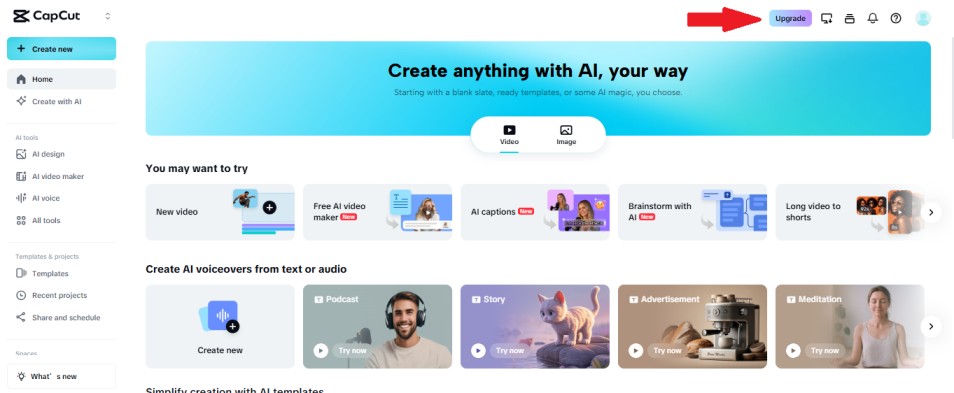
The exact offer can change based on your country, your device, and even your account.
If you see a “Free Trial” option when you try to upgrade to Pro, you can use it. If you don’t see it, it may not be available for your region or account right now.
Is the CapCut Pro Free trial only for new users?
Most of the time, yes, the CapCut Pro free trial is mainly shown to eligible users, which often means people who are new to the Pro subscription (or who haven’t used a trial or introductory offer before).
CapCut also notes that the trial is available only in select countries and regions, so even a new user might not see it everywhere.
In other words: if you don’t see a free trial button, it usually means your account isn’t eligible right now (for example, you’ve had a trial before, you’re in a region without the offer, or you’re upgrading on a platform where the offer isn’t currently shown).
Desktop vs Mobile: Is the Trial the Same?
Not always. The CapCut Pro free trial offer can vary by platform and promotion, so what you see on mobile may not match what you see on desktop.
- Mobile (iPhone/Android): If you’re eligible and the trial is available in your region, the free trial typically appears when you tap Join Pro or Upgrade inside the app and then confirm through the App Store or Google Play.
- Desktop (Windows/Mac/Web): CapCut sometimes runs separate desktop-focused promos (for example, a 30-day free trial for desktop users). In other cases, you may only see paid plans, or the trial may not appear even if it shows on mobile.
Bottom line: if you don’t see a free trial on one device, it’s worth checking another platform while signed into the same CapCut account, because offers can be displayed differently depending on where you upgrade.
Important Warning About “free Capcut Pro Mod” Downloads
You’ll see a lot of sites promising “CapCut Pro for free” using cracked or modded apps. Avoid those.
They’re often unsafe, can break your device, and can put your account at risk. If you want Pro features without surprises, the safest path is the official CapCut Pro free trial (when available) or the normal Pro plan.
Quick Checklist: Before You Start the CapCut Pro Free Trial
- Update CapCut to the latest version.
- Sign in to your CapCut account (trial offers can depend on account eligibility).
- Check the Pro / Upgrade screen for a “Free Trial” label.
- Confirm which platform you’re subscribing through (App Store or Google Play).
- If you don’t see it, try the same account on another device (mobile vs desktop).
How to Get the CapCut Pro Free Trial (Step-by-Step)
If the CapCut Pro free trial is available to your account, it usually appears when you open the Pro upgrade screen inside CapCut. If you want a quick starting point, you can open CapCut here: CapCut download page. Follow the steps below for your device.
iPhone On iPhone (App Store Method)
- Update CapCut in the App Store so you’re on the latest version.
- Open CapCut and sign in to your account.
- Tap your Profile (or account icon), then look for CapCut Pro, Join Pro, or Upgrade.
- If you’re eligible, you’ll see a plan that includes a Free Trial label.
- Select the plan, then confirm through the App Store (Face ID/Touch ID may be required).
- Once confirmed, Pro features should unlock in CapCut.
Android On Android (Google Play Method)
- Update CapCut in Google Play so you’re on the latest version.
- Open CapCut and sign in to your account.
- Go to your Profile, then tap CapCut Pro, Join Pro, or Upgrade.
- If you’re eligible, choose the option marked Free Trial.
- Confirm through Google Play (a payment method may be required even for a trial).
- After confirmation, Pro features should unlock in CapCut.
Desktop On Desktop (Windows/Mac)
- Download CapCut Desktop from the official CapCut website.
- Open it and sign in (use the same CapCut account as mobile if you have one).
- Click your Profile or the Pro / Upgrade area to view subscription options.
- If a desktop promo or trial is available, you’ll see it listed and can activate it by following the on-screen steps.
- If you only see paid plans, your account may not be eligible for a desktop trial/promo at that time.
Tip: If you don’t see the free trial on one device, check another (mobile vs desktop) while signed into the same CapCut account. Offers can show differently depending on platform and current promos.
Disclosure: This page may include links that earn a small commission at no extra cost to you.
How Long Is the CapCut Pro Free Trial?
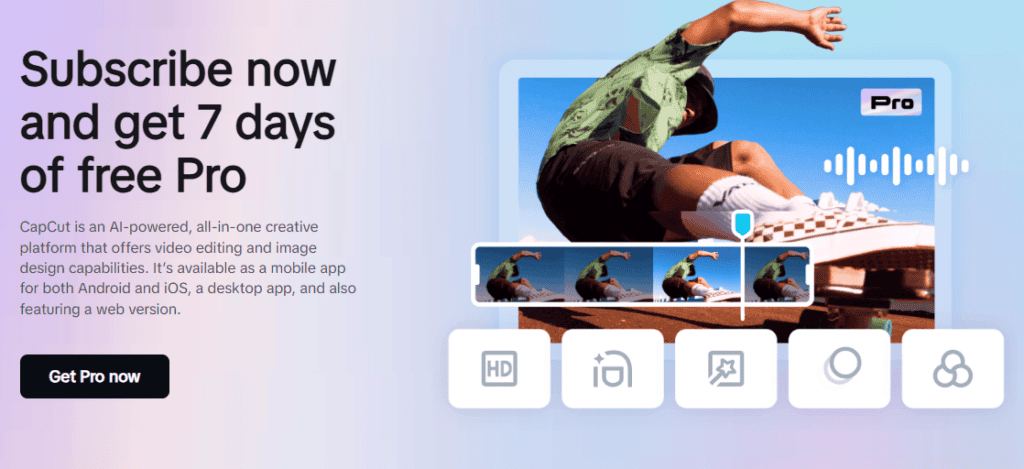
In most cases, the CapCut Pro free trial is 7 days if it’s available to your account and region. CapCut describes this as a trial for eligible users in selected countries or regions.
When Does Billing Start?
Billing typically starts after the 7-day trial ends, unless you cancel before the trial period is over. If you’re not planning to keep Pro, cancel at least 24 hours before the renewal time to avoid an automatic charge.
How to Check How Many Trial Days You Have Left
The easiest way to see your remaining trial time is inside the store you subscribed through:
- iPhone (App Store): Open Settings > tap your Apple ID > Subscriptions > select CapCut.
- Android (Google Play): Open Google Play > tap your profile icon > Payments & subscriptions > Subscriptions > select CapCut.
What About Desktop: Is It 7 Days Too?
Desktop can be different. CapCut has also run desktop-only promotions (for example, 30 days of free Pro) for eligible desktop users. If you’re on a desktop and don’t see a 7-day trial, you may still see a separate promo offer depending on your eligibility.
Quick tip: If you don’t see a trial on one platform, check another (mobile vs desktop) while signed into the same CapCut account. Trial and promo offers can vary by platform and eligibility.
What’s Included in the CapCut Pro Free Trial?
When you activate the CapCut Pro free trial, you get access to the same premium features that paid Pro subscribers receive during the trial period. That means you can fully test the upgrade before deciding if it’s worth keeping.
1. No Watermark on Exports
One of the biggest upgrades is removing the CapCut watermark. If you’re posting to TikTok, YouTube Shorts, or Instagram Reels, this alone can make your videos look more professional.
2. Premium Effects and Transitions
Pro unlocks advanced effects, transitions, filters, and templates that are not available in the free version. These are especially useful if you want more polished, cinematic, or viral-style edits.
3. Higher Export Quality
With Pro, you can export in higher resolutions like 2K or 4K (depending on your device). This helps maintain clarity, especially for YouTube or large-screen viewing.
4. Advanced AI Tools
CapCut Pro includes additional AI-powered tools such as background removal, advanced cutout features, and certain auto-edit enhancements. Availability can vary slightly by device.
5. Cloud Storage and Sync Features
Pro users may receive expanded cloud storage, making it easier to save projects and access them across devices when signed into the same CapCut account.
Important: Features can change over time, and some tools may vary depending on whether you’re using mobile or desktop. During the CapCut Pro free trial, you’ll see exactly which tools are unlocked for your account.
How to Cancel CapCut Pro Before You’re Charged
If you sign up for the CapCut Pro free trial but decide it’s not for you, you must cancel through the same platform you used to subscribe. Deleting the app alone will not stop the subscription.
Cancel on iPhone (App Store)
- Open Settings on your iPhone.
- Tap your Apple ID at the top.
- Select Subscriptions.
- Tap CapCut from the list.
- Choose Cancel Subscription and confirm.
Your access to Pro features will continue until the trial period ends.
Cancel on Android (Google Play)
- Open the Google Play Store.
- Tap your profile icon in the top right.
- Select Payments & Subscriptions > Subscriptions.
- Choose CapCut.
- Tap Cancel subscription and follow the prompts.
You’ll keep Pro access until the end of your trial period.
Cancel on Desktop
If you subscribed directly through CapCut’s desktop version, log into your account on the same platform where you upgraded and check your account or subscription settings. If the subscription was processed through Apple or Google, you must cancel through those stores instead.
Important Timing Tip
To avoid being charged, cancel at least 24 hours before your trial ends. Both Apple and Google typically process renewals automatically, so waiting until the last minute can result in a charge.
Is CapCut Pro Worth It After the Free Trial?
After you test the CapCut Pro free trial, the real question is simple: did it actually make editing easier or your videos better? For some people, Pro is a no-brainer. For others, the free version is already enough.
When CapCut Pro Is Worth Paying For
CapCut Pro is usually worth it if you:
- Post videos often (Reels, Shorts, TikTok) and want faster, cleaner edits.
- Rely on premium effects, templates, or styles that the free version keeps locking.
- Need higher export quality for YouTube or crisp-looking brand content.
- Care about removing watermarks and keeping your videos looking professional.
- Use AI tools like cutouts, background edits, or auto features a lot and want the smoother Pro experience.
When You Probably Don’t Need Pro
You can usually skip the upgrade if you:
- Edit only once in a while and don’t mind working around locked templates.
- Mostly do simple cuts, captions, and basic transitions.
- Don’t care about premium effects or exporting at the highest quality.
A Simple Way to Decide
Here’s the test I used after trying it: if you opened CapCut during the trial and kept thinking “okay, that feature is actually saving me time,” Pro is probably worth it. If you barely touched the premium tools, the free version will likely do the job.
Common Problems and Fixes
You Don’t See the Free Trial Button
This usually means the offer isn’t available for your region or your account isn’t eligible. Try updating the app, signing out and back in, and checking the Pro screen on both mobile and desktop.
The Trial Started, But Pro Features Still Look Locked
Close the app completely and reopen it. Make sure you’re signed into the same CapCut account you used when you activated the trial. On iPhone or Android, you can also check your subscription status in the App Store or Google Play.
You’re Worried About Being Charged
Cancel the subscription right after you start the trial if you don’t want to pay. In most cases, you’ll keep Pro access until the trial ends, but the renewal will be turned off.
FAQs
Quick answers about the CapCut Pro free trial, eligibility, billing, and what happens to your projects after the trial ends.
+Is there a 7-day CapCut Pro free trial?
In most regions, yes. The CapCut Pro free trial is typically 7 days for eligible users. That said, it’s only available in select countries and may not show up for every account.
+Can I get the CapCut Pro free trial more than once?
Usually, no. Free trials are generally limited to new or eligible subscribers. If you’ve already used a trial under the same Apple ID, Google account, or CapCut account, you may not see the offer again.
+Why don’t I see the free trial option?
If the free trial doesn’t appear, it could be because:
- The offer isn’t available in your country.
- You’ve already used a previous trial.
- Your app needs to be updated.
- The current promotion has ended.
+Do I lose my projects after the trial ends?
No—your projects stay in your account. However, if you used Pro-only effects or features, those elements may become locked once your subscription ends. You’d need to remove them or upgrade again to export with Pro features applied.
+Will I be charged automatically after the trial?
Yes. If you don’t cancel before the trial ends, the subscription will automatically renew at the selected plan price.
Final Thoughts
If you can see the CapCut Pro free trial on your account, it’s the safest way to test Pro features without guessing.
Use the trial window to try the premium effects you actually care about, export a few real videos, and decide if it genuinely saves you time.
And if you already know you don’t want to pay, just cancel early. You’ll still keep access until the trial ends, and you won’t get hit with an unwanted charge.
