

Have you ever finished editing a video in CapCut, tapped export, and realised the final result still does not look as clean as you wanted?
Maybe a premium effect is locked. Maybe the template you want has a Pro label. Maybe you want cleaner exports, more creative tools, or fewer limits when editing videos for TikTok, YouTube, Instagram, clients, or your brand.
That is where CapCut Pro comes in.
CapCut Pro is the paid upgrade for creators who want more than basic editing. It can unlock premium effects, templates, assets, export options, cloud features, and other tools depending on your device, region, and plan availability.
The real question is not just “What does CapCut Pro give you?” It is whether those Pro features actually match the way you edit.
Table of Contents
- What Is a CapCut Pro Subscription?
- CapCut Pro Features That Actually Matter
- Does CapCut Have Credits? What Are CapCut Credits?
- How Much Does a CapCut Pro Subscription Cost?
- Does CapCut Give Refunds?
- How to Subscribe to CapCut Pro Safely
- Can You Buy CapCut Pro Cheap?
- Why Does CapCut Keep Giving Me Free Pro?
- Should You Pay for CapCut Pro?
- What Happens If Your CapCut Pro Subscription Ends?
- Quick Checklist Before Buying CapCut Pro Subscription
- Frequently Asked Questions
- Final Thoughts
- Official Resources
What Is a CapCut Pro Subscription?
A CapCut Pro subscription is a paid plan that gives you access to more CapCut features than the free version.
The free version is still useful. You can trim clips, add text, use basic effects, create short videos, add audio, and export simple edits. For casual users, that may be enough.
CapCut Pro is for users who want fewer limits and more creative options. Depending on what is available in your account, Pro may unlock premium effects, advanced tools, templates, filters, cloud features, higher-quality export options, and other paid assets.
Think of the free version as the starting point. CapCut Pro is for people who edit often enough to care about speed, polish, and flexibility.
CapCut Pro Features That Actually Matter
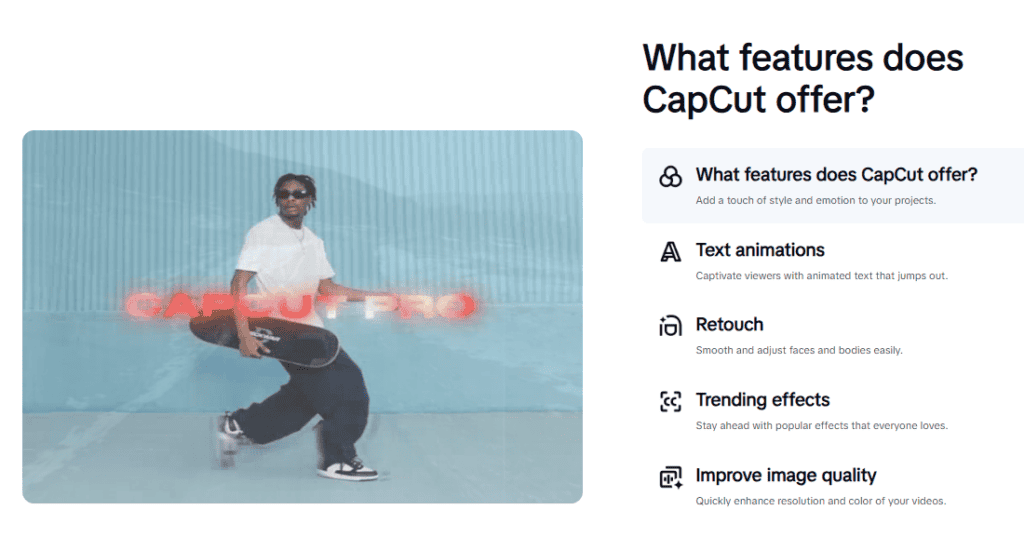
CapCut Pro unlocks premium effects, templates, filters, advanced AI tools, stronger export options, 100GB cloud storage, and fewer locked tools while editing. The most useful features depend on how often you edit and what kind of content you create.
For a full breakdown of every Pro feature and whether it is worth it for your workflow, see our complete guide to CapCut features and capabilities.
Does CapCut Have Credits? What Are CapCut Credits?
Yes. CapCut has a credits system, but it works differently from the main subscription. Credits are CapCut’s virtual currency for AI-powered features — each credit equals $0.01 USD and is spent when you use tools like AI Image Generation, AI Script-to-Video, Smart Cutout, AI Portrait, and Premium Voiceovers.
Standard subscription features like effects, templates, and filters do not consume credits.
As of 2026, the credits system is available on CapCut Online (web) and CapCut Desktop only. The mobile app does not support credit-consuming features at this time.
The three types of CapCut credits
- Subscription credits: Automatically granted with an active Pro or Teams plan. These reset each billing cycle — monthly plans get a fresh allocation every 30 days, yearly plans every 365 days. Pro subscribers receive around 1,200 credits per month.
- Promotional credits: Earned through official CapCut campaigns, challenges, or limited-time events. These have their own expiry dates.
- Purchased credits: Bought separately inside CapCut if you need more than your plan includes. These do not expire.
If you run out of credits mid-project, you can wait for your next billing cycle to refresh them, earn more through active promotions, or purchase additional credits inside your account.
How Much Does a CapCut Pro Subscription Cost?
CapCut Pro is offered as a monthly or yearly subscription, but the exact price varies depending on your country, device, app store, and any active promotions.
Always check the final price inside your own CapCut account before paying — prices shown in screenshots or posts from other regions may not match what you see.
For a full breakdown of Free, Standard, Pro, and Teams pricing, see our CapCut pricing plans guide.
Does CapCut Give Refunds?
CapCut’s official position is that subscriptions are considered virtual goods and generally do not support refunds once the billing cycle has processed.
However, there is one exception: if you have not used any Pro features at all, you may be eligible for a full refund within 14 calendar days of first subscribing by contacting CapCut support at support@us.capcut.com.
Outside that window, where you get your refund from depends on where you originally subscribed:
- Apple App Store: Go to reportaproblem.apple.com, sign in with your Apple ID, find the CapCut charge, and request a refund. Apple reviews each case individually and refunds are more likely for accidental purchases or first-time requests.
- Google Play: Open Google Play, go to Payments and Subscriptions, find the CapCut charge, and request a refund. Acting within 48 hours gives you the best chance — Google becomes stricter after that window.
- CapCut website direct: Contact CapCut support directly via your account billing settings or at support@us.capcut.com.
One important thing to know: cancelling a CapCut subscription stops the next payment but does not trigger an automatic refund for the current billing period.
If you want a refund, you need to actively request one through the correct channel above. To avoid unwanted charges entirely, cancel at least 24 hours before your renewal date.
How to Subscribe to CapCut Pro Safely
If you are ready to upgrade, subscribe through CapCut itself or through your official app store. Do not buy from random sellers, social media pages, or “cheap Pro account” offers.
Using the official route keeps your subscription connected to your real CapCut account and makes it easier to manage renewals, cancellations, payment issues, and device access later.
Here is the short version:
- Open CapCut and sign in to the account you want to use with Pro.
- Go to the Pro, Upgrade, or Subscription area.
- Choose the monthly, yearly, trial, or promotional option available to you.
- Confirm payment through the official checkout method shown on your device.
- Sign in with the same CapCut account on your other devices if you want Pro access there too.
For the full walkthrough with screenshots and device-specific steps, follow this guide on how to subscribe to CapCut Pro.
Can You Buy CapCut Pro Cheap?
You may see people selling cheap CapCut Pro accounts, shared logins, cracked APKs, or discounted access online.
Be careful.
Those offers can create problems with account security, lost access, payment disputes, malware, banned accounts, or Pro features suddenly disappearing.
The safest way to get CapCut Pro is through the official CapCut app, official website, Apple App Store, or Google Play Store.
Why cheap Pro accounts are risky
- You may lose access without warning
- The account may be shared, stolen, or resold
- Your projects and payment details may not be safe
- Pro features may stop working later
- Cracked APKs or modified installers may contain malware
- You may not be able to get support if something goes wrong
If cost is the issue, it is safer to go for an official trial, discount, or yearly plan than to risk your account and projects on a third-party seller.
Why Does CapCut Keep Giving Me Free Pro?
If CapCut is letting you use Pro features without paying, it is almost always intentional — not a glitch or error. There are a few common reasons this happens:
- Free trial: New CapCut users are typically offered a 7-day free Pro trial when they first sign up or visit the upgrade screen. Some regions and promotional periods have offered up to 30 days. The trial ends automatically and your account reverts to free unless you subscribe.
- Referral rewards: CapCut’s referral program lets you earn free Pro days by inviting new users to download the app. Each successful referral adds 7 days of Pro access, up to a maximum of 70 days (10 referrals) on the desktop version.
- Promotional campaigns: CapCut occasionally runs limited-time promotions — especially around holidays or new feature launches — that give existing users temporary free Pro access.
- Active subscription you forgot about: Check your App Store or Google Play subscriptions. A previous trial or paid plan may still be running in the background on a different account or payment method.
If you are unsure whether you are on a free trial or a paid plan, go to your CapCut account settings and check the subscription or membership section.
Also check your Apple ID or Google Play subscriptions directly to confirm whether any billing is active. Free trials auto-renew into a paid subscription unless cancelled before the trial period ends.
Should You Pay for CapCut Pro?
Not everyone needs CapCut Pro. The free version covers basic trimming, text, captions, simple effects, and 1080p exports — which is enough for casual or occasional editing.
Pro makes sense if you edit regularly, rely on premium templates or effects, create content for clients or a business, or keep running into locked tools while editing. The clearest sign you are ready to upgrade is when the free version is slowing your workflow down rather than just limiting a few extras.
The main trade-offs worth knowing before subscribing:
- Some Pro features vary by device, region, and app version — check your own upgrade screen before paying
- Cloud and AI features require a stable internet connection to work properly
- If you subscribe with one account and edit with another, Pro may not appear where you expect
- You cannot pause the subscription — it is active or cancelled, nothing in between
If a free trial is available in your account, use it on real projects rather than test clips. That is the fastest way to know whether Pro actually improves your workflow before committing to a paid plan.

What Happens If Your CapCut Pro Subscription Ends?
If your CapCut Pro subscription ends, your account usually goes back to the free version.
That means premium tools, Pro effects, locked templates, extra cloud features, or paid assets may no longer be available the same way.
Your existing projects may still appear in CapCut, but any Pro-only elements inside them may become locked, limited, or harder to export depending on how the project was built.
Before cancelling or letting Pro expire, do this:
- Export important finished videos
- Check whether any projects use Pro effects or templates
- Back up important source clips and audio
- Confirm whether your drafts are local or cloud-synced
- Make sure you know which account has the subscription
If you’re unsure whether your projects are stored locally or in the cloud — and what that means for keeping them safe — our guide on losing CapCut projects after an update or reinstall walks through exactly that.
Quick Checklist Before Buying CapCut Pro Subscription
Before you subscribe, run through this quick checklist.
- Are you signed into the right CapCut account?
- Have you checked the exact price inside your own app?
- Do you actually use the Pro tools that are locked?
- Will you edit often enough to justify the subscription?
- Are you buying through CapCut, App Store, Google Play, or another official checkout?
- Do you know how to cancel if you change your mind?
- Have you avoided cheap third-party Pro accounts or cracked APKs?
If most answers are yes, CapCut Pro may be a smart upgrade. If not, stay on the free version a little longer and upgrade only when you clearly need it.
Frequently Asked Questions
Does CapCut give refunds?
Refunds are not guaranteed once a billing cycle has processed. However, if you have not used any Pro features, you may request a full refund within 14 calendar days of first subscribing by contacting CapCut at support@us.capcut.com. App Store purchases must be refunded through Apple and Google Play purchases through Google — CapCut cannot process those directly.
Does CapCut have credits and does it give free credits?
Yes. CapCut uses credits as virtual currency for AI-powered features like AI Image Generation, Script-to-Video, and Smart Cutout. Each credit equals $0.01 USD. Pro subscribers receive around 1,200 credits per month automatically. Free credits are also available through promotions and referral rewards. The credits system currently works on CapCut Desktop and Web only — not on mobile.
Why does CapCut keep giving me free Pro access?
This is intentional. CapCut offers a 7-day free Pro trial to new users, and up to 70 days of free Pro through its referral program on desktop. Promotional campaigns can also unlock temporary Pro access. If you are unsure whether you are on a trial or a paid plan, check your subscription status inside CapCut and also inside your App Store or Google Play account directly — free trials auto-renew into paid subscriptions unless cancelled before the trial ends.
What happens to my projects if my CapCut Pro expires?
Your projects remain saved, but any Pro-only effects, templates, or assets inside them may become locked or unavailable for export. If your project uses Pro elements, you will need to remove or replace them before you can export cleanly on the free plan. Export any finished videos before your subscription ends to avoid this.
Can I pause my CapCut Pro subscription instead of cancelling?
No. CapCut does not currently offer a pause option. You can only keep the subscription active or cancel it entirely. If you cancel, you keep Pro access until the end of the current billing period but cannot resume from where you left off — you would need to subscribe again.
Final Thoughts
CapCut Pro can be a useful upgrade, but only if it fits the way you actually edit.
If you create videos often, use premium templates, edit for clients, or keep hitting locked tools, Pro can save time and make your workflow feel smoother.
If you only make simple edits now and then, the free version may still be enough.
Before paying, check the Pro features inside your own CapCut account, confirm the real price, and avoid cheap third-party offers. The safest subscription is the one bought through official CapCut or app store channels.
CapCut Pro is worth it when it removes real limits from your editing workflow — not just because the upgrade button is there.
