
Best CapCut Template For Photos (Top Photo Templates)

Are your photo slideshows looking flat or boring?
Photos alone are not the problem. The structure is.
The best CapCut template for photos turns simple images into smooth, engaging videos with rhythm, motion, and timing. Instead of a basic slideshow, you get pacing that holds attention and makes memories feel cinematic.
Whether you are posting a vacation recap, birthday edit, relationship video, or trend-based photo dump, the right template makes a huge difference.
Let’s look at the photo templates that actually make your content stand out.
9 Best CapCut Templates For Photos That Don’t Feel Like a Boring Slideshow
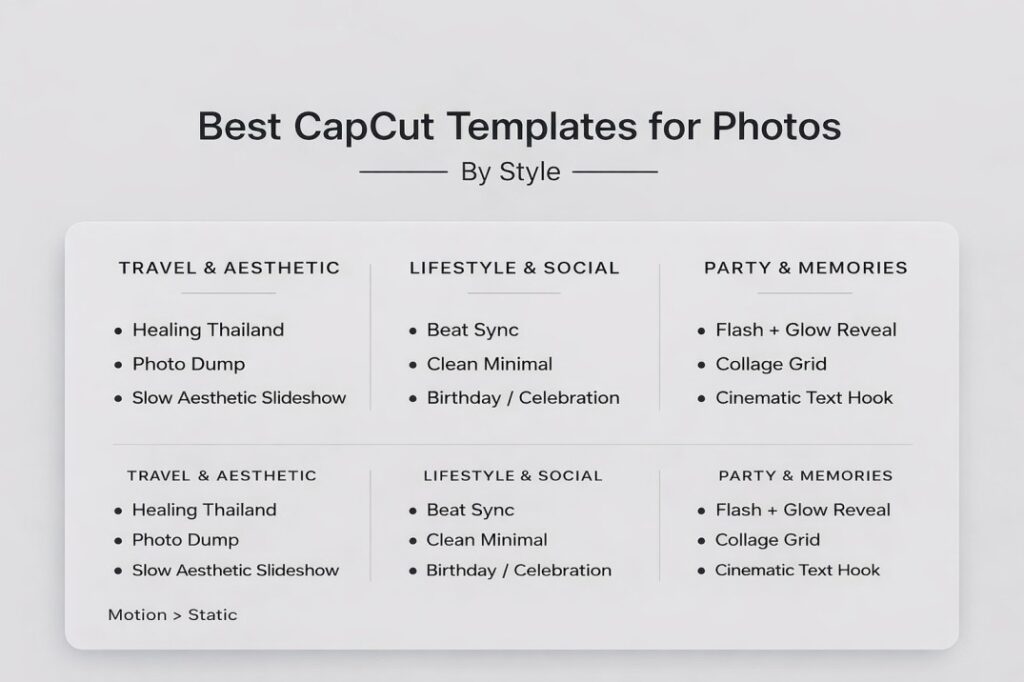
Photo templates work when they add motion, rhythm, and clean pacing. These are the best CapCut templates for photos based on the most common photo post styles on TikTok, Reels, and Shorts.
1) Healing Thailand Photo Template
Best for: travel, memories, aesthetic recaps
Why it works: soft zoom + fades make photos feel cinematic.
2) Photo Dump “Life Lately” Template
Best for: casual recaps, friend groups, daily life
Why it works: structured pacing makes random photos feel intentional.
3) Beat Sync Photo Template
Best for: glow-ups, transformations, before/after photos
Why it works: music timing adds energy and boosts replays.
4) Slow Aesthetic Slideshow Template
Best for: relationship edits, soft memories, emotional posts
Why it works: calm pacing helps viewers connect with each photo.
5) Clean Minimal Photo Template
Best for: polished lifestyle, creator brand, “clean girl” vibe
Why it works: looks premium without heavy effects.
6) Birthday / Celebration Photo Template
Best for: birthdays, milestones, best friend recaps
Why it works: upbeat pacing keeps it fun and watchable.
7) Flash + Glow Reveal Photo Template
Best for: party pics, fit checks, big reveals
Why it works: creates impact fast, but works best in small doses.
8) Collage Grid Photo Template
Best for: photo-heavy dumps, event recaps, travel highlights
Why it works: keeps variety without feeling messy.
9) Cinematic Text Hook Photo Template
Best for: storytelling photos, reflective posts, memories
Why it works: a strong opening line keeps people watching.
If you are interested in the CapCut Templates for Video read this: Best CapCut Templates For Video
Best CapCut Template For Photos By Post Type
| What you’re posting | Best template type | Why it works |
|---|---|---|
| Travel/scenery | Healing Thailand / Soft Cinematic | Makes still shots feel like a film |
| Glow-up / before-and-after | Beat Sync Photo | Beat timing boosts impact and replays |
| Friend group / events | Photo Dump “Life Lately” | Feels organized, not random |
| Romantic/emotional | Slow Aesthetic Slideshow | Gives photos breathing room |
| Party / celebration | Birthday / Flash + Glow | Fast energy that still feels fun |
How To Pick Photos That Fit The Template
A strong CapCut photo template can elevate your content, but only if the photos match the structure.
Start with quality. Choose sharp, well-lit images. Blurry or dark photos will look worse once motion and transitions are added. Templates enhance what is already there. They do not fix poor images.
Next, think about consistency. Try to use photos with similar lighting, color tones, and mood. Mixing bright outdoor shots with dark indoor photos can make the slideshow feel unbalanced.
Match the energy of the photos to the template style. If you are using a beat sync photo template, pick images with movement, expressions, or clear subject focus. For slow aesthetic slideshows, choose calm, emotional moments.
Order matters. Place your strongest photo at the hook or on the music drop. First impressions and key beats decide whether viewers keep watching.
When your photos align with the pacing and mood of the template, the final video feels intentional instead of random.
If you want a complete breakdown of how to choose and use templates across platforms, check out our CapCut templates for social media guide , where we cover formats, trends, and how to turn simple edits into consistent views.
Timing Tips (So Photos Don’t Feel Rushed)
One of the biggest problems with photo templates is pacing. If images change too fast, viewers cannot process them. If they stay too long, the video feels slow.
First, match the number of photos to the template structure. If a template is built for 6 to 8 photos, avoid forcing 15 images into it. Overloading makes each moment feel rushed.
Second, use strong photos during beat drops or transition peaks. These are your highlight moments. If the most important image flashes by too quickly, the impact is lost.
For slower aesthetic templates, let emotional or meaningful photos sit slightly longer. That breathing space helps viewers connect.
If a template feels too fast, consider choosing one with fewer transition cuts instead of trying to stretch clips manually. The best CapCut template for photos should make your content flow naturally, not feel like a race.
Good timing turns a simple slideshow into something people actually watch until the end.
How To Use Photo Templates In CapCut
Using a CapCut photo template is simple, but small adjustments make the final result look much more professional.
Open the Templates section and search for the style or template name you want, such as Healing Thailand, Photo Dump Trend, or Beat Sync Photo. Tap “Use Template” to begin.
Upload your photos in the order requested. The first image usually acts as the hook, so choose something eye-catching. If the template includes a beat drop, place your strongest photo at that exact moment.
After the photos load, preview the full video. Check for awkward crops, cut-off faces, or important details hidden by text overlays. If something looks wrong, replace the image with a better-framed version.
Pay attention to aspect ratio. Vertical 9:16 works best for TikTok, Reels, and Shorts. If your photo is horizontal, make sure the subject stays centered to avoid awkward cropping.
Before exporting, select the highest resolution available. Clear, sharp images combined with a clean CapCut template always perform better than low-quality slideshows.
When used properly, photo templates turn simple images into structured, engaging short-form content.
Best Settings For Photo Templates (So They Look Sharp)
Use vertical 9:16 for TikTok, Reels, and Shorts. If a photo is horizontal, make sure the subject is centered so the crop doesn’t ruin it.
Pick fewer photos, but stronger ones. Most photo templates look best with 6–10 good images.
Export at the highest resolution available. If your final video looks blurry, it’s usually export settings or low-quality source images, not the template.
Choose a clean cover. Your first photo should be clear, bright, and easy to understand in one second.
Common Mistakes to Avoid
Even the best CapCut template for photos can fall flat if used incorrectly. Most issues come from simple mistakes that are easy to fix.
One common mistake is adding too many photos. When you overload a template, each image flashes too quickly and viewers cannot connect with any moment. Fewer strong photos almost always perform better than many average ones.
Another mistake is mixing different photo styles. Bright outdoor shots, dark indoor images, screenshots, and blurry pictures in one slideshow can make the video feel inconsistent. Keep lighting and color tones similar whenever possible.
Using the wrong template for the mood is also a problem. A heavy flash beat drop template does not fit emotional memory photos. And a slow cinematic template may feel boring for a high-energy glow-up.
Finally, ignoring cropping hurts quality. Faces cut in half or important details hidden by text overlays instantly make the edit look careless.
It shows you how to adjust timing, text, and structure so your edits don’t look like generic slideshows.
When you avoid these mistakes, even a simple CapCut photo template can look polished and intentional.
FAQs
Final Picks
If you want the best CapCut template for photos, start with your goal.
For travel, aesthetic recaps, and emotional storytelling, templates like Healing Thailand or slow cinematic slideshow styles work best. They create smooth motion and controlled pacing.
For glow-ups, transformations, and high-energy posts, beat sync photo templates deliver a stronger impact and better retention.
For casual photo dumps, birthday posts, and friend group recaps, clean photo dump trend templates strike the right balance between simple and engaging.
Do not overload your slideshow with too many images. Choose strong photos, match them to the template’s energy, and focus on clarity.
When timing, quality, and structure align, even simple photos can turn into scroll-stopping short-form content.
