
Can People Tell If You Edited a Photo With CapCut? (Honest Answer)


Can people tell if you edited a photo with CapCut?
If that question has ever made you pause before posting, you’re not alone.
Here’s the truth: CapCut doesn’t leave a “signature” that regular people can spot. Most of the time, nobody is guessing the app — they’re just scrolling.
In this post, I’ll show you what people can actually notice, what they can’t, and the few editing moves that make a photo look “too edited.” No tech talk. No stress. Just the truth — so you can post with confidence.
Quick Reality Check
When people ask, “Can people tell if I edited a photo with CapCut?” they’re usually worried about judgment — not the app.
Editing photos is normal now. Almost everyone does it. Phones do it automatically. Apps enhance colors. Cameras sharpen details without asking. So the idea of a “raw, untouched” photo is kind of a myth.
Here’s the honest truth
Most people aren’t analyzing shadows, zooming into pixels, or trying to guess which app you used. Unless a photo looks extreme or unnatural, they just see a nice photo and move on.
Baseline: CapCut isn’t what people notice — the final look is.
What Capcut Does to Photos
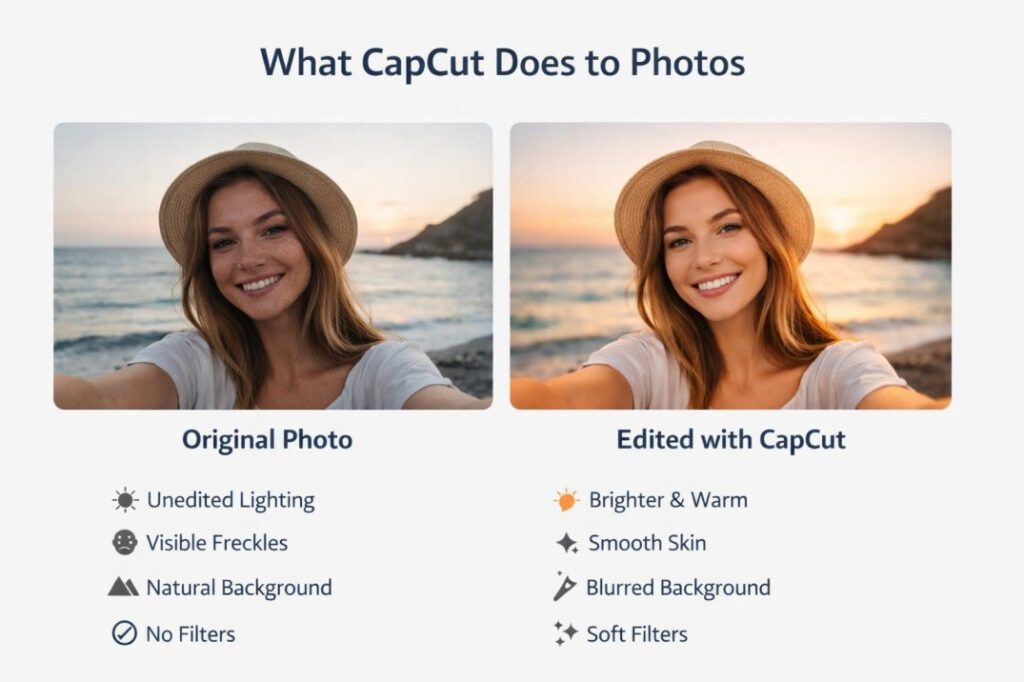
CapCut doesn’t magically change your photo in some secret way. It just applies the edits you choose, the same way most editing apps do.
Think of it like makeup for photos.
Light edits are things like brightness, contrast, warmth, sharpness, or a soft filter. These are subtle. They clean things up. They don’t scream “edited.” Most people won’t notice anything at all.
Heavier edits are different. Strong filters, skin smoothing, background blur, reshaping, or AI effects can start to look obvious if they’re pushed too far. Not because of CapCut, but because the photo stops looking natural.
CapCut also uses AI tools now. Stuff like background removal, object cleanup, or face enhancements. These can look amazing when used lightly. But when overdone, they create that polished, unreal look people instantly clock.
Here’s the key part.
CapCut doesn’t stamp a visual signature on your photo. It doesn’t add a hidden glow. It doesn’t leave a “CapCut style” people recognize by eye.
What people notice isn’t the app.
They notice the result.
Natural edits blend in. Heavy edits stand out. That’s it.
Heavy smoothing or background changes can create that “plastic” look people notice. Start with lighter, template-based approaches, check out the best CapCut templates for edits to keep things clean and intentional.
Can people tell if you edited a photo with CapCut?
Short answer: almost never.
There is no way for someone to look at a photo and say, “Yep, that was edited with CapCut.” CapCut doesn’t leave a visual fingerprint. It doesn’t have a signature style that gives it away.
What people react to is how the photo looks, not how it was made.
If your edits are light and natural, no one notices anything. The photo just looks clean. Better lighting. Better colors. That’s it.
But if edits are pushed too far, people might notice something feels off. Skin looks too smooth. Edges look blurry. Backgrounds look cut out.
Faces look slightly unreal. When that happens, people think, “This looks edited,” not “This was edited in CapCut.”
That difference matters.
The app is invisible. The editing choices are not.
Simple rule
Here’s a simple way to think about it:
You’re safe if…
your photo still looks like something a camera could realistically capture.
People will notice if…
it looks like a cartoon, plastic, or AI-generated image.
And even then, most won’t care. They’ll just scroll.
Does CapCut Leave a Watermark or Tag on Photos?
By default, CapCut does not force a watermark on photos.
If you’re editing images, exporting properly, and not using a template that adds branding, there is no visible “CapCut” label slapped on your picture. Nothing in the corner. Nothing hidden in the image itself.
Watermarks usually show up in two situations:
First, when people use certain video templates and forget to turn the watermark off. That’s mostly a video issue, not a photo one.
Secondly, when someone exports incorrectly or uses a preset that includes branding. Even then, it’s obvious. You’d see it right away.
For regular photo edits, CapCut doesn’t secretly mark your image. There’s no hidden logo. No sneaky tag that suddenly appears when you upload it.
Once the photo is saved to your device, it looks like any other edited image. Instagram, TikTok, and other platforms don’t display which app you used to edit it.
So if your worry is, “Will people see ‘edited with CapCut’ somewhere?”
The answer is no.
If there’s no watermark visible to you, there’s no watermark visible to anyone else either.
Photo Metadata: The Part Nobody Talks About
Metadata sounds technical, but it’s actually simple.
It’s just background info saved with a photo. Things like the device used, file size, date, and sometimes the app that edited it.
Here’s the important part.
Most people will never see this. Ever.
On social media, metadata is usually stripped out when you upload a photo. Instagram, TikTok, Facebook, and others remove it automatically. So even if CapCut added editing info, it wouldn’t travel with the image.
And even outside social media, metadata isn’t visible unless someone goes out of their way to inspect the file. Regular viewers can’t tap a photo and see what app you used.
CapCut may update or change metadata when exporting. That’s normal. Many editing apps do the same. But that doesn’t mean people can detect it just by looking at the photo or scrolling past it online.
The only time metadata matters is in very specific situations. Like professional photography work, legal use, or when someone is deliberately analyzing the file. That’s not everyday life.
For normal posting, sharing, and saving, metadata is a non-issue.
Can Apps, Platforms, or Professionals Detect CapCut Edits?
For regular apps and social platforms, the answer is no.
Instagram, TikTok, and similar platforms don’t flag photos based on the editing app you used. They don’t label images as “edited with CapCut,” and they don’t care if you adjusted lighting, colors, or sharpness.
Once a photo is uploaded, it’s treated like any other image.
For regular people scrolling, detection isn’t happening either. No one has tools that magically identify CapCut edits. They’re reacting to how the photo looks, not how it was made.
Professionals are a different story, but not in the way people fear.
Photographers and designers can sometimes tell when a photo has been edited heavily. Not because of CapCut, but because of visual clues. Over-smoothing. Strange shadows. Unnatural edges. Inconsistent lighting.
Even then, they usually can’t tell which app was used. Photoshop, Lightroom, CapCut, or something else all produce similar results when pushed too far.
There are forensic tools that analyze image files, but those are used in niche situations like investigations or professional verification. Not casual social media browsing.
So unless someone is actively trying to analyze your image at a technical level, no one is detecting your CapCut edits.
How to Edit Photos in CapCut Without It Being Obvious
Follow this quick checklist to keep edits looking natural (and avoid the “overdone” look).
-
1
Fix the lighting first
Start with brightness, contrast, and exposure. Small adjustments make the biggest difference. If the lighting looks natural, everything else is easier to control.
-
2
Adjust colors gently
Increase saturation and warmth slightly. Stop as soon as colors look healthy, not intense. If colors grab attention, you’ve gone too far.
-
3
Use filters sparingly
If you apply a filter, lower its strength. Aim for subtle. A good filter should feel invisible, not stylized.
-
4
Be careful with face and skin tools
Light smoothing is fine. Heavy smoothing removes texture and makes faces look unreal. Keep pores and lines. That’s what makes a photo feel real.
-
5
Check edges and backgrounds
Zoom in around hair, shoulders, and objects. Look for blur halos or cut lines. Clean edges are what separate natural edits from obvious ones.
-
6
Take a break before exporting
Step away for a minute. When you come back, ask yourself one question:
“Would this still look normal if I didn’t know it was edited?”
If the answer is yes, you’re done.
For quick polished photo looks without heavy manual tweaks, try some of the best CapCut templates for photos to add subtle motion or aesthetic vibes.
Should You Even Worry About People Knowing a Photo Was Edited?
Honestly? Most of the time, no.
Editing a photo isn’t lying. It’s presentation. Just like choosing good lighting, a clean outfit, or a nice background. No one expects photos online to be untouched anymore.
People only care when editing distracts from the photo itself. When it looks unnatural, overdone, or misleading. That’s when trust drops. Not because an app was used, but because the image feels fake.
If your edits simply make the photo clearer, brighter, or more polished, you’re fine. That’s the standard now.
There are a few moments when it does matter. Professional work. Brand partnerships. Situations where accuracy is expected. In those cases, subtlety and honesty go a long way.
But for everyday posts, profiles, and sharing moments? Don’t overthink it.
Most people aren’t judging your edits. They’re scrolling, liking, and moving on with their day.
Frequently Asked Questions
Can someone tell it was CapCut specifically, not just “edited”?
No. A viewer can’t identify CapCut just by looking at a photo. People can only react to the result. If the edit looks natural, it won’t raise eyebrows. If it looks heavy (too smooth skin, weird edges, unrealistic colors), they may think it’s edited — but they still won’t know which app you used.
Does CapCut leave a watermark on photos?
In most normal photo edits, no. CapCut is more known for watermarks on videos or certain templates, but photos typically export without a CapCut watermark unless you manually added one or used a branded template/effect.
If I remove the CapCut watermark, can people still detect it?
Removing a watermark only removes the visible logo. It doesn’t hide the fact that editing occurred. People won’t detect CapCut specifically, but they might notice heavy edits if the image looks unnatural (plastic skin, halo edges, color shifts, etc.).
Does CapCut add “edited with CapCut” in the file info?
CapCut usually does not embed any visible “edited with CapCut” metadata that survives upload to social platforms. Even if some EXIF/IPTC field gets modified during export, Instagram, TikTok, Twitter/X, etc. strip most metadata on upload anyway — so regular viewers never see it.
Can Instagram or TikTok tell my picture was edited in CapCut?
No — they don’t label or tag your photo as “edited with CapCut” for other users to see. Platforms treat your upload like any other image. What matters far more is whether the final look complies with community guidelines and doesn’t appear obviously manipulated in ways that violate rules (e.g., misinformation via deep edits).
Why do my edits look “fake” even when I try to keep them light?
Common culprits include:
- Overdoing skin smoothing / beauty filters
- Too much sharpening or contrast
- Filter strength pushed too high
- Visible halo/edge artifacts from background removal or cutouts
Tip: Always preview at 100% zoom before export and reduce intensity sliders by 20–40% from what “looks good” at first glance.
Does exporting from CapCut reduce photo quality?
The app name itself doesn’t reduce quality — export settings and later compression do. If your photo looks softer/grainier after export/upload, it’s usually caused by:
- Choosing medium/low quality export
- Resizing too aggressively
- Platform compression (Instagram/TikTok heavily compress images)
- Repeated open → edit → save cycles
Best practice: Export at maximum resolution/quality your device allows, and avoid unnecessary re-saves.
Final Thoughts
If you’re worried people can tell you edited a photo with CapCut, here’s the truth: they usually can’t.
CapCut doesn’t leave a secret “this was edited here” stamp that regular people can spot. What people notice is only the look of the final image. If it feels natural, it passes as natural. If it feels overdone, they’ll clock that it’s edited, but they still won’t know the app.
So aim for clean, light edits. Fix the lighting, keep skin texture, don’t push filters too hard, and always double-check edges before exporting.
And if you needed permission to stop stressing about this, here it is: you’re fine. Post the photo.
