

Not every song or sound you find in CapCut is automatically safe to use everywhere.
That is where many creators get caught off guard.
A track may work fine inside CapCut, but still cause problems after you upload the video to YouTube, Instagram, TikTok, Facebook, a business page, or a client account.
The real question is not only whether CapCut lets you add the music. The bigger question is whether you have the right to use that music for the platform and purpose you care about.
If the video is personal, the risk may be lower. If the video is monetized, sponsored, commercial, or made for a client, you need to be much more careful.
Table of Contents
- Is CapCut Music Copyright Free?
- Why CapCut Music Can Still Cause Copyright Problems
- Is CapCut Music Safe for TikTok?
- Is CapCut Music Safe for YouTube?
- Is CapCut Music Safe for Instagram Reels?
- Can You Use CapCut Music for Commercial Use?
- Can You Use CapCut Sound Effects Without Copyright Issues?
- What Is the Difference Between Copyright-Free and Royalty-Free Music?
- How to Check If CapCut Music Is Safe Before Posting
- What Happens If You Use Copyrighted Music in CapCut?
- Best Music Options for CapCut Creators
- Quick Checklist Before Using CapCut Music
- Frequently Asked Questions
- Final Thoughts
- Official Resources
Is CapCut Music Copyright Free?
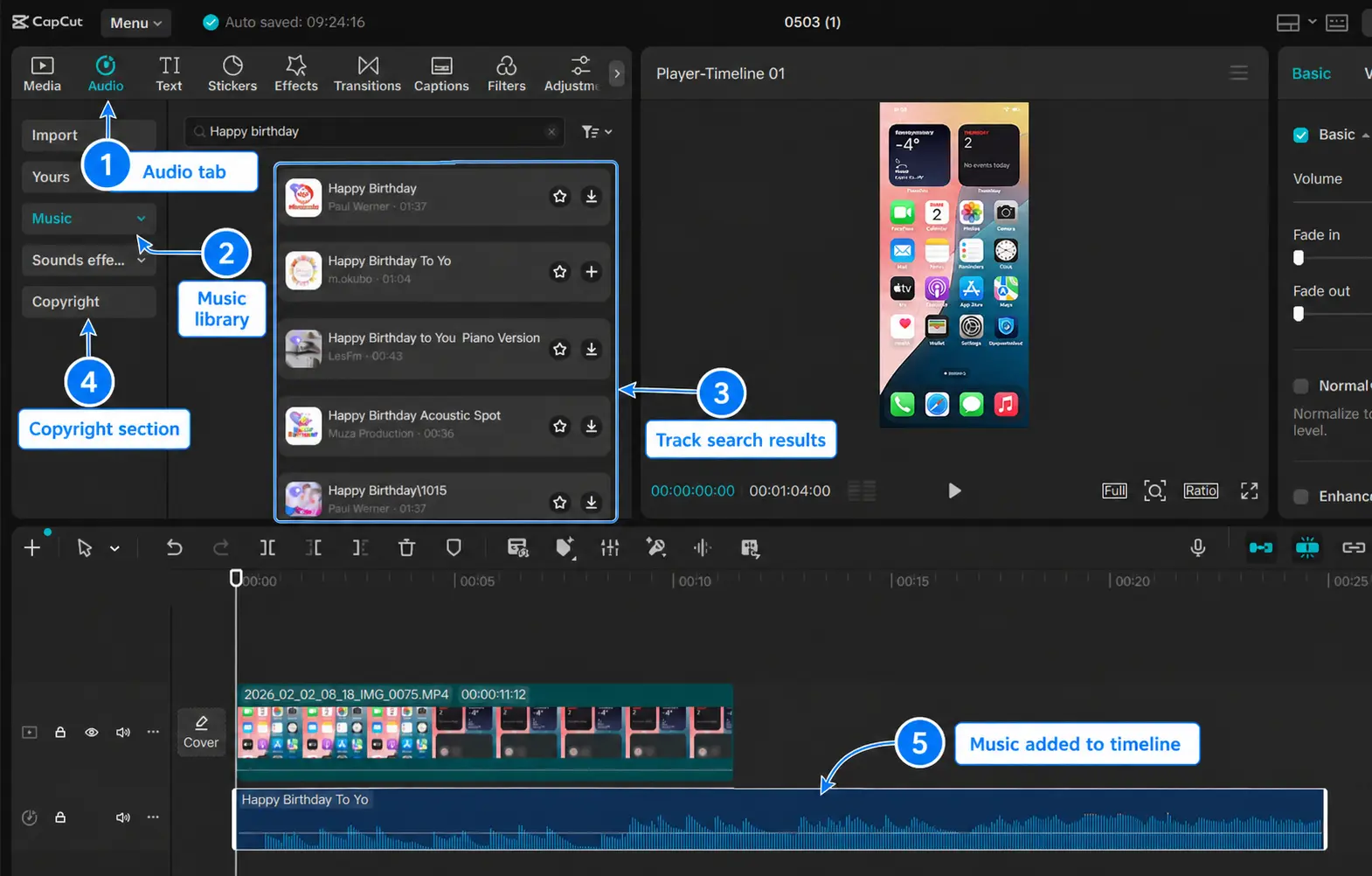
Some CapCut music may be copyright-free, royalty-free, or cleared for certain uses, but you should not treat every CapCut song as free to use everywhere.
CapCut offers music, sound effects, templates, and audio tools that creators can use while editing. But music rights can still depend on the specific track, license, platform, region, and type of use.
So the safest answer is this: some CapCut music may be safe for certain projects, but not every CapCut sound is automatically safe for YouTube, Instagram, ads, client work, or commercial use.
CapCut’s own Materials License Agreement says Sounds are made available to individual users for video content only for personal entertainment and non-commercial purposes. That is important if you are making content for a business, brand, sponsor, client, or monetized channel.
⚠️ Do not assume a song is safe just because it appears inside CapCut.
If you are making a casual personal video, you may be fine using available sounds carefully. But if the video will make money, promote a product, support a business, run as an ad, or be delivered to a client, check the license first.
Does CapCut Use Royalty-Free Music?
Sometimes, but not always. CapCut includes different types of music, sounds, and audio assets, and the usage rights can vary by track, platform, region, and license.
Some tracks may be royalty-free or cleared for certain uses, while others may have restrictions around commercial use, monetization, or distribution.
Because of these differences, creators should not assume every CapCut song is royalty-free simply because it appears inside the app.
Always review the available licensing information before using music in business, client, advertising, or monetized projects.
Why CapCut Music Can Still Cause Copyright Problems
Music copyright is tricky because one track can have several rights attached to it.
A song can involve rights for the sound recording, the composition, the platform, the country or region, commercial use, monetization, and distribution.
That is why a sound that works on TikTok may still cause issues on YouTube. A track that works in a personal edit may not be okay for a paid ad. A sound that seems fine in one country may be restricted in another.
CapCut may let you edit with a sound, but the platform you upload to can still mute, block, claim, or restrict the video later.
Common copyright issues creators run into:
- The video gets muted after posting
- The platform shows a copyright claim
- The sound works on TikTok but not YouTube
- The track is not cleared for commercial use
- The music is allowed in one region but restricted in another
- A client or brand asks for proof that the music is licensed
- Monetization is limited, blocked, or redirected
If you are editing for a brand, client, ad, business page, or monetized channel, treat music like a license issue, not just an editing choice.
Is CapCut Music Safe for TikTok?
CapCut music may be safer for TikTok when the sound is cleared for TikTok use, but you should still check before posting.
CapCut and TikTok workflows are closely connected, so some sounds, templates, and trends may work smoothly between the two apps. But that does not mean every audio track is safe forever, everywhere, or for every type of account.
For TikTok, pay attention to any copyright warnings, sound availability issues, or posting restrictions before publishing.
If CapCut or TikTok warns you about a sound, change the audio before posting. It is better to swap the track early than to publish the video and have it muted later.
Best practice for TikTok
- Use sounds that are available for your account type
- Watch for copyright or availability warnings
- Be more careful with business or promotional videos
- Replace risky audio before publishing
- Do not assume TikTok-safe means YouTube-safe or Instagram-safe
If your content workflow is TikTok-heavy, learning how to use CapCut for TikTok can help you keep editing and posting cleaner.
Is CapCut Music Safe for YouTube?
CapCut music is not automatically safe for YouTube just because it is available inside CapCut.
YouTube has its own copyright system, and music that works in CapCut or TikTok may still trigger a YouTube copyright claim, restriction, muted audio, or monetization issue.
This matters even more if your channel is monetized, you use the video for a brand, or you plan to reuse the same edit across several platforms.
If YouTube matters to you, do not treat CapCut music as automatically YouTube-safe.
What to do before uploading to YouTube
- Check whether the track is clearly licensed for YouTube use
- Use royalty-free music from a source that gives clear usage rights
- Keep proof of the music license when possible
- Upload as private or unlisted first if you want to check for claims
- Avoid random trending sounds in monetized YouTube videos
If you mainly edit YouTube content, learning how to use CapCut for YouTube can help you plan a safer workflow before publishing.
Is CapCut Music Safe for Instagram Reels?
CapCut music is not automatically safe for Instagram Reels either.
Instagram has its own music library, licensing rules, business account limits, and regional restrictions. A track that works on TikTok or inside CapCut may not behave the same way on Instagram.
If you export a CapCut video with music and upload it to Instagram, Instagram may still mute, block, limit, or restrict the audio if it detects a rights issue.
For Instagram, the safest option is to use audio that is allowed for your account type and region.
Best practice for Instagram
- Use music that is available inside Instagram when possible
- Be extra careful with business or creator accounts
- Avoid using random TikTok sounds for brand or ad content
- Check for audio restrictions after uploading
- Replace the sound if Instagram shows a warning
If Instagram is your main platform, learning how to use CapCut for Instagram Reels can help you avoid workflow mistakes before posting.
Can You Use CapCut Music for Commercial Use?
You should not assume CapCut music is safe for commercial use unless the track or license clearly allows it.
Commercial use means the video is tied to business, promotion, advertising, sponsorship, client work, product sales, monetized content, or paid distribution.
This is where music rights become much more important.
CapCut’s Materials License Agreement says Sounds are made available to individual users for video content only for personal entertainment and non-commercial purposes. CapCut’s Terms also point users back to the Materials License Agreement when checking whether CapCut content can be used commercially.
For business, client, ad, or monetized work, use music with clear commercial rights.
Be extra careful when the video is for:
- Paid ads
- Sponsored posts
- Client videos
- Business pages
- Product promos
- Monetized YouTube content
- Online courses or paid content
If your project is commercial, use a music library that clearly grants commercial rights and keep a record of the license.
Before using CapCut assets in business content, it also helps to understand whether you can use CapCut for commercial use without running into licensing problems.
Can You Use CapCut Sound Effects Without Copyright Issues?
CapCut sound effects may feel safer than full songs, but you should still check how they are allowed to be used.
Short sound effects, clicks, whooshes, transitions, pops, and ambient sounds are often less risky than popular music tracks. But they are not automatically free for every project.
If the video is personal or casual, the risk may be lower. If the video is for a brand, paid ad, client, or monetized channel, check the license first.
Sound effects can still have usage rules, especially in commercial projects.
Use sound effects carefully when:
- The video is for a business
- The video is a paid ad
- The video is for a client
- The video will be monetized
- The sound effect came from a template or third-party source
When in doubt, use sound effects from a library that clearly allows the type of project you are making.
What Is the Difference Between Copyright-Free and Royalty-Free Music?
Copyright-free and royalty-free do not always mean the same thing.
Copyright-free usually means the music is not protected by copyright, or the owner has made it available under certain terms. But you still need to check what those terms actually allow.
Royalty-free usually means you do not pay ongoing royalties each time the music is used. It does not always mean the music is free, and it does not always mean you can use it for every purpose.
That is where many creators get confused. A track can be royalty-free and still have limits around commercial use, ads, YouTube monetization, client work, attribution, or platform distribution.
The simple way to understand it
- Copyright-free does not always mean “use it anywhere with no rules.”
- Royalty-free does not always mean “free music.”
- Commercial use allowed is what matters most for business, ads, client work, and monetized videos.
Before using any track, check the license for YouTube use, Instagram use, TikTok use, commercial use, ads, client projects, attribution, and region limits.
How to Check If CapCut Music Is Safe Before Posting
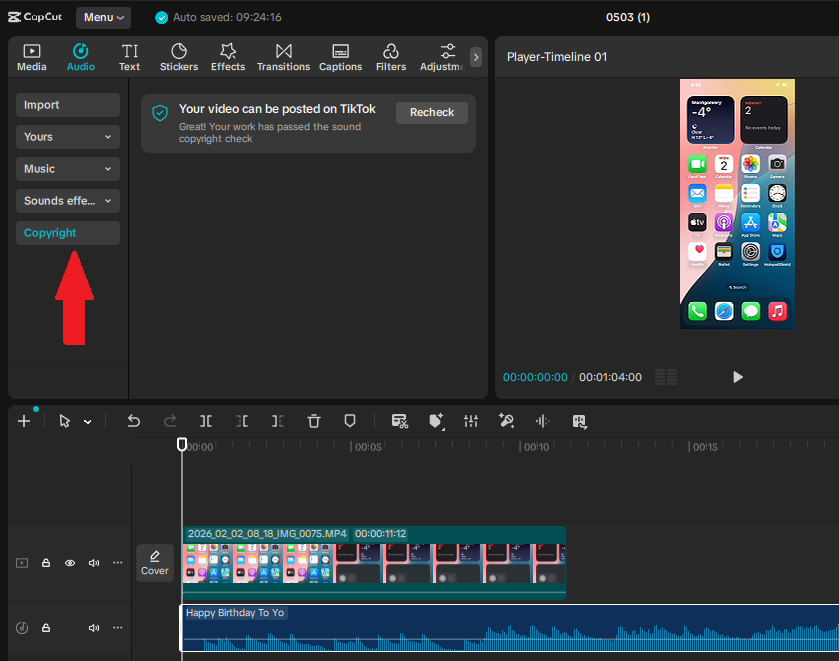
The safest way to check CapCut music is to look for clear licensing information before you publish.
Do not rely only on the fact that the sound appears inside CapCut. Look for labels, warnings, platform checks, or license terms that explain where the audio can be used.
If you cannot confirm the usage rights, do not use that track for important, commercial, or monetized content.
Use this music safety checklist
- Check whether the track is labeled copyright-free or royalty-free
- Look for commercial use permission if the video is for business
- Use CapCut’s copyright check for TikTok when available
- Upload privately or unlisted on YouTube first if you want to check for claims
- Read the license if the music comes from a third-party library
- Keep proof of the license for client, brand, or monetized projects
- Avoid random trending sounds in ads or sponsored videos
This may feel boring, but it is much better than having a video muted, claimed, or restricted after it starts getting views.
What Happens If You Use Copyrighted Music in CapCut?
If you use copyrighted music in a CapCut video, the issue usually happens after you upload or share the video, not while you are editing.
CapCut may let you add the song, export the video, and save it to your device. But once you upload it to TikTok, YouTube, Instagram, Facebook, or another platform, that platform may scan the audio and take action.
Just because CapCut lets you export the video does not mean the music is cleared for every platform.
Possible outcomes
- The video may be muted
- The audio may be replaced or removed
- The video may be blocked in some countries
- You may get a copyright claim
- Your monetization may be limited or redirected
- A brand, client, or platform may ask you to replace the music
The exact result depends on the platform, the song, the rights owner, the country, and how the video is being used.
Best Music Options for CapCut Creators
If you want fewer copyright headaches, use music that clearly fits your project.
For casual personal videos, CapCut’s available sounds and platform audio may be enough. For serious, commercial, sponsored, or monetized content, use a music source that gives clear licensing terms.
The safest music is music you can prove you have permission to use.
Safer music options include:
- Your own original music
- Your own recorded voiceover
- Royalty-free music with clear commercial rights
- Platform music libraries, when used inside that platform
- Licensed stock music from trusted music libraries
- Sound effects with clear usage permission
If you edit for brands or clients, build a small folder of approved music and sound effects. That way, you are not hunting for a safe track five minutes before publishing.
Quick Checklist Before Using CapCut Music
Before you publish a video with CapCut music, ask yourself these questions.
- Where will the video be posted?
- Is the video personal, monetized, sponsored, or commercial?
- Does the track clearly allow that type of use?
- Does the platform show a copyright warning?
- Do you need to keep proof of the music license?
- Can you replace the track with safer audio?
If the video is important, do not guess. Use music with clear permission.
Frequently Asked Questions
Is CapCut music copyright free?
Some CapCut music may be copyright-free or royalty-free for certain uses, but not every track is safe for every platform or project. Always check the track label, license terms, and any copyright warnings before using CapCut music in public, monetized, client, or commercial videos.
Does CapCut music have copyright?
Yes. Many songs and audio tracks available through CapCut are protected by copyright. Just because a track appears inside CapCut does not automatically mean it is free to use everywhere. Usage rights can vary depending on the track, platform, region, and type of content you create.
Can I use CapCut music on YouTube?
You can use CapCut music in a YouTube video, but some tracks may still trigger copyright claims, monetization restrictions, or other copyright actions if they are not cleared for YouTube use. For important uploads, verify the licensing first and check for claims before publishing publicly.
Can I use CapCut music for commercial use?
Do not assume CapCut music is safe for commercial use unless the track or license clearly allows it. If the video is for advertising, sponsored content, client work, business pages, product promotions, or monetized content, use music with clear commercial rights and keep proof of the license.
Does CapCut allow you to add your own music?
Yes. CapCut allows you to import your own music, sound effects, voice recordings, and other audio files. This gives creators more control over licensing and can help reduce copyright risks when using properly licensed music.
Why does CapCut not have songs or popular music?
Music availability can vary based on your country, account type, device, licensing agreements, and regional copyright restrictions. Some songs may be available in one region but unavailable in another, while certain commercial tracks may only appear on specific platforms.
How do I know if a CapCut song is safe to use?
Check the song label, usage notes, license terms, and any copyright checks available inside CapCut or the platform where you plan to publish. For important videos, especially YouTube, ads, client work, or business content, use royalty-free music with clear written permission rather than guessing.
Final Thoughts
CapCut music can be helpful, but it is not automatically safe for every creator, platform, or project.
If you are making casual videos, you may be fine using available sounds carefully. But if the video is for YouTube monetization, Instagram business use, client work, ads, sponsored content, or a brand page, take music licensing seriously.
The safest habit is simple: check the rights before posting, use clearly licensed music for important projects, and keep proof of permission when money or business is involved.
CapCut can help you edit faster, but music rights are still your responsibility before you publish.
