

Most people who struggle with video editing aren’t struggling because they lack skill. They’re struggling because they’re spending most of their time on things that barely affect the final result.
This is exactly the problem the 80/20 rule or Pareto Principle helps solve. The idea is simple: roughly 80% of your results come from 20% of your efforts.
The rest is noise. Once you understand which 20% actually moves the needle in video editing, you can stop grinding through low-impact tasks and focus on what genuinely makes your videos better.
This isn’t a theoretical framework. It’s a practical lens that changes how you approach every edit.
Table of Contents
- What the 80/20 Rule Actually Means for Editors
- The 20% of Editing That Produces 80% of the Results
- Why Professional Editors Seem Faster Than Everyone Else
- The Hidden Problem: Perfectionism in Video Editing
- The 80% of Editing Time That Often Produces Minimal Results
- Applying the 80/20 Rule to Your Editing Workflow
- The Best Skills Beginner Editors Should Focus On First
- The 80/20 Rule Applied to Learning Video Editing
- How I Apply the 80/20 Rule in My Favorite Video Editor (CapCut)
- Frequently Asked Questions
- The Bottom Line
- Official Sources
What the 80/20 Rule Actually Means for Editors
The Pareto Principle was first observed by Italian economist Vilfredo Pareto, who noticed that 80% of Italy’s land was owned by 20% of the population.
The pattern turned out to repeat across almost every domain — and video editing is no different.
In practical terms, it means:
- 20% of your editing decisions account for 80% of how good your video feels
- 20% of your footage carries 80% of the story
- 20% of your time spent on audio probably produces 80% of the perceived quality improvement
- 20% of the effects and features you learn will cover 80% of your actual editing needs
The problem is that most beginners — and plenty of experienced editors — get this backwards. They spend hours on colour tweaks that viewers won’t notice, experiment with transitions they’ll never actually use, and obsess over export settings while leaving audio rough and pacing sloppy.
The 80/20 rule is really about getting honest with yourself about where the real leverage is.
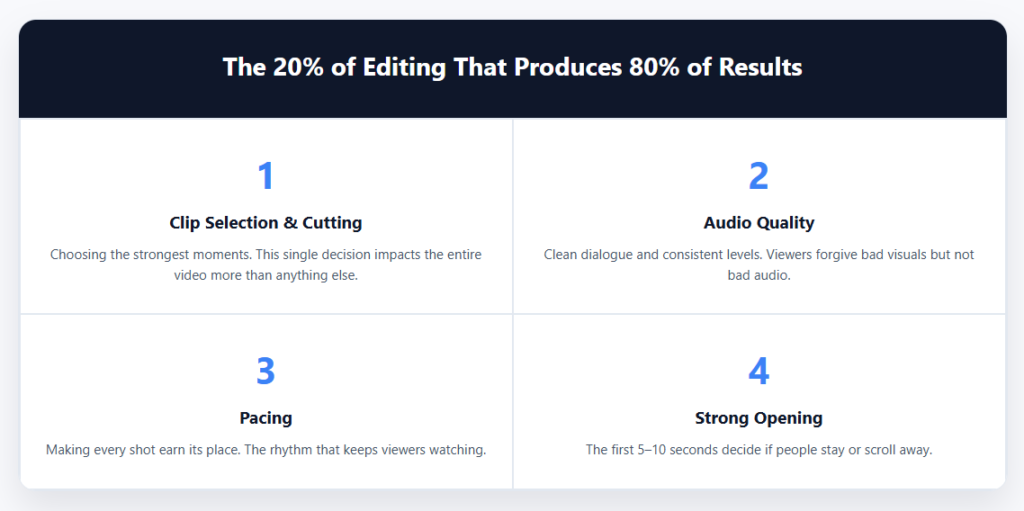
The 20% of Editing That Produces 80% of the Results
1. Clip selection and cutting
This is the highest-leverage skill in editing. What you leave in and what you cut determines almost everything about how your video feels.
Bad clips drag a video down, no matter how much you polish around them. Strong clips carry the edit even with minimal refinement.
Most of the footage you shoot won’t make the cut — and that’s fine. In a well-edited video, roughly 20% of the footage you capture ends up carrying 80% of the emotional and narrative weight.
Getting good at identifying those clips quickly is more valuable than any technical skill.
Before you do anything else with an edit, focus on selection. Find the best moments, the clearest delivery, the most compelling footage. Cut everything that isn’t pulling its weight. This single habit will make your editing faster and your videos noticeably better.
2. Audio quality and cleanup
Viewers will forgive a lot of visual imperfections. They will not forgive bad audio. Poor sound kills a video faster than anything else — yet it’s consistently the thing beginners spend the least time on.
Audio is the 20% that most people underinvest in while it produces an outsized share of perceived quality.
Before adding music, transitions, or colour grades, make sure your dialogue is clear, your background noise is minimal, and your audio levels are consistent.
If you’re editing on CapCut, tools like noise reduction and audio level adjustment are available in the audio panel — and spending ten minutes there will do more for how your video lands than an hour of visual effects.
3. Pacing
Pacing is how long you stay on a shot before cutting. It’s the rhythm of your edit. Good pacing keeps viewers engaged; bad pacing loses them, and they often can’t tell you exactly why.
Tight pacing doesn’t mean cutting fast. It means every shot earns its time. If a clip is communicating what it needs to in three seconds, don’t let it run for seven.
This is one of the hardest things to feel when you’re close to a project, but it’s one of the highest-impact things you can adjust.
Watch your edit back and honestly note every moment you feel yourself wanting to skip forward. Those are your pacing problems.
4. A strong opening
The first five to ten seconds of your video determine whether most viewers stay or leave. This is disproportionately important — investing time in your opening pays off far more than the same time spent polishing the middle of a video that viewers may never reach.
Lead with something compelling. Don’t open with a long intro, your logo animation, or a slow establishing shot. Start in the middle of something interesting and let context build from there.
Why Professional Editors Seem Faster Than Everyone Else
Professional editors are not necessarily faster because they know more shortcuts.
They’re faster because they spend their time differently.
Most beginners focus on polishing. Professionals focus on decisions.
They know that stronger footage, cleaner audio, better pacing, and tighter storytelling create far bigger improvements than fancy effects or complicated workflows.
Experienced editors spend most of their time on:
- Choosing the strongest clips
- Fixing pacing problems
- Cleaning audio
- Strengthening the opening
What they do not spend hours on is endlessly testing transitions, overusing effects, or tweaking tiny details viewers will never notice.
The biggest editing speed advantage usually comes from decision-making clarity — not editing software speed.
The Hidden Problem: Perfectionism in Video Editing
A lot of editing inefficiency is really perfectionism disguised as productivity.
Many creators keep tweaking projects long after the important problems are already solved.
The issue is that viewers rarely notice the tiny refinements editors obsess over.
They notice:
- Boring pacing
- Weak storytelling
- Poor audio
- Slow intros
The 80/20 rule helps you recognize when additional editing time is no longer producing meaningful improvement.
Sometimes the smartest editing decision is simply exporting the video and moving on to the next project.
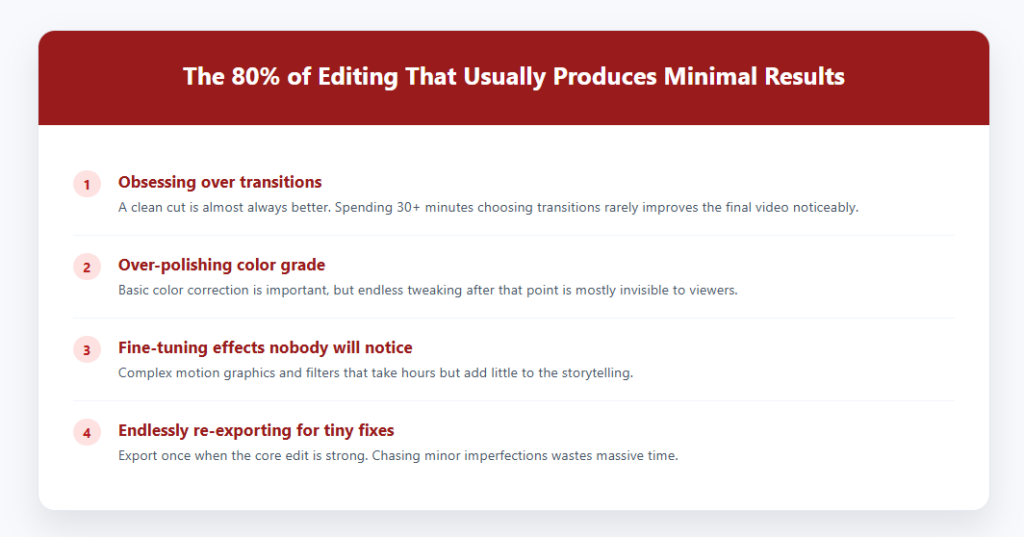
The 80% of Editing Time That Often Produces Minimal Results
Obsessing over transitions
Transitions are useful, but most editors — especially beginners — spend far more time on them than they deserve. A clean cut is almost always better than an elaborate transition. The most used transition in professional editing is the cut. That’s it.
If you find yourself spending 30 minutes choosing between transition styles, that’s a strong signal to redirect your energy somewhere else.
Over-polishing colour grade
Colour grading matters, but the marginal return drops off quickly. Getting your footage to a clean, consistent baseline takes maybe 10–15% of the time editors spend on colour. After that, most adjustments are invisible to viewers.
Get your white balance right, make sure your clips match each other in tone and brightness, and move on. Unless you’re producing cinematic content where the grade is part of the identity, diminishing returns set in fast.
Fine-tuning effects nobody will notice
Adding motion graphics, experimenting with filters, or layering effects can be genuinely fun — but fun and high-impact aren’t the same thing. If you’ve been working on a visual effect for more than 20 minutes and you’re still not sure it’s right, it’s probably not pulling enough weight to justify the time.
Endlessly re-exporting to fix minor issues
Export once when the edit is done, not five times chasing small imperfections. Export settings matter for quality, but most viewers can’t tell the difference between a thoughtfully optimized export and a slightly imperfect one. Prioritize getting the edit right before you touch export settings.
Applying the 80/20 Rule to Your Editing Workflow
The 80/20 rule doesn’t just apply to editing decisions. It applies to your entire workflow.
Shoot With the Edit in Mind
Good editing starts before you even open your editing software.
Spending a few extra minutes capturing cleaner audio, better framing, and stronger takes can eliminate hours of unnecessary work later.
A small improvement during filming often saves a huge amount of time in post-production.
If you’re deciding whether to edit it yourself or hand it to a studio, this startup video cost breakdown shows what each tier actually costs
Build the Rough Cut Before Polishing
One of the biggest mistakes editors make is polishing too early.
Before touching effects, transitions, color correction, or motion graphics, build a rough cut first. Get the story working. Make sure the pacing feels right. Put the strongest clips in the right order.
Refining a weak structure is like decorating a house before building the foundation.
Create Simple Editing Templates
If you regularly create the same type of content, stop rebuilding everything from scratch.
Save reusable intros, outros, lower thirds, captions, audio settings, and project presets. A few templates can eliminate repetitive tasks and free up more time for creative decisions.
Review What Viewers Actually Notice
Before spending another hour tweaking details, ask yourself a simple question:
Will viewers actually notice this change?
If the answer is no, your time is probably better spent improving the hook, tightening the pacing, cleaning up the audio, or moving on to the next video.
The goal isn’t to make every edit perfect. The goal is to spend your time where it creates the biggest improvement.
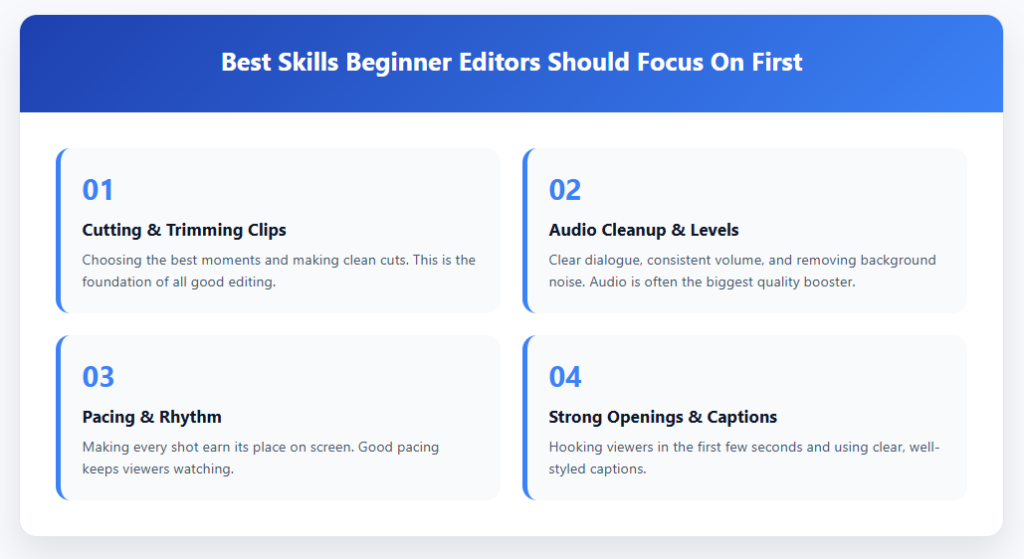
The Best Skills Beginner Editors Should Focus On First
Most beginner editors try to learn too many advanced techniques too early.
But the reality is that a small number of editing skills create most of the visible improvement in a video.
If you are new to editing, focus first on:
- Cutting clips cleanly
- Improving audio quality
- Fixing pacing
- Writing stronger hooks
- Using captions effectively
These core skills matter far more than cinematic transitions, advanced effects, or complicated colour grading.
Once those fundamentals become automatic, everything else becomes much easier to learn.
The 80/20 Rule Applied to Learning Video Editing
The same principle applies to learning itself. There are hundreds of features in any editing app, but a small handful of them are responsible for the vast majority of what professional-looking videos require.
If you’re learning video editing, focus first on:
- Cutting and trimming clips cleanly
- Adjusting audio levels and removing background noise
- Adding and styling captions
- Basic colour correction (not grading — just correction)
- Export settings for your target platform
These five areas will cover the overwhelming majority of what you need for real-world editing. Every other feature is additive — useful when the situation calls for it, but not the foundation.
Resist the urge to learn every feature before you start producing work. You’ll learn faster by doing, and you’ll naturally encounter the advanced features when you actually need them.
What This Looks Like in Practice
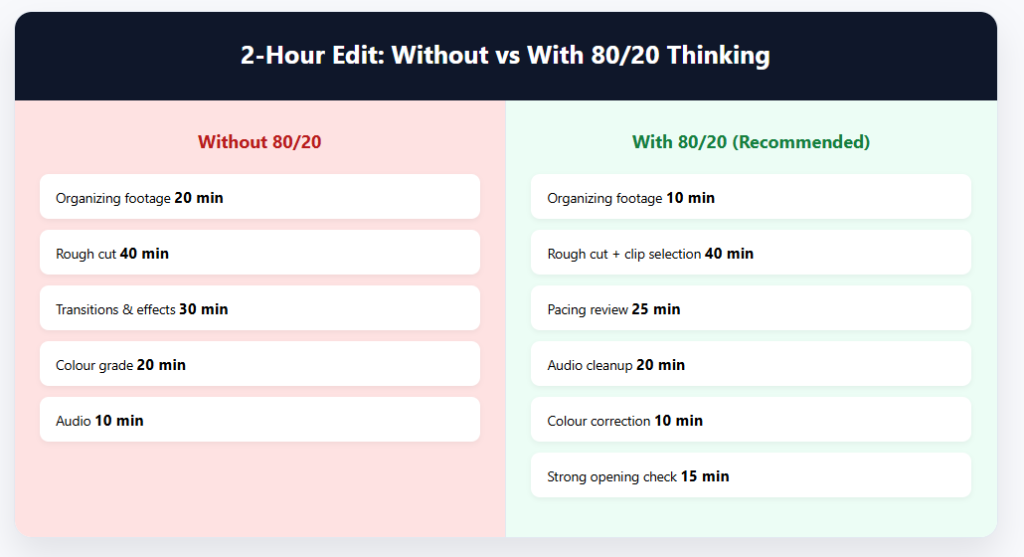
Say you have two hours to edit a 5-minute YouTube video. Here’s how the 80/20 approach changes how you allocate that time:
Without 80/20 thinking:
- 20 min: organising footage
- 40 min: rough cut
- 30 min: experimenting with transitions and effects
- 20 min: colour grade
- 10 min: audio
- 0 min: reviewing pacing and opening
With 80/20 thinking:
- 10 min: organizing footage
- 40 min: rough cut and clip selection
- 25 min: pacing review and tightening
- 20 min: audio cleanup and levels
- 10 min: colour correction to match clips
- 15 min: reviewing the opening and first 30 seconds
Same two hours. Completely different results — because the second approach concentrates effort on what actually determines how good the video is.
How I Apply the 80/20 Rule in My Favorite Video Editor (CapCut)
While the 80/20 rule applies to every editing app, I notice it most when I’m editing in CapCut.
CapCut gives creators access to an enormous number of tools, including transitions, effects, animations, filters, templates, AI features, and motion graphics.
That’s great for creativity, but it also makes it easy to spend time on things that have very little impact on the final video.
When I first started editing, I thought better videos came from using more features. Over time, I realized the biggest improvements almost always came from the same handful of editing decisions: choosing stronger clips, tightening pacing, improving audio, and creating a better opening.
In fact, some of my best-performing videos use surprisingly few effects. The difference is that the footage is stronger, the cuts are cleaner, and the story moves faster.
I’ve also learned that larger, more complicated projects aren’t always better. The more unnecessary clips, layers, and assets you add, the harder the project becomes to manage.
That’s one reason I try to keep my timelines as simple as possible and focus on the edits that actually improve the viewer experience.
If you’re editing larger projects in CapCut, you may also want to read my guide on whether CapCut can handle long videos and large files. It covers some of the performance and workflow challenges that can appear as projects become more complex.
For me, that’s the 80/20 rule in action: spending less time chasing features and more time improving the handful of things that viewers actually notice.
Frequently Asked Questions
What is the 80/20 rule in video editing?
The 80/20 rule suggests that a small number of editing decisions create most of a video’s quality. Skills like clip selection, pacing, audio cleanup, and strong openings typically have the biggest impact on viewer experience.
How can the 80/20 rule help me edit videos faster?
By focusing on high-impact tasks first and spending less time on low-value activities like excessive transitions or effects, you can finish projects faster while still improving overall video quality.
What editing tasks give the biggest return on time invested?
Strong clip selection, clean audio, good pacing, and an engaging opening usually provide the largest improvements in viewer retention and perceived production quality.
Do professional editors follow the 80/20 rule?
Most experienced editors naturally apply it by prioritizing storytelling, pacing, and audio quality rather than spending excessive time on effects, transitions, or minor visual tweaks.
What are common examples of low-impact editing work?
Overusing transitions, endlessly tweaking color grades, testing effects viewers won’t notice, and repeatedly re-exporting videos are common examples of tasks that often consume time without significantly improving results.
The Bottom Line
The 80/20 rule in video editing is really about one thing: honesty about where your time and energy are going versus where they should be going.
The things that make the biggest difference are clip selection, audio quality, pacing, and a strong opening. If those four things are right, your video will work. Everything else is refinement.
The things that feel productive but often aren’t are obsessive transition-hunting, endless colour tweaking, effects that viewers won’t notice, and over-exporting. These can eat hours without meaningfully improving what viewers experience.
Start applying this to your next edit. Before you touch any effect or setting, ask yourself: is this one of the 20% of things that actually moves the needle? If you’re not sure, it probably isn’t.
Working on making your editing process faster and less stressful? Check out our guides on whether CapCut can handle long videos and large files, how to reduce video file size in CapCut, and whether CapCut is safe to use.
