
Best CapCut Template For Boys (Top Viral Templates)

Are your edits looking strong… but not getting the reaction you expected?
A lot of the time, it is not your clips. It is the template.
The best CapCut template for boys is not just about adding aggressive transitions or loud effects. It is about choosing the right structure for your vibe.
Gym edits, car clips, gaming highlights, glow-ups, motivational reels, and clean lifestyle content all need different pacing.
When the template matches your energy, the edit feels sharp and intentional. When it does not, it feels forced.
Let’s break down the templates that actually work and how to use them properly.
9 Best CapCut Template For Boys That Actually Perform
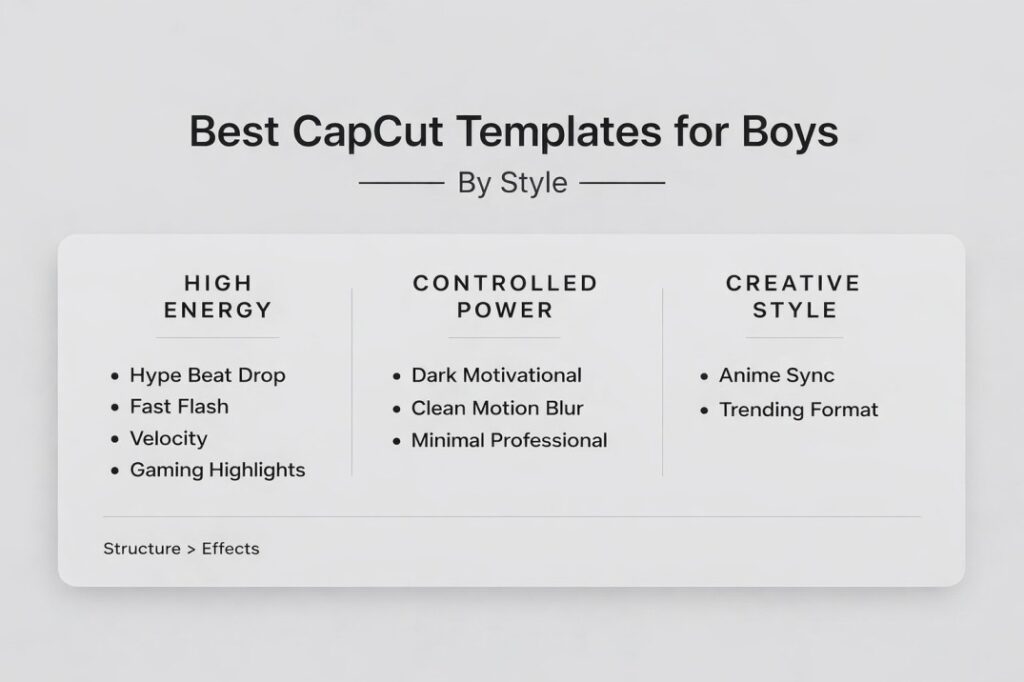
If you want edits that look clean, powerful, and scroll-stopping, these are the best CapCut templates for boys based on content type and engagement performance.
1) Hype Beat Drop Template
Best for: gym edits, transformations, glow-ups
Why it works: strong bass drops create impact moments that increase replays.
2) Fast Flash Transition Template
Best for: aggressive edits, hype reels
Why it works: sharp cuts grab attention in the first 2 seconds.
3) Clean Motion Blur Template
Best for: lifestyle, outfit edits, casual content
Why it works: keeps edits sharp without overloading effects.
4) Car Velocity Template
Best for: rolling shots, night drives, speed edits
Why it works: speed ramps create movement even in simple clips.
5) Gaming Highlight Template
Best for: clutch plays, action moments
Why it works: fast cuts maintain viewer focus during high-action scenes.
6) Dark Motivational Template
Best for: mindset reels, villain arc edits
Why it works: controlled pacing builds intensity instead of chaos.
7) Minimal Professional Template
Best for: business content, self-improvement clips
Why it works: clean transitions make content feel intentional.
8) Anime / Sync Template
Best for: anime edits, character builds
Why it works: dramatic sync amplifies emotional scenes.
9) Trending Template (Current Viral Style)
Best for: quick reach boosts
Why it works: familiar formats increase replay and sharing.
Best CapCut Template For Boys By Content Type
| Content Type | Best Template Style | Why It Works |
|---|---|---|
| Gym / Transformation | Hype Beat Drop | Strong impact moments increase replay rate |
| Car Edits | Velocity / Motion Blur | Adds speed and intensity |
| Gaming Clips | Gaming Highlight | Fast pacing keeps viewers locked in |
| Motivational Reels | Dark Cinematic | Builds emotion without messy effects |
| Lifestyle Content | Clean Transition | Looks polished and professional |
If you are a CapCut beginner i recommend your understand how to use CapCut for Social media (TikTok, Instagram, etc)
Music And Timing Tips
Music and timing matter more than effects. A template can be perfect, but if your clips do not match the beat, the edit will still feel off.
Start by choosing a template that uses a sound you actually like. If the audio does not fit your content, the whole edit feels mismatched. Hype edits need strong bass drops. Clean lifestyle edits work better with smoother tracks. Gaming edits usually perform best with fast, energetic sounds.
Next, make sure your best clip lands on the biggest beat drop. That is the moment viewers are waiting for. If the drop hits and the clip is average, you lose the impact.
Keep your hook strong. The first one to two seconds decide everything. Use your most visually interesting clip first. For gym edits, that could be a flex or lift. For car edits, a clean rolling shot. For gaming, a clutch moment.
If the template feels too fast, swap to shorter clips with clear action. If it feels too slow, choose a template with tighter cuts instead of forcing your clips to stretch.
Finally, do not ignore volume. If your clip audio is loud and the music is quiet, the edit feels weak. If the music is overpowering and you want voice or dialogue, choose a cleaner template style and adjust audio levels so it stays clear.
When music, timing, and clip selection align, your edit looks instantly more professional even if the template is simple.
Best CapCut Templates For Edits (For Boys)
If you’re looking for the best CapCut templates for edits, don’t chase the craziest effects. Chase a clean structure. The edits that get the most replays usually follow the same flow: hook → buildup → beat drop → clean finish.
Here’s the rule: one main transition style is better than ten random ones. When the same style repeats (motion blur, flash, or beat cuts), the edit feels sharp and intentional instead of noisy.
Match the template to your vibe: if your content is aggressive (gym, cars, gaming), go for fast beat sync or beat drop templates. If you want a more controlled, confident look (lifestyle, clean fits, motivational), use clean motion transitions or a minimal cinematic template.
The best template is the one that makes your best clip land at the best moment. Save your strongest shot for the drop, keep the hook strong, and let the structure do the work.
Pro tip (makes edits hit harder)
Use the best clip first (hook), then save your cleanest “wow” moment for the beat drop. If you only change one thing, change that. It boosts replays way more than adding extra effects.
Common Mistakes to Avoid
Even the best CapCut template for boys can fall flat if it’s used the wrong way. Most issues are simple but make a big difference.
One mistake is overdoing effects. Too many flashes, shakes, and transitions can make a gym or car edit look messy instead of powerful. Strong edits usually have one main impact moment, not constant noise.
Another mistake is poor clip placement. If your strongest scene does not land on the beat drop, you waste the template’s structure. Always save your best moment for the biggest impact point.
Low-quality footage is another problem. Dark gym clips, blurry car shots, or low-resolution gameplay will not look sharp no matter how good the template is. Clean lighting and stable framing matter.
Using the wrong energy level is also common. A slow cinematic template will not fit aggressive hype content. A chaotic beat drop template will ruin a calm motivational message.
Finally, copying a trending template exactly like everyone else limits growth. If your clip quality and timing do not stand out, you blend in.
Templates are just the starting point. If you want your edits to look clean, original, and built for TikTok, Reels, or Shorts, read our full guide on how to use CapCut templates for social media before you export
It shows you how to customize timing, text, and structure so your content doesn’t look copy-paste.
Avoiding these mistakes makes your edit look intentional instead of rushed. When structure, energy, and quality align, the result feels clean and powerful.
Final Thoughts: Which Template Should You Use?
If you want maximum impact, start with a hype beat drop template. If you prefer a sharper and more controlled vibe, use clean motion transitions. If you’re testing growth, mix one trending template with one evergreen style and compare results.
The best CapCut template for boys is not the loudest one. It’s the one that matches your energy, your clips, and your audience.
Strong footage. Correct timing. Clean structure.
That’s what makes an edit hit.
