
Best CapCut Template Name (Popular Names And How To Search)

Are you trying to find a CapCut template you saw on TikTok, but the name you typed in keeps giving you the wrong results?
That is normal.
CapCut template names are not always official, not always consistent, and sometimes they change or disappear.
One person might call it by the song. Another might call it by the effect. CapCut might label it under a creator name you have never seen.
This post fixes that.
You will learn what “template name” really means, the most common name patterns people search for, and the fastest ways to find the exact template you want inside CapCut or from TikTok links.
Quick answer
A “CapCut template name” is usually one of these: the template card label, the song name, the effect style (beat sync, glow, cinematic), or the creator name. If the exact name doesn’t work, search using 2–3 core keywords (like “beat 3”, “photo recap”, “slow zoom”), or use TikTok’s “Use Template in CapCut” button to open the exact template instantly.
What “Template Name” Means In CapCut
A “CapCut template name” is not always a real, official title.
Most of the time, people use the word name to mean one of these things:
- The text label shown on the template card in CapCut
- The song or sound attached to the template
- The main effect style, like beat sync, flash, or cinematic
- The creator’s name of the account that posted the template
- A nickname people use in TikTok comments
That is why searching can feel frustrating. You might type the name you saw on TikTok and get nothing, because CapCut stores it under a different label.
Template names also change. A template can get reuploaded, renamed, or replaced by a newer version with the same style. Sometimes it is removed completely.
So the goal is not just memorizing names. The goal is learning how to search using the right clues so you can find the template fast, even if the exact name is different.
If you want a full breakdown of how templates work across TikTok, Reels, and Shorts, see our complete guide to CapCut templates for social media , where we cover formats, trends, and how to choose the right template for consistent views.
CapCut Template Name Patterns (Cheat Sheet)
| What people call it | What it usually means | What to search instead |
|---|---|---|
| “Beat 3 / Beat 5” | Beat sync template with a set number of cut points | beat 3, beat sync, beat drop |
| Song name | Template tied to trending audio | song title + template, song title + beat |
| Effect name | Flash, glow, shake, velocity, slow zoom | flash edit, glow up, velocity, slow zoom |
| Creator name | Template uploaded under an account label | creator name + template |
| Nickname from comments | Not official, often wrong or shortened | search the vibe: recap, cinematic, beat, photo dump |
How To Search CapCut Templates By Name
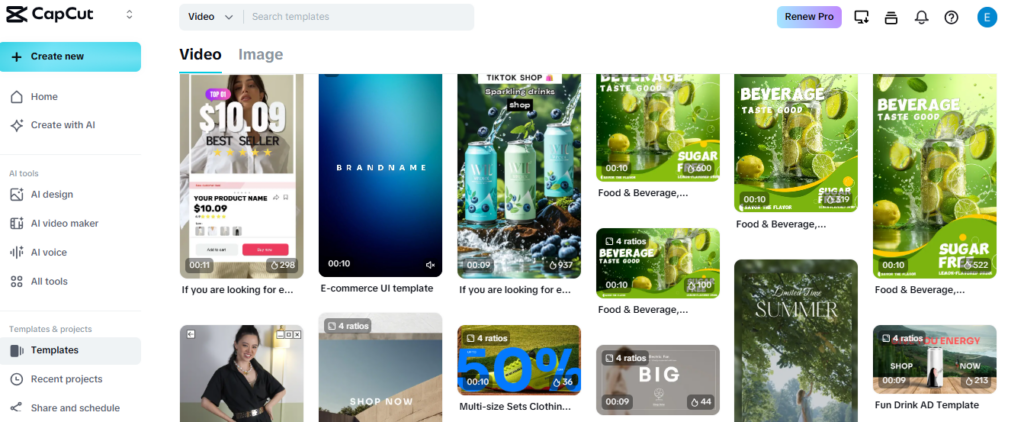
Knowing the template name is helpful, but knowing how to search properly is what actually gets results.
Search Inside CapCut
Open the Templates tab and use short keyword combinations instead of long full names. For example:
- beat 3
- photo recap
- cinematic slow
- flash edit
- healing
Avoid typing long phrases exactly as you saw them in comments. CapCut search works better with shorter, descriptive keywords.
If the first search does not work, simplify it. Remove extra words and focus on the core term like beat, recap, glow, or cinematic.
Also, check the trending or popular filters. Sometimes the template is easier to find by browsing than by typing the full name.
Search From TikTok Links
Many viral CapCut templates spread through TikTok.
If you see a video using a template, look above the caption for a button that says “Use Template in CapCut.” Tapping that takes you directly to the exact template without searching.
If there is no button, tap the sound used in the video. Scroll through other videos using that sound. Often, one of them will include the CapCut template link.
You can also check comments. Creators frequently reply with the template name or share the link when asked.
Searching smart is about flexibility. If the full name does not work, use keywords, song titles, or creator names instead. That approach saves time and reduces frustration.
Common CapCut Template Name Searches People Use
If you don’t know the exact name, these are the search phrases that usually get results because they match how CapCut labels templates.
- beat sync
- beat drop
- beat 3 / beat 5
- photo dump
- photo recap
- recently / life lately
- glow up
- flash edit
- velocity/speed ramp
- slow zoom
- cinematic
- POV/story
Start with one phrase, then add one extra detail if you need it (like “soft”, “dark”, “aesthetic”, or a number).
What To Do If You Can’t Find The Template
Sometimes you do everything right and still cannot find the exact CapCut template. That does not always mean you made a mistake. Templates can change, disappear, or get reuploaded under different names.
First, try searching by the sound. If you remember the song used, type the song title into CapCut search or TikTok search along with the word “CapCut template.” Many templates are tied to the audio, so audio-based searching often works better than name-based searching.
Second, search by effect style. If you remember what the template looked like, use descriptive keywords like beat drop, flash, glow, slow zoom, photo dump, or cinematic. Most templates are variations of a few popular formats, so you can usually find something extremely close.
Third, check the creator. If you saw the template on TikTok, the creator who posted the video might have linked it in other posts. Visit their profile and look for another template video with the “Use Template in CapCut” button.
If the template was removed, the fastest solution is to find a duplicate. Many viral templates get reuploaded by other accounts. Searching using the main keyword plus “template” often reveals copies.
Finally, save templates when you find them. If you use a template often, add it to favorites so you do not lose it when the trend fades.
Even when a template disappears, the format typically remains. Once you know what style it was, you can recreate the same vibe with a similar template.
FAQs About CapCut Template Names
Final Tips
If you want to find the best CapCut template name fast, treat the name like a clue, not a guarantee.
Use short keywords inside CapCut instead of long exact phrases. Search by the core style words like beat, recap, glow, cinematic, or POV.
If you saw the template on TikTok, the fastest method is always the direct “Use Template in CapCut” link.
When search fails, switch to sound-based searching. Many templates are built around an audio trend, and finding the sound often leads you to the template.
Also, save what you find. Favorite templates you like so you do not have to hunt for them again later.
Once you understand how template naming works, you stop wasting time scrolling and start finding the exact template you want in minutes.
