
Best CapCut Templates For Girls (Top Trendy Templates)

Are your edits cute… but not hitting the way you want?
The right CapCut template can completely change how your video feels. Soft transitions, glow effects, smooth beat drops, and aesthetic pacing can turn simple photos or clips into something that looks polished and intentional.
The best CapCut template for girls’ edits is not about adding random effects. It is about choosing a style that matches your vibe.
So, whether you are posting a glow-up, birthday recap, self-love video, or aesthetic photo dump, structure makes the difference.
Let’s go through the templates that actually make your edits stand out.
For a full breakdown of how to choose the right templates across platforms, see our CapCut templates for social media guide .
9 Best CapCut Templates For Girls Edits That Actually Look Premium
If you want your edits to feel aesthetic, cute, confident, or clean, these are the best CapCut templates for girl content based on vibe and engagement.
1) Soft Aesthetic Zoom Template
Best for: lifestyle clips, coffee runs, travel, outfit edits
Why it works: gentle zoom and smooth motion make simple clips feel intentional.
2) Cute Photo Dump Template
Best for: “recently” recaps, friend groups, birthdays
Why it works: structured pacing keeps multiple photos from feeling random.
3) Glow-Up Beat Drop Template
Best for: makeup looks, hair changes, transformations
Why it works: strong reveal moment increases replays.
4) Soft Cinematic Template
Best for: relationship edits, memories, emotional content
Why it works: slow fades create warmth and storytelling feel.
5) Pastel Flash Reveal Template
Best for: confident outfit switches and bold edits
Why it works: light flashes add energy without looking aggressive.
6) Minimal Clean Transition Template
Best for: polished lifestyle or self-improvement content
Why it works: controlled pacing keeps the edit looking premium.
7) Birthday Recap Template
Best for: milestone moments and celebration videos
Why it works: emotional pacing boosts engagement.
8) Healing / Emotional Style Template
Best for: self-love edits and reflective moments
Why it works: soft music sync builds connection.
9) Trending Girl Edit Template
Best for: quick reach when a format is going viral
Why it works: familiar structures increase shares.
Are you a guy? Read the Best CapCut Template for Boys guide.
Best CapCut Templates For Girls Edits By Vibe
| Vibe | Best Template Type | Why It Works |
|---|---|---|
| Soft & Calm | Soft Cinematic | Creates emotional and aesthetic feel |
| Cute & Casual | Photo Dump | Keeps multiple moments organized |
| Confident & Bold | Glow-Up Beat Drop | Strong reveal increases impact |
| Clean & Minimal | Minimal Transition | Looks polished and intentional |
| Trend-Focused | Trending Template | Leverages algorithm momentum |
How To Pick The Right Template For Your Style
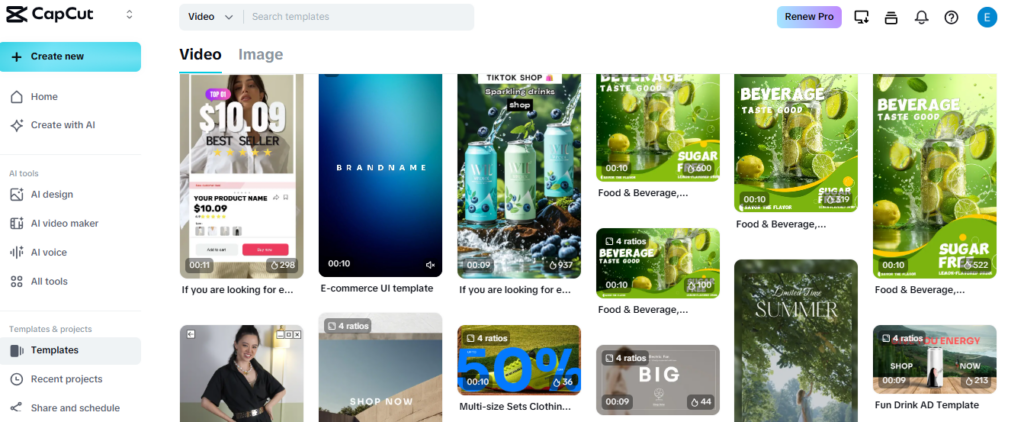
Not every aesthetic template will match your content. The key is choosing one that fits your personality and the message behind your video.
If your vibe is soft and minimal, go for slow cinematic or gentle zoom templates. These work best with natural lighting, neutral colors, and calm music. The goal is to feel effortless, not dramatic.
If your style is confident and bold, beat sync or glow reveal templates may fit better. These highlight transitions and emphasize changes like outfit switches, makeup transformations, or glow-ups.
For cute and casual content, photo dump or recap templates are strong options. They allow you to share multiple moments without overcomplicating the edit.
Also consider color tone. If your clips are bright and pastel, choose templates with light transitions. If your clips are darker or more dramatic, avoid overly soft effects that wash out the mood.
The best CapCut template for girl edits should feel like it supports your personality. When the style aligns with your content, the result feels natural instead of forced.
Choosing the right vibe is step one. Making it look polished across TikTok, Reels, and Shorts is step two.
Best CapCut Templates For Photos (Girl Edits)
If you are editing mostly photos instead of video clips, choose templates with smoother pacing. Photo recap, aesthetic zoom, and collage-style templates perform best because they add motion without overwhelming the image.
Avoid overly aggressive flash transitions when using still images. Photos need softer movement to look premium. Subtle zoom, slow fade, and light beat sync usually perform better than heavy shake effects.
The best CapCut template for photos should enhance your pictures, not compete with them.
Caption/Text Tips To Match The Vibe
A lot of girl edits look good, but still underperform because the text does not match the vibe. Small caption choices can improve retention and make the video feel more intentional.
Keep text short. One strong line is better than a paragraph. CapCut templates move fast, so long captions get skipped.
Match your tone to the template style. If you are using a soft cinematic template, text that feels calm and simple works best. If you are using beat sync or glow effects, stronger and bolder lines fit better.
Use “relatable” wording. People engage more when they feel like the video is about them too. Simple phrases that feel real often perform better than trying to sound perfect.
Avoid covering the main subject. If the template places text in a bad spot, adjust it. A face or outfit should never be blocked by captions.
If you want easy caption directions, here are vibe-based examples you can adapt:
- Soft aesthetic: “just a little life update”.
- Cute recap: “recently” or “life lately”.
- Glow-up: “watch this” or “new era”,
- Memories: “one of my favorite days”.
When text matches the vibe, the edit feels complete. It looks planned instead of rushed, and people are more likely to watch to the end.
Common Mistakes to Avoid
Even with the best CapCut template for girl edits, small mistakes can make the final video feel messy or overly edited.
One common mistake is picking a template that does not match the clips. Soft aesthetic templates look strange with chaotic footage.
Flashy beat drop templates look too aggressive with calm, sentimental moments. Match the energy first.
Another mistake is overusing glow and flash effects. These can look amazing for a reveal, but if every transition is flashing, the edit starts to feel noisy and cheap.
One strong impact moment usually looks better than constant effects.
Using low-quality photos is also a problem. Blurry or dark images look worse once motion and transitions are added. Choose your sharpest photos and best-lit clips.
Cropping is another issue. Faces cut off, outfits cropped awkwardly, or text blocking the subject instantly makes the edit feel careless. Always preview and swap any clip that does not fit cleanly.
When you keep it clean, the template enhances your vibe instead of overpowering it. That is what makes the edit look premium.
Final Thoughts: Which Template Should You Start With?
If you want safe and aesthetic, start with a soft cinematic template. If you want impact and confidence, go with a glow-up beat drop. If you want something cute and easy, choose a structured photo dump template.
The best CapCut template for girl edits is not the one with the most effects. It is the one that matches your vibe and keeps your content clean.
When the structure fits your personality, your edits stop feeling random and start looking intentional.
