
15 Best CapCut Templates New Trend (Latest Viral Templates)

Are you using CapCut templates that were viral last month… and wondering why your views feel stuck?
Trends in short-form video move fast. A CapCut template can explode across TikTok and Reels in days, then disappear just as quickly. If you miss the wave, your edit looks late instead of fresh.
The best CapCut template new trend is not just about flashy effects. It is about timing, music choice, pacing, and how well the format matches what people are already watching.
When you catch a trend early, even simple clips can gain strong reach.
In this guide, you will see which CapCut template trends are performing right now, how to spot them before they peak, and how to use them without looking copy-paste.
15 Best CapCut Template New Trend Formats To Use Right Now
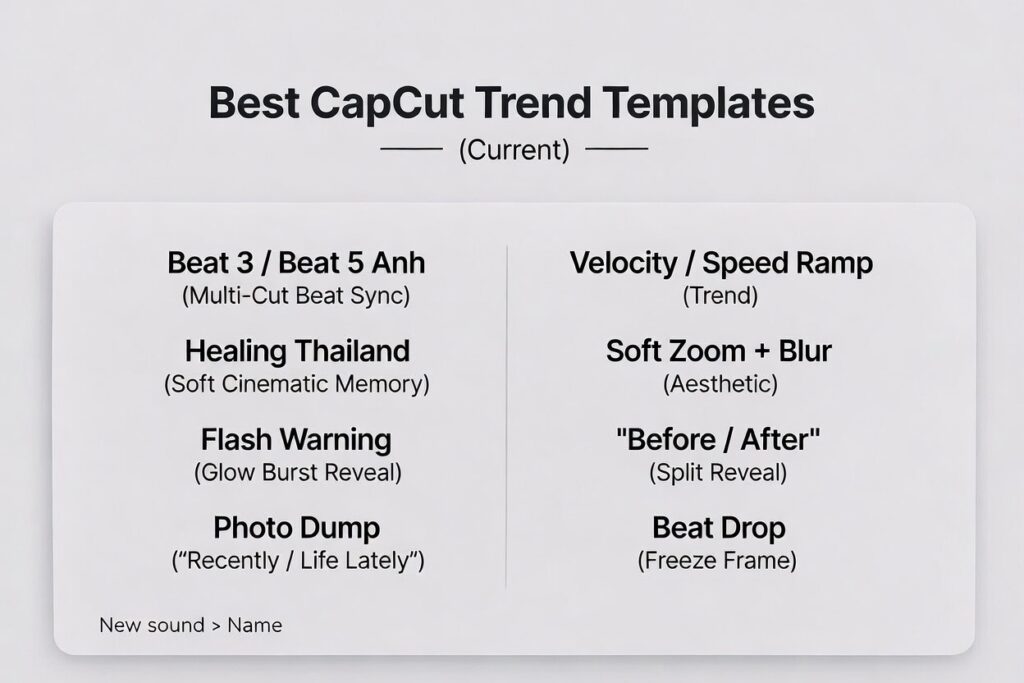
If you’re searching for the best CapCut template new trend, don’t chase names. Chase formats. Names change, but the structures repeat. These are the trend formats that keep showing up on TikTok, Reels, and Shorts.
1) Beat 3 / Beat 5 Anh (Multi-Cut Beat Sync)
Best for: glow-ups, gym edits, cars, transformations
Why it works: fast cuts + tight beat timing boost replays.
2) Healing Thailand (Soft Cinematic Memory)
Best for: travel, memories, aesthetic lifestyle
Why it works: warm pacing keeps people watching longer.
3) Flash Warning / Glow Burst Reveal
Best for: dramatic reveals, “new era” edits
Why it works: instant impact in the first second.
4) Photo Dump “Recently / Life Lately”
Best for: casual recaps, friends, birthdays
Why it works: easy to copy and always relatable.
5) Cinematic Text Hook Template
Best for: storytelling, motivation, brand content
Why it works: the hook lands before people scroll.
6) Velocity / Speed Ramp Trend
Best for: cars, sports, action clips
Why it works: speed changes create movement fast.
7) Soft Zoom + Blur Aesthetic
Best for: outfit edits, coffee runs, calm lifestyle
Why it works: looks premium without heavy effects.
8) “Before / After” Split Reveal
Best for: transformations, makeovers, progress edits
Why it works: people stay for the payoff.
9) Beat Drop Freeze Frame
Best for: flex shots, hero moments, big reveals
Why it works: it punctuates the beat and increases replay value.
10) Collage Grid Photo Trend
Best for: photo-heavy content, dumps, recaps
Why it works: keeps photos moving without feeling messy.
11) “Villain Arc” Dark Mood Trend
Best for: motivation edits, confidence content
Why it works: familiar format + strong emotion.
12) Light Glow + Sparkle Trend
Best for: beauty, self-love, cute edits
Why it works: adds pop without looking aggressive.
13) Minimal Clean Business Trend
Best for: tips, tutorials, creator brand posts
Why it works: clean visuals keep focus on the message.
14) “One Line Story” Hook Template
Best for: dramatic storytelling clips
Why it works: one strong line boosts retention.
15) Sound-Driven Remix Trend
Best for: any niche when a sound is rising
Why it works: the same structure gets reused with a new sound wave.
Want more than just trends? Learn how to consistently create high-performing videos across platforms in our complete guide to CapCut templates for social media , where we break down the best formats, strategies, and template choices for TikTok, Reels, and Shorts.
Best Trending CapCut Templates By Content Type
| What you’re posting | Best trend format | Why it hits |
|---|---|---|
| Tutorials/tips | Beat 3/5 Anh, Before/After Split | Strong payoff + replay-friendly pacing |
| Photo recaps | Life Lately, Collage Grid | Easy to copy, always relatable |
| Travel / memories | Healing Thailand, Soft Cinematic | Mood + storytelling increases watch time |
| Travel/memories | Velocity, Beat Drop Freeze | Motion + impact moments stop the scroll |
| Tutorials / tips | Clean Business, Cinematic Text Hook | Hook first, then clarity |
How To Find New Trending Templates In CapCut
Finding the best CapCut template new trend is less about luck and more about pattern recognition. Most creators discover trends too late because they only look at what is already everywhere.
Start inside CapCut. Go to the Templates section and check the trending or popular tab. Pay attention to templates with rapidly increasing usage numbers, not just the ones already at the top. Fast growth usually signals a rising trend.
Next, use TikTok strategically. Scroll your For You page and watch for repeated edit structures. If you see the same transition timing, same text format, or same beat drop pattern across different accounts, that is not random. It is usually a template spreading.
Tap on the sound being used. If the number of videos using that sound is climbing quickly, there is a strong chance a related CapCut template is gaining traction.
Also read comments. Creators often ask, “Template name?” or “CapCut link?” When multiple people request it, the format is trending.
Another method is searching directly inside CapCut using keywords like:
- beat drop new
- trending edit
- flash effect
- 2026 trend
- viral template
Sorting by popularity and recency helps surface newer templates before they peak.
The key is consistency. Spend a few minutes daily checking patterns. When you recognize repetition early, you can use the trend while it is still fresh instead of after it becomes oversaturated.
Trend Tracker Checklist (How To Know It’s Early)
- You see the same edit structure on different accounts within 24–72 hours.
- People ask “template name?” repeatedly in the comments.
- The sound is rising, and the edit timing keeps repeating.
- Results look different (not copy-paste). Variety means it’s still usable.
- CapCut Trending tab shows fast movement, not just the same #1 template every day.
If it’s everywhere and every version looks identical, you’re late. If it’s repeating but still evolving, you’re early.
Why Trends Blow Up (And How Long They Last)
A CapCut template trend usually explodes for one reason: it makes creators look skilled with almost no effort. When a format is easy to copy and looks impressive fast, it spreads.
The Format Is Instantly Recognizable
Most viral templates have a signature moment people remember. A beat drop with a hard cut. A glow burst on a face reveal. A text hook that lands before the first transition. Viewers recognize the pattern, and that familiarity makes the video easier to watch.
When viewers know what is coming, they often stay to see how the creator personalizes it. That boosts retention, and retention boosts distribution.
The Sound Carries The Trend
CapCut template trends are often attached to a sound cycle. When a song rises on TikTok or Reels, templates built around its beat structure rise with it. That is why you will see the same edit format return with a different sound a few weeks later.
If the sound drops in popularity, the template usually drops too, unless the format is flexible enough to survive with new music.
It Fits The “Copy This” Culture
Short-form platforms reward repetition. A template trend is basically a repeatable script. Creators do not need to invent a new idea. They just plug in new clips and post. That lowers the barrier, so more people join in fast.
The easier it is to recreate, the faster it spreads.
The Hook Is Built In
A strong template trend gives you a hook without thinking. Fast movement in the first second, bold text, a hard cut on the beat, a dramatic reveal. That is why templates outperform many handmade edits. They are designed for scroll behavior.
When a template consistently stops the scroll, it becomes a trend.
How Long Most Template Trends Last
Most CapCut template trends have a short lifespan:
- Fast, flashy edit trends often peak in 3 to 10 days
- Medium-speed recap trends can last 2 to 4 weeks
- Cinematic and photo dump formats can resurface for months because they are flexible
The difference is in reuse potential. If a template only works with one specific sound or one type of clip, it burns out fast. If it works across multiple niches and sounds, it sticks around.
How To Tell If A Trend Is Still Worth Using
A trend is still usable when you see variety. Different creators. Different niches. Different clip types. If every video looks identical, the trend is already saturated.
A simple rule: if you are seeing it for the first time, it is often already late. The best time to use a trend is when it is repeating but still evolving.
How To Use A Trending Template Without Looking Copy-Paste
Using a trending CapCut template can boost reach, but copying it exactly the way everyone else does usually limits results. The goal is to ride the trend, not blend into it.
Start with clip selection. Most people use average footage in trending templates. If you use stronger visuals, sharper lighting, or better framing, your version instantly stands out even if the structure is the same.
Next, change the pacing slightly if possible. Some templates allow small adjustments in clip length. If you can stretch or tighten a moment to land harder on the beat, do it. Micro-adjustments create a cleaner finish.
Personalize the text. Many trending templates include default captions or hooks. Rewrite them in your own tone. A stronger hook in the first line can increase retention without changing the template itself.
Consider niche adaptation. If a template is trending in fitness, try adapting it to travel, tech, fashion, or storytelling. When viewers see a familiar format used in a different context, it feels fresh again.
Also ,avoid stacking extra effects. The template already carries a strong visual structure. Adding more flashes or transitions often makes the edit look messy.
Finally, move quickly. Trending CapCut templates reward speed. The earlier you post after spotting a trend, the higher your chance of riding the wave before saturation hits.
When you combine trend awareness with personalization, your edit benefits from the format while still feeling original.
When To Use Trending Templates vs Evergreen Templates
Use trending templates when you want reach fast. Post quickly, keep it simple, and let the format do the work.
Use evergreen templates when you want consistency. Beat sync, cinematic, and photo recap styles keep working even when a specific trend fades.
The best strategy is rotation: 1 trending template + 1 evergreen template. Compare results, then repeat the winner.
FAQs About Trending CapCut Templates
Final Recommendations
If you are searching for the best CapCut template new trend, focus on timing and structure instead of hype.
Beat drop variations like Beat 3 Anh and Beat 5 Anh continue to resurface with new sounds. Cinematic formats like Healing Thailand return in waves with different music. Flash and glow reveal templates explode quickly but fade just as fast. Photo dump recap trends are safer because they adapt easily to new sounds and seasons.
The smartest approach is balance. Use trending templates to capture short bursts of reach, but keep a few evergreen formats in your rotation. That way your content does not depend entirely on short-lived waves.
Watch patterns daily. Look for repetition before saturation. Act fast when you notice a format spreading. Adjust the hook and clip quality so your version stands out.
Trends reward speed, but quality keeps people watching. When you combine both, you give yourself the strongest chance to grow.
