

Can CapCut really grow with you — from free hobby edits to full-team content production? If you’re comparing CapCut Free vs Pro vs Teams, you’re not alone.
CapCut’s pricing has shifted, and knowing what each plan actually offers can save you money and frustration.
- The Free version offers basic editing tools and templates at $0 — ideal for quick TikToks and personal projects.
- Pro unlocks premium tools like advanced AI editing, cloud storage, and 4K exports for around $19.99/mo or $179.99/yr.
- Teams builds on Pro with collaboration features and shared assets at about $24.99/mo or $214.99/yr per user, ideal for agencies and groups.
In this guide, you’ll learn not just what each plan costs, but what it means — so you can pick the one that fits your workflow and budget.
Table of Contents
- What CapCut Is and Who It’s For
- CapCut Free (
): What You Really Get
- CapCut Pro: Is It Worth Your Money?
- CapCut Teams
- CapCut Free vs Pro vs Teams: Side-by-Side Comparison
- The Real Difference
- Which CapCut Plan Should You Choose? By Use Case
- Hidden Trade-Offs Most CapCut Reviews Don’t Mention
- The Smart Way to Think About CapCut Plans
- CapCut Pricing Breakdown: Quick Overview
- When Upgrading Actually Makes Financial Sense
- Frequently Asked Questions
- Final Verdict: CapCut Free vs Pro vs Teams
What CapCut Is and Who It’s For
Look, CapCut didn’t get popular by accident.
It’s built for people who want to create scroll-stopping videos fast, without learning complicated editing software. Think TikTok, Reels, Shorts, and quick YouTube videos. Drag, drop, tweak, post. That’s the whole vibe.
CapCut shines when:
- Speed matters more than perfection
- You’re creating content often
- You don’t want to fight timelines, layers, and confusing menus
It’s especially loved by solo creators, influencers, small brands, and social teams who need results now, not after weeks of learning curves.
But here’s the honest part.
CapCut is not made for:
- Long-form cinematic editing
- Complex color grading workflows
- Heavy professional film production
If you want Hollywood-level control, this isn’t your tool. If you want content that performs on social platforms and gets done quickly, CapCut hits the sweet spot.
CapCut Free ($0): What You Really Get
CapCut Free is generous. That’s why so many people stick with it longer than they expect.
You can cut clips, add music, throw on text, use templates, and export decent-looking videos without paying a cent.
For casual creators or anyone just testing content ideas, this feels almost too good to be true.
Here’s what CapCut Free does well.
You can:
- Edit short-form videos quickly
- Use basic effects, transitions, and text
- Access a large library of templates
- Export without a hard paywall slapping you in the face
For many people, that’s enough. Especially if you’re posting a few times a week and just want your videos to look clean and modern.
But here’s where things start to pinch.
Most users hit limits when:
- You want premium effects or fonts and keep seeing locked icons
- You need higher consistency across videos
- You’re editing often and wasting time working around restrictions
Free is great for learning and light posting. It’s not built for speed at scale.
Who CapCut Free is perfect for: Beginners. Hobby creators. Anyone validating ideas before committing money.
Who will outgrow it fast: Daily posters. Brand accounts. Creators who care about polish and efficiency.
CapCut Pro: Is It Worth Your Money?
This is where CapCut starts to feel less like a toy and more like a real workflow tool.
CapCut Pro removes most of the friction you feel on the free plan. Those locked effects, fonts, and tools? Gone.
Editing becomes faster because you stop hunting for workarounds and start focusing on the video itself.
What really changes with Pro isn’t just access. It’s time.
With Pro, you spend less effort making videos look good and more time shipping content. That matters if you’re posting daily or managing multiple platforms.
Pro makes sense when:
- You create content consistently
- You want cleaner branding across videos
- You rely on effects, text styles, and polish to stand out
But let’s be honest. Pro isn’t for everyone.
Pro can be a waste if:
- You post once in a while
- Templates do most of the heavy lifting for you
- You don’t care about visual consistency
If CapCut Free already feels “good enough,” Pro won’t magically change your results. It pays off only when speed, consistency, and quality actually matter to your goals.
CapCut Teams
CapCut Teams isn’t an upgrade for better effects. It’s an upgrade for how people work together.
If Pro is about editing faster, Teams is about not stepping on each other’s toes.
This plan is built for situations where multiple people touch the same content. Editors, social managers, brand leads
Everyone needs access. Everyone needs consistency. And nobody wants files flying around on random drives.
Teams start to make sense when:
- More than one person edits or reviews videos
- Brand assets need to stay consistent
- Projects get reused, updated, or repurposed
The biggest win here is shared control. Templates, brand elements, and projects live in one place. That alone can save hours each week and prevent messy mistakes.
But Teams is not a flex plan.
You should skip Teams if:
- You’re a solo creator
- You don’t collaborate on edits
- Pro already covers your needs
Paying for Teams without collaboration needs is like renting a conference room to work alone. It looks official, but it’s pointless.

CapCut Free vs Pro vs Teams: Side-by-Side Comparison
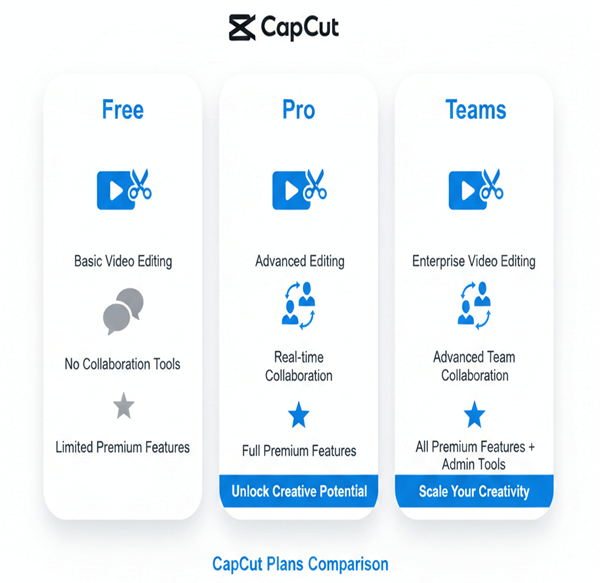
Here is the quick difference between CapCut Free, CapCut Pro, and CapCut Teams before we break down who each plan is actually for.
| Feature / Use Case | CapCut Free | CapCut Pro | CapCut Teams |
|---|---|---|---|
| Best For | Beginners and casual creators | Serious solo creators and freelancers | Agencies, brands, and content teams |
| Main Value | Basic access without paying | Faster editing and more premium tools | Collaboration and shared workflow control |
| Editing Speed | Good for simple edits | Faster for regular publishing | Faster when multiple people work together |
| Premium Effects & Assets | Limited or locked | More premium access | More premium access for team workflows |
| Brand Consistency | Manual | Easier for one creator | Centralized for teams |
| Collaboration | No | Limited | Yes |
| Best Upgrade Signal | You keep hitting locked tools | You need to publish faster | More than one person touches the content |
Most plan comparisons focus only on features, but that is not enough.
The better question is: which plan removes the biggest problem in your workflow?
For beginners, the problem is usually access. For regular creators, it is speed. For teams, it is coordination.
That is the real difference between Free, Pro, and Teams.
CapCut Free: Best for Starting Out
CapCut Free is best when you are still learning, testing ideas, or posting casually.
You can edit simple videos, use basic tools, try templates, and publish without paying. That makes it a strong starting point for beginners.
But once you start creating more often, the limits become more noticeable. Locked tools, manual workarounds, and repeated styling can slow you down.
Free is great for experimenting. It is not the best plan if speed and consistency matter every week.
CapCut Pro: Best for Serious Solo Creators
CapCut Pro is the better fit when you create content regularly and want fewer interruptions.
Instead of working around locked effects, premium assets, AI tools, or export limits, you get a smoother editing workflow. That matters when you post weekly, manage client content, or want your videos to look more consistent.
Pro is not just about having more features. It is about saving time.
If you edit alone and publish often, this is usually the sweet spot.
CapCut Teams: Best for Collaboration
CapCut Teams is not mainly about better effects. It is about working with other people.
It makes sense when editors, reviewers, brand managers, or clients need access to the same projects and assets. Shared workflows help reduce file confusion, repeated work, and inconsistent branding.
If you work alone, Teams is probably unnecessary.
But if multiple people touch the same content, Teams can save time and keep the process more organized.
The Real Difference
The easiest way to understand the plans is this:
CapCut Free gives you access.
CapCut Pro gives you speed.
CapCut Teams gives you collaboration.
That is the real decision. If you are still learning, Free is enough. If you edit often by yourself, Pro is the better upgrade. If more than one person works on the content, Teams starts to make sense.
Which CapCut Plan Should You Choose? By Use Case
The easiest way to choose is to match the plan to how you actually create.
If You’re a Beginner or Just Testing Content
Best choice: CapCut Free
Choose Free if you are still learning the app, testing TikTok or Reels ideas, or posting inconsistently.
At this stage, you do not need to pay for every premium tool. Your main goal is to learn what works, build confidence, and create without pressure.
Upgrade when locked tools, repeated workarounds, or inconsistent styling start slowing you down.
If You’re a TikTok, Reels, or Shorts Creator
Best choice: CapCut Pro
Choose Pro if you post short-form content regularly and want a faster workflow.
Short-form rewards speed, polish, captions, effects, and consistency. Pro helps because you spend less time avoiding locked assets and more time finishing videos.
If you post multiple times per week, Pro usually makes more sense than Free.
If You’re a YouTuber
Best choice: It depends on your content
Choose Pro if you mostly make YouTube Shorts, simple talking-head videos, tutorials, or repurposed clips.
But if you make advanced long-form videos with deep color grading, complex audio, heavy timelines, or cinematic edits, CapCut may not be the best long-term editor.
In that case, a desktop editor may fit better.
If You’re a Freelancer or Solo Social Media Manager
Best choice: CapCut Pro
Choose Pro if you manage videos for clients, brands, or multiple social accounts by yourself.
You get faster turnaround, cleaner visuals, and fewer interruptions from locked tools. You probably do not need Teams unless another editor, client, or reviewer also works inside CapCut with you.
If You Run an Agency or Brand Team
Best choice: CapCut Teams
Choose Teams if multiple people touch the same content.
That includes editors, social media managers, reviewers, brand leads, or clients. Teams makes more sense when shared projects, shared assets, and consistent branding matter more than individual editing speed.
If You’re Scaling Content Seriously
Best choice: Start with Pro, then move to Teams when needed
A normal upgrade path is Free to Pro to Teams.
Start with Free while learning. Move to Pro when you publish often and need more speed. Move to Teams only when collaboration becomes part of the workflow.
Do not upgrade just because a higher plan exists. Upgrade when the current plan starts costing you time, consistency, or coordination.
Hidden Trade-Offs Most CapCut Reviews Don’t Mention
CapCut’s plans look simple on the surface, but each one comes with trade-offs that only become obvious once you start editing regularly.
CapCut Free Can Slow You Down Over Time
CapCut Free gives you enough tools to start, but the hidden cost is time.
As you create more videos, you may spend extra time avoiding locked effects, rebuilding the same styles, or finding workarounds for tools that are not included in your plan.
That is fine for casual editing, but it becomes frustrating when you are trying to publish consistently.
CapCut Pro Improves Speed, Not Teamwork
CapCut Pro is great for solo creators because it removes many of the interruptions you get on the free plan.
But Pro does not automatically solve team problems. If multiple people need to edit, review, organize assets, or manage brand consistency, Pro can start to feel limited.
That is when Teams becomes more useful.
CapCut Teams Needs Organization to Work Well
CapCut Teams gives you shared projects and better collaboration, but it still needs a clear system.
If your team does not organize assets, name projects properly, or agree on brand rules, the workflow can still become messy.
Teams gives you structure, but your team still has to use that structure properly.
Upgrading Does Not Fix Weak Content
This is the part many creators forget.
CapCut Pro can make editing faster, and Teams can make collaboration cleaner. But neither plan will fix weak hooks, unclear messaging, poor footage, or content that does not match your audience.
The right plan improves your workflow. It does not replace good content strategy.
The Smart Way to Think About CapCut Plans
Instead of asking, “Which plan has the most features?”, ask:
- How often do I publish?
- How much time am I losing to locked tools or workarounds?
- How many people touch my content?
- How important is brand consistency?
If you are still learning, stay on Free. If speed matters, consider Pro. If collaboration becomes part of the workflow, Teams makes more sense.
The Smart Way to Think About CapCut Plans
Instead of asking “What features do I get?”, ask:
- How fast do I need to publish?
- How many people touch my content?
- How consistent does my brand need to be?
Those answers matter more than price or hype.
CapCut Pricing Breakdown: Quick Overview
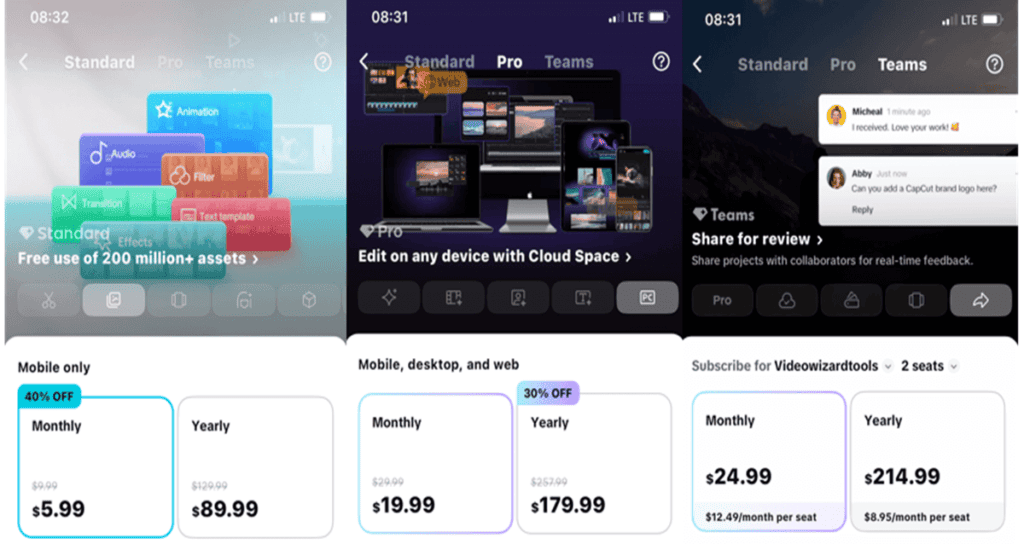
CapCut pricing can vary by country, device, app store, taxes, and promotions, so the price inside your own CapCut account is always the final one to check.
For this comparison, the simple idea is:
CapCut Free gives you basic access at no cost.
CapCut Pro is the better fit for serious solo creators who want premium tools, AI features, better export options, and smoother cross-device editing.
CapCut Teams is for agencies, brands, and groups that need shared projects, collaboration, and centralized assets.
So the real difference is not just price. Free is about access, Pro is about speed, and Teams is about collaboration.
For the full plan-by-plan cost breakdown, including current monthly and yearly pricing, read my full guide here: CapCut Pricing Plans Explained.
When Upgrading Actually Makes Financial Sense
You should consider upgrading when:
✔ Your editing time impacts output
✔ You publish regularly (weekly or more)
✔ You collaborate with others often
✔ You earn revenue or build a brand with video
CapCut’s paid plans aren’t about just having tools — they’re about saving hours, improving quality, and coordinating workflows.
Frequently Asked Questions
Is CapCut Pro worth it compared to Free?
CapCut Pro is worth it if you edit regularly, post weekly or more, and keep running into locked tools, premium effects, AI features, or export limits. If you only edit occasionally and the free tools already do enough, CapCut Free is still a good place to stay.
What is the difference between CapCut Pro and CapCut Teams?
CapCut Pro is mainly for solo creators who want more premium tools, assets, AI features, and cross-device editing. CapCut Teams is for groups that need collaboration, shared projects, centralized assets, and a cleaner workflow for multiple people working on the same content.
Can I use CapCut Pro on both mobile and desktop?
Yes, CapCut Pro is usually designed for cross-platform access across mobile, desktop, and web when you log in with the same CapCut account. However, exact access can vary by region, device, app version, and the plan shown in your account.
Is CapCut Teams priced per user?
Yes, CapCut Teams is usually priced per user. That makes it useful for agencies, brands, and content teams, but unnecessary for most solo creators who only need individual editing tools.
Can I downgrade from CapCut Pro or Teams?
Yes. You can usually cancel or downgrade your CapCut subscription through the platform where you subscribed, such as CapCut web, desktop, App Store, or Google Play. You normally keep paid access until the current billing period ends.
Does CapCut Free add a watermark?
CapCut Free does not always add a forced watermark to basic exports, but watermark or export restrictions can appear if you use Pro templates, premium assets, locked effects, or certain export options. Always check the export screen before publishing.
Is CapCut good for YouTube?
CapCut is good for YouTube Shorts, simple talking-head videos, repurposed clips, and basic edits. For advanced long-form YouTube editing, heavy color grading, deep audio work, or complex timelines, a desktop editor may be a better fit.
Which CapCut plan is best for TikTok and Reels?
CapCut Pro is usually the best plan for serious TikTok and Reels creators because it gives smoother access to premium effects, templates, captions, AI tools, and export options. CapCut Free is still enough if you are just testing content or posting casually.
Does CapCut Teams replace other collaboration tools?
No. CapCut Teams can help with shared editing, assets, and project collaboration, but it does not fully replace project management, communication, approval, or client feedback tools. It works best as the editing collaboration layer, not your entire operations system.
Which CapCut plan should beginners choose?
Beginners should usually start with CapCut Free. It gives enough tools to learn editing, test TikTok or Reels ideas, and understand your workflow. Upgrade only when locked features, repeated workarounds, or publishing volume start slowing you down.
Final Verdict: CapCut Free vs Pro vs Teams
The best CapCut plan depends on one thing: how serious your video workflow is right now.
Choose CapCut Free if you are still learning, testing content ideas, or posting occasionally. It gives you enough tools to make simple TikToks, Reels, Shorts, and basic edits without paying.
Choose CapCut Pro if you post consistently and want fewer limits. This is the best fit for solo creators, freelancers, YouTubers making Shorts, social media managers, and small business owners who need faster editing, premium tools, AI features, and more consistent visuals.
Choose CapCut Teams if more than one person works on your content. Teams is not really about better effects. It is about shared projects, brand assets, collaboration, and keeping everyone aligned.
CapCut may not be the best fit if you need advanced cinematic editing, deep color grading, complex timelines, or professional audio workflows. In that case, a traditional desktop editor may make more sense.
Bottom line: start with Free if you are learning, upgrade to Pro when speed and consistency matter, and choose Teams only when collaboration becomes part of your workflow.
