

When it comes to CapCut Standard vs Pro, most creators assume the only difference is price.
That’s not true.
I spent time editing in both versions, back-to-back testing tools, exporting projects, pushing the limits, and the gap between them surprised me.
The difference isn’t just features on paper. It’s how smoothly you edit, how much control you have, and how professional your videos feel at the end.
If you’re trying to decide which plan is actually worth it, this guide breaks it down in simple, practical terms.
Table of Contents
- What Is the Difference Between CapCut Standard and Pro?
- What Most People Get Wrong About CapCut Standard vs Pro
- What’s Inside CapCut Standard
- What’s Inside CapCut Pro
- Detailed Breakdown: Difference Between CapCut Standard and Pro
- Which One Should You Choose?
- Who Benefits the Most From CapCut Standard?
- Who Benefits the Most From CapCut Pro?
- Frequently Asked Questions
- Final Thoughts: Is CapCut Standard or Pro Worth It?
What Is the Difference Between CapCut Standard and Pro?
The main difference between CapCut Standard and Pro is access to the platform and advanced features. CapCut Standard is a lower-cost, mobile-only premium plan that unlocks extra effects and tools for phone editors.
CapCut Pro works across mobile, desktop, and web, and includes advanced AI tools, cloud storage, 4K exports, motion tracking, and full access to premium assets.
In simple terms:
- CapCut Standard = Affordable mobile upgrade
- CapCut Pro = Full professional multi-device editing system
If you only edit on your phone, Standard may be enough. If you edit often, work with clients, or use a desktop, Pro removes limitations.
Pricing note: CapCut prices vary by country, platform (iOS/Android/Desktop/Web), taxes, and promotions. Always confirm your exact price inside CapCut → Me/Profile → Upgrade/Pro/Subscription (Images Used on this post contains discounted Pricing offers).
What Most People Get Wrong About CapCut Standard vs Pro
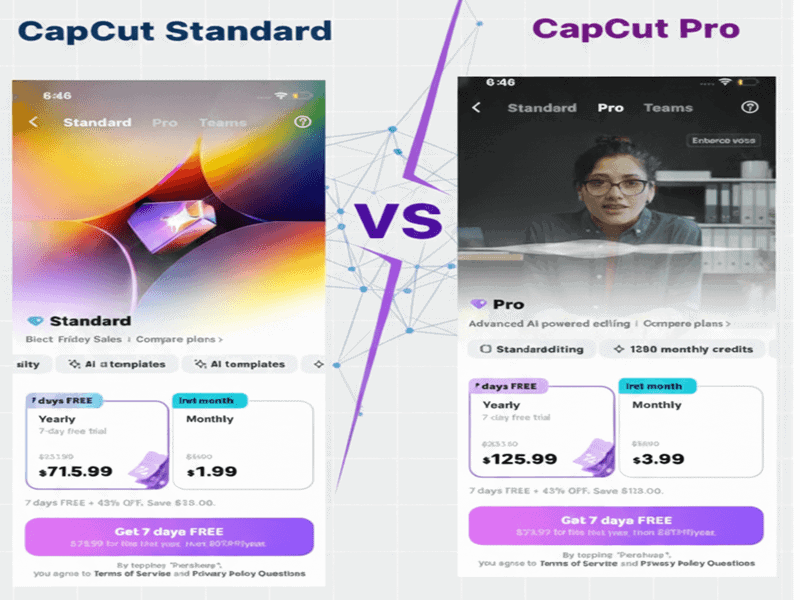
Look, most people think the only difference between CapCut Standard and CapCut Pro is whether you pay or not, but that is totally wrong.
The real difference lies in how you edit. Your workflow. Your habits. The kind of videos you publish.
When I started comparing both versions, I noticed something fast: people aren’t choosing between “free” and “paid.”
They’re choosing between “good enough” and “built for growth.” But that only matters if you actually need the growth part.
Here’s the truth no one tells you: CapCut Standard already covers everything a beginner or casual creator needs.
At $5.99 monthly or $89.99 annually, it unlocks premium effects, fonts, transitions, and better mobile exports without the full commitment, far beyond the free version’s basics like trimming, simple filters, and 1080p exports (which now include a removable end card in free).
But once your videos get more complex, longer, or more polished, that’s when Standard starts to feel tight, especially if you’re limited to mobile-only editing.
CapCut Pro plan isn’t about fancy bells and whistles.
It’s about removing friction: stronger AI tools like advanced background removal and auto-captions, premium effects that actually look professional, cleaner 4K exports, better control across devices, and speed.
The kind of speed you only feel once you’re deep in editing every day for about $19.99 monthly or $179.99 annually.
So the mistake people make isn’t picking the wrong version… It’s picking based on assumptions rather than on how they actually edit.
Wondering if CapCut is a one-time purchase or a recurring subscription? Here’s a clear breakdown.
What’s Inside CapCut Standard
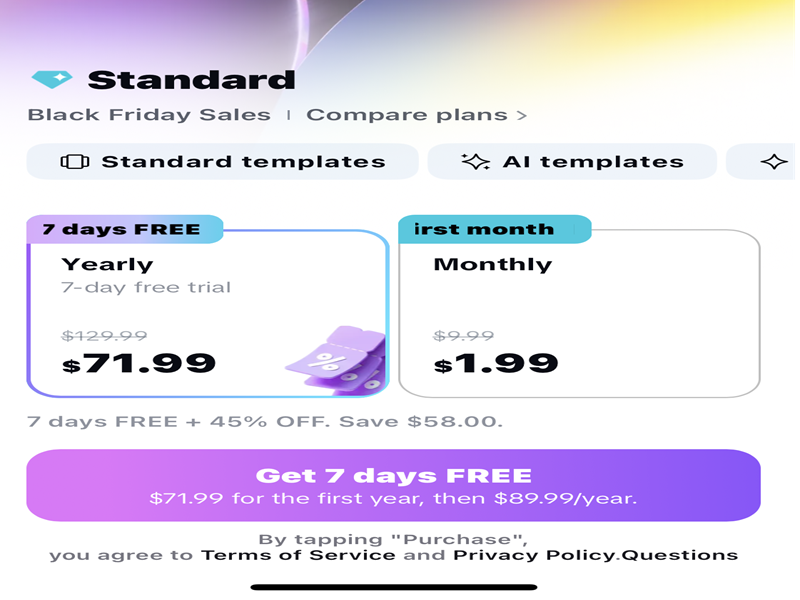
CapCut Standard is the affordable entry-level paid plan most mobile-focused creators upgrade to, and honestly, it’s a significant step up from the free version, offering premium tools that punch above its weight compared to many budget editors.
When i tested it, what stood out wasn’t just the expanded toolkit it was how seamless and intuitive everything remained. You don’t fight the software.
You just edit, with access to higher-quality assets right on your phone.
And yes, Capcut Standard lets you export in high quality up to 1080p without watermarks or end cards, plus better compression controls for social media.
It’s perfectly fine for personal or casual projects, but if you’re pushing for 4K resolution, custom bitrates, or advanced formats for client work, that’s where its mobile-only limits start to show.
CapCut Standard is built for beginners, casual creators, and mobile-only editors who want stress-free access to premium effects and templates.
Minimal learning curve. Affordable subscription. No headaches—just elevated editing on the go.
What’s Inside CapCut Pro
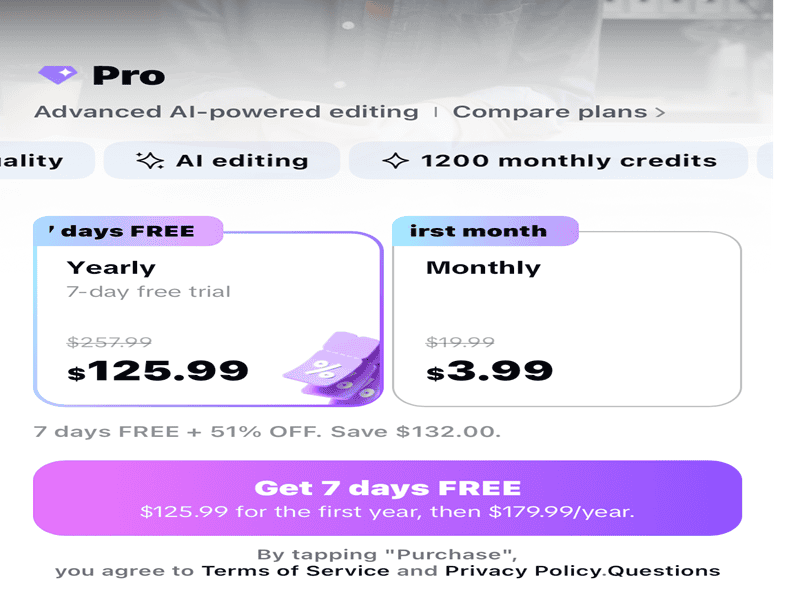
CapCut Pro isn’t just the “paid version” — it’s the version built for creators who want more control, more power, and more time saved during editing.
When I compared it directly with Standard, the biggest difference I noticed wasn’t just the number of features… it was the quality of the tools and how much smoother the overall workflow feels.
CapCut Pro also boosts your workflow through powerful AI features.
Things like smart background removal, advanced auto-captions, motion tracking, and automated enhancements save you hours compared to doing everything manually.
If you edit multiple videos a week, these AI upgrades make a real difference.
Pro gives you better export options and additional storage, which means your videos look crisp, load faster, and stay organized.
It’s the type of upgrade you don’t realize you need until you’re exporting five versions of the same clip.
CapCut Pro is built for growing creators, business owners, and anyone who wants a professional edge. If CapCut Standard feels like a starter kit, Pro feels like a full editing studio.
Learn more about all the CapCut Pricing Plan.
Detailed Breakdown: Difference Between CapCut Standard and Pro
When comparing the difference between CapCut Standard and Pro, it comes down to five major areas: platform access, AI tools, export quality, cloud storage, and workflow flexibility.
Standard focuses on mobile editing with expanded premium tools. Pro expands into full cross-device editing with advanced controls and professional output settings.
So instead of guessing which version fits your workflow, here’s a clean, detailed comparison table based on the features I tested directly.
Note: CapCut plan names and feature availability can vary by country, platform (iOS/Android/Desktop/Web), app version, and promotions. Always confirm the exact feature list inside your CapCut Upgrade/Subscription screen.
| Feature | Standard (typical) | Pro (typical) |
|---|---|---|
| Platforms supported | Often mobile-focused (varies by region) | Often mobile + desktop/web (varies by region) |
| Advanced editing controls | More limited (basic layering/timeline) | More complete set (keyframes, deeper controls) |
| Premium filters & effects | Some premium assets (expanded from Free) | Wider premium library (plus Pro-only items) |
| Templates | More templates than Free (varies) | More premium + Pro-exclusive templates (varies) |
| Background removal | May be limited or slower (depends on version) | Often faster/stronger (depends on version) |
| Auto-captions | Basic caption tools (varies) | More styling/options + better controls (varies) |
| Motion tracking | Often unavailable / limited (varies) | More likely available (varies by platform) |
| Noise reduction & audio tools | Basic controls + some premium assets | More advanced options (varies) |
| Color grading tools | Basic adjustments/filters | More advanced grading controls (varies) |
| Cloud storage & sync | May be limited (varies by region/platform) | More cloud + cross-device workflow (where available) |
| Watermark behavior | Often fewer restrictions, but depends on assets used | Often fewer restrictions, but depends on assets used |
| Export options | High-quality exports (device/version dependent) | More control (higher resolutions/FPS where supported) |
| Multi-layer editing | More limited layers (varies) | More layers & flexibility (varies) |
| Speed & performance | Good for quick mobile edits | Often faster for heavy projects (desktop helps) |
Tip: Always compare the actual plan details inside CapCut on the device you will use.
Which One Should You Choose?
Deciding between CapCut Standard and CapCut Pro isn’t really about price — it’s about how you edit and what you want your content to look like.
If You’re a Beginner or Casual Creator
New to editing or only posting TikToks/Reels occasionally? CapCut Standard gives you everything you need — premium mobile effects, clean exports, and a dead-simple workflow — without paying for pro tools you won’t use.
If You’re a Business Owner or Social Media Manager
Need consistent, professional-looking videos fast? CapCut Pro delivers polished templates, advanced AI, desktop editing, and better color controls.
If You’re an Advanced Editor, Frequent Creator, or Make Money from Videos
Post daily/weekly or do client work? Standard will feel limiting quickly. Pro removes restrictions — 4K exports, motion tracking, keyframing, and pro-level AI.
Bottom line: Mobile-only and casual → Standard.
If content is your business or income → Pro.
Who Benefits the Most From CapCut Standard?
This plan is perfect for:
- TikTok/Reels creators
- Mobile-only editors
- Students and beginners who want premium content
- Casual users who want more effects
- Anyone who doesn’t use desktop editing
It’s CapCut’s best-value upgrade for people who don’t need advanced Pro-level features.
Who Benefits the Most From CapCut Pro?
CapCut Pro is perfect for:
- professional content creators
- YouTubers & short-form creators
- business owners
- editors handling client projects
- social media managers
- creators who edit across multiple devices
- Anyone who relies on AI tools for speed
If CapCut Standard is for basic mobile creators, CapCut Pro is for people who take content creation seriously.
Frequently Asked Questions
What is the main difference between CapCut Standard and Pro?
The main difference is usually platform access and advanced features. CapCut Standard is often a lower-cost, mobile-focused upgrade for users who want extra effects, templates, and tools. CapCut Pro is usually the stronger plan for creators who want broader premium access, desktop or web editing, advanced AI tools, cloud features, and more export control.
Is CapCut Pro better than CapCut Standard?
CapCut Pro is better if you edit often, use CapCut for work, need desktop access, or rely on advanced tools. CapCut Standard can still be enough if you mostly edit short videos on your phone and only want a lighter paid upgrade from the free version.
Does CapCut Standard work on desktop?
CapCut Standard is usually more mobile-focused, while CapCut Pro is usually the better option to compare if you want to edit across mobile, desktop, and web. However, plan access can vary by region, device, app version, and account offer, so always check the details inside your own CapCut Upgrade or Subscription screen.
Does CapCut Pro include more AI features than Standard?
Usually, yes. CapCut Pro often gives broader access to advanced AI tools, premium effects, captions, background removal, motion tracking, cloud features, and other time-saving tools. The exact AI tools you see can still vary depending on your device, region, and app version.
Can you export 4K videos with CapCut Standard?
CapCut Standard may support high-quality mobile exports, but full export options can vary by device, plan, and region. If 4K export, higher frame rates, or more control over export settings matters to your workflow, CapCut Pro is usually the safer plan to compare first.
Can I upgrade from CapCut Standard to Pro later?
Yes. You can usually upgrade from Standard to Pro later through your CapCut account or subscription screen. Before upgrading, check what features, devices, billing terms, and prices are shown in your own account so you know exactly what you are paying for.
Which plan is best for beginners?
CapCut Standard is usually better for beginners who mostly edit on mobile and want extra effects, templates, and simple premium tools without paying for a full Pro workflow. CapCut Pro makes more sense once you edit regularly, need desktop access, or want more advanced creative control.
Which plan is best for creators, businesses, or client work?
CapCut Pro is usually the better choice for serious creators, business owners, social media managers, and people editing for clients. It gives you more room to grow because it is built around stronger tools, broader access, and more flexible workflows.
Final Thoughts: Is CapCut Standard or Pro Worth It?
When it comes to CapCut Standard vs Pro, the right choice isn’t about which plan is “better.”
It’s about which plan matches your editing reality.
If you mostly edit short-form content on your phone and just want better effects, fonts, and templates without spending much, CapCut Standard does exactly that.
It removes the biggest limitations of the free version while keeping things simple and affordable.
But if you edit frequently, manage multiple projects, work with clients, or care about advanced tools like motion tracking, AI background removal, desktop editing, and stronger export control, CapCut Pro feels like a completely different experience.
It’s faster.
More flexible.
More scalable.
And once you get used to the workflow freedom, it’s hard to go back.
Most beginners won’t outgrow Standard immediately.
Most serious creators outgrow it fast.
So instead of asking, “Which plan is cheaper?”
Ask yourself, “How serious am I about my content?”
Because in the CapCut standard vs pro debate, the real difference isn’t just features.
It’s how far you want your editing to go.
