

Choosing between 4K and 1080p sounds simple until you start editing real videos.
One creator says 4K is mandatory. Another says nobody can tell the difference. Then you upload a video, wait twice as long for it to export, and wonder whether all that extra resolution actually helped.
The truth is that neither option is universally better.
The right choice depends on where your video will be published, how powerful your editing device is, how much storage you have available, and whether you need extra flexibility during editing.
For many creators, the best workflow is surprisingly straightforward: record in 4K when possible, then export in 1080p for social media platforms that don’t fully benefit from higher resolutions.
In this guide, we’ll compare 4K and 1080p in terms of image quality, file size, editing performance, storage requirements, and platform-specific recommendations so you can choose the right resolution for your workflow.
Table of Contents
- Quick Comparison: 4K vs 1080p
- What 4K and 1080p Actually Mean
- Does 4K Actually Look Better Than 1080p?
- How Much Larger Are 4K Video Files?
- Which Resolution Is Easier to Edit?
- Is 1080p Still Good in 2026?
- When 4K Is Worth Using
- Does 4K Affect Battery Life and Export Time?
- Does Uploading in 4K Actually Improve Video Quality?
- When 1080p Is the Smarter Choice
- Should You Shoot in 4K and Export in 1080p?
- Best Resolution for YouTube
- Best Resolution for TikTok
- Best Resolution for Instagram Reels
- Best Resolution for YouTube Shorts
- How Resolution Affects Storage Usage
- The Workflow Most Experienced Creators Use
- Quick Reference: 4K vs 1080p
- Final Thoughts
- Official Sources
Quick Comparison: 4K vs 1080p
| Feature | 4K | 1080p |
|---|---|---|
| Resolution | 3840 × 2160 | 1920 × 1080 |
| Total Pixels | 8.3 Million | 2.1 Million |
| Image Detail | Higher | Good |
| File Size | Much Larger | Smaller |
| Editing Performance | More Demanding | Easier |
| Export Speed | Slower | Faster |
| Storage Usage | Higher | Lower |
| Best For | YouTube, TVs, Cropping | TikTok, Reels, Shorts |
What 4K and 1080p Actually Mean
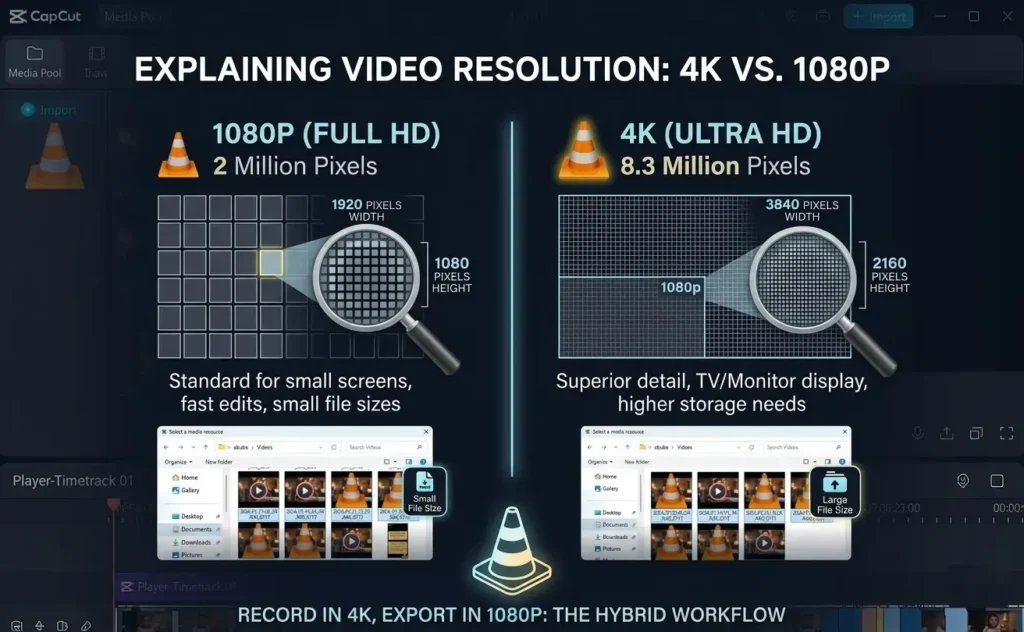
The numbers refer to the number of pixels displayed in each frame of a video.
1080p, often called Full HD, uses a resolution of 1920 × 1080 pixels. That works out to roughly 2 million pixels per frame.
4K Ultra HD uses a resolution of 3840 × 2160 pixels. That’s over 8 million pixels per frame.
In other words, 4K contains four times as many pixels as 1080p.
More pixels generally mean:
- More visible detail
- Greater cropping flexibility
- Cleaner zoom-ins during editing
- Larger file sizes
- More demanding editing requirements
That tradeoff between quality and efficiency is what drives the entire 4K vs 1080p discussion.
Does 4K Actually Look Better Than 1080p?
Yes, but the difference depends heavily on how people watch your videos.
On a large television, desktop monitor, or laptop screen, 4K footage often looks noticeably sharper. Fine details such as hair, textures, landscapes, and small text appear cleaner.
However, on a typical smartphone screen, the difference becomes much harder to notice.
Most viewers scrolling TikTok, Instagram Reels, Facebook Reels, or YouTube Shorts are watching on devices between 5 and 7 inches wide. At that size, a well-exported 1080p video often looks nearly identical to a 4K version.
This is one reason why many creators continue publishing in 1080p despite owning cameras capable of recording 4K or higher.
How Much Larger Are 4K Video Files?
File size is one of the biggest practical differences.
A video recorded in 4K typically requires significantly more storage than the same footage recorded in 1080p.
As a rough example:
- 10 minutes of 1080p footage may use around 800MB to 1GB
- 10 minutes of 4K footage may use 3GB to 4GB or more
Actual numbers vary depending on bitrate, codec, frame rate, and camera settings, but the pattern stays the same: higher resolution means larger files.
This affects more than just storage.
Larger files take longer to:
- Transfer
- Upload
- Download
- Render
- Back up
If you frequently run out of space while editing, understanding why CapCut takes so much storage can help explain where those gigabytes disappear.
Which Resolution Is Easier to Edit?
1080p wins comfortably when it comes to editing performance.
Because 4K footage contains four times as many pixels, your editing software has significantly more information to process.
That means:
- Higher RAM usage
- Longer exports
- Slower timeline playback
- More dropped frames during preview
- Greater strain on older devices
If you’ve ever experienced lag while scrubbing through footage, resolution could be one of the main reasons.
For creators editing on smartphones, tablets, or entry-level laptops, 1080p often provides a much smoother experience.
This becomes especially important if you’re working with larger projects. Before committing to a high-resolution workflow, it’s worth understanding whether CapCut can handle long videos and large files on your device.
Is 1080p Still Good in 2026?
Absolutely.
Despite the constant marketing around 4K, 6K, and even 8K cameras, 1080p remains one of the most widely used resolutions online.
Many successful creators continue publishing in 1080p because it offers an excellent balance between quality and efficiency.
Benefits of 1080p include:
- Faster exports
- Smoother editing
- Smaller files
- Lower storage requirements
- Quicker uploads
- Better compatibility with older devices
For TikTok, Instagram Reels, Facebook Reels, online courses, webinars, tutorials, and most everyday content, 1080p remains a professional-quality standard.
When 4K Is Worth Using
While 1080p is often enough, there are situations where 4K provides clear advantages.
You Need Cropping Flexibility
This is arguably the strongest reason to shoot in 4K.
Because the footage contains more pixels, you can crop into the image during editing without significantly reducing quality in a final 1080p export.
Many creators intentionally shoot wide in 4K and then create multiple camera angles from a single recording.
This technique is especially useful for:
- Talking-head videos
- Podcasts
- Interviews
- Tutorials
- YouTube content
You Publish Primarily on YouTube
YouTube processes 4K uploads differently than 1080p uploads.
In many cases, 4K uploads receive higher bitrate allocation during processing, which can result in cleaner-looking playback for viewers.
This is one reason many YouTube creators export in 4K even when a large portion of their audience watches at 1080p.
You Need Long-Term Flexibility
If you’re creating evergreen content, stock footage, commercial work, or footage that may be reused in future projects, archiving in 4K gives you more options later.
It’s easier to downscale 4K footage than it is to magically create extra detail from a 1080p file.
Does 4K Affect Battery Life and Export Time?
Yes, and often more than people expect.
Editing and exporting 4K video requires significantly more processing power than 1080p. That means your phone, tablet, or computer has to work harder, which can increase battery drain, device temperatures, and export times.
On newer devices, the difference may be manageable. On older laptops and phones, however, 4K projects can lead to laggy playback, slower exports, and even overheating during long editing sessions.
If speed matters more than maximum resolution, 1080p is usually the more efficient choice. Many creators prefer faster editing, smoother previews, and quicker exports over a quality increase that most viewers may never notice.
Does Uploading in 4K Actually Improve Video Quality?
Sometimes.
The answer depends heavily on where you’re uploading the video.
For YouTube, uploading in 4K can provide a genuine quality advantage. YouTube typically allocates higher bitrates to 4K uploads during processing, which means the final video often looks cleaner and sharper than a standard 1080p upload.
That’s why many YouTube creators export in 4K even when most viewers aren’t watching on 4K screens.
However, the same logic doesn’t always apply to social media platforms.
TikTok, Instagram Reels, Facebook Reels, and similar platforms heavily compress uploaded videos. In many cases, a properly optimized 1080p file looks just as good—or sometimes better—than an oversized 4K upload that gets aggressively compressed.
Before assuming bigger is always better, consider where the video will actually be viewed.
When 1080p Is the Smarter Choice
There are many situations where 1080p isn’t just acceptable—it’s the better option.
Your Device Struggles With 4K Editing
If timeline playback stutters, previews lag, or exports take forever, 4K may be creating unnecessary friction in your workflow.
Switching to 1080p often results in:
- Faster editing
- Smoother playback
- Shorter export times
- Lower storage usage
- Less device overheating
For many creators, these practical benefits outweigh the relatively small visual gains of 4K.
You Primarily Create Short-Form Content
Platforms such as TikTok, Instagram Reels, Facebook Reels, and YouTube Shorts are consumed primarily on smartphones.
Since these platforms already compress uploads and display content on relatively small screens, exporting in 1080p is usually the most efficient choice.
You still get excellent visual quality while reducing upload times and storage requirements.
You Need Fast Turnaround Times
If you’re publishing daily content, speed matters.
Smaller files move through your workflow faster:
- Faster imports
- Faster editing
- Faster exports
- Faster uploads
- Faster backups
When content volume increases, these small time savings add up quickly.
Should You Shoot in 4K and Export in 1080p?
For many creators, this is the ideal workflow.
Recording in 4K gives you extra flexibility during editing while exporting in 1080p keeps file sizes manageable and matches the requirements of most social media platforms.
This approach gives you the best of both worlds.
Benefits include:
- More room to crop footage
- Better stabilization options
- Cleaner digital zooms
- Smaller final exports
- Faster uploads
- Better compatibility across platforms
This workflow is especially popular among:
- YouTube creators
- TikTok creators
- Instagram creators
- Podcasters
- Course creators
- Solo content creators
You maintain the flexibility of 4K during editing without forcing every viewer to stream a massive file.
Best Resolution for YouTube
YouTube is one platform where 4K often provides real benefits.
If your footage was recorded in 4K and your editing hardware can handle it comfortably, exporting in 4K is usually worthwhile.
Benefits include:
- Higher YouTube bitrate allocation
- Cleaner image quality
- Better playback on large screens
- Improved future-proofing
That said, a well-produced 1080p YouTube video can still perform extremely well.
Resolution alone rarely determines whether viewers watch, subscribe, or engage with your content.
Best Resolution for TikTok
For TikTok, 1080p is usually the better choice.
TikTok compresses videos heavily and displays them on mobile devices where the difference between 1080p and 4K is difficult to notice.
A clean 1080p export typically offers:
- Faster uploads
- Smaller file sizes
- Reliable processing
- Excellent visual quality
If you’re creating TikTok videos in CapCut, focus more on good lighting, sharp footage, and proper export settings than chasing the highest possible resolution.
Best Resolution for Instagram Reels
Instagram Reels follows a similar pattern.
Most users watch Reels on smartphones, and Instagram compresses uploaded videos significantly.
For most creators, exporting at 1080p vertical resolution provides the best balance between quality and efficiency.
Uploading oversized 4K files rarely produces noticeable improvements for viewers.
Best Resolution for YouTube Shorts
YouTube Shorts sits somewhere between TikTok and traditional YouTube.
Many creators record in 4K because it provides flexibility when reframing vertical footage during editing.
However, exporting at 1080 × 1920 remains a common and effective workflow.
The key is maintaining strong visual quality while avoiding unnecessarily large files.
How Resolution Affects Storage Usage
Resolution affects far more than the final export.
Higher-resolution projects often generate:
- Larger source files
- Larger cache files
- Larger preview files
- Larger project backups
- Longer export times
This becomes especially noticeable on mobile devices.
If you’re constantly running out of storage space while editing, it may not be the editing app itself causing the issue. High-resolution footage is often the biggest contributor.
You may also find these guides helpful:
- How to Reduce Video File Size in CapCut
- Why Does CapCut Take So Much Storage?
- Can CapCut Handle Long Videos and Large Files?
The Workflow Most Experienced Creators Use
Once you move beyond the “4K versus 1080p” debate, you’ll notice that many experienced creators follow a hybrid workflow.
Instead of choosing one resolution for everything, they adapt based on the final destination.
- Shoot in 4K whenever possible
- Edit using the highest-quality source footage available
- Export in 4K for YouTube long-form content
- Export in 1080p for TikTok, Reels, and Shorts
- Use 4K for TV displays, commercial projects, and client work
This approach maximizes flexibility while keeping uploads practical.
Quick Reference: 4K vs 1080p
| Category | Winner |
|---|---|
| Image Detail | 4K |
| Cropping Flexibility | 4K |
| YouTube Quality | 4K |
| File Size | 1080p |
| Editing Speed | 1080p |
| Storage Efficiency | 1080p |
| TikTok Uploads | 1080p |
| Instagram Reels | 1080p |
| Everyday Content Creation | 1080p |
Final Thoughts
4K isn’t automatically better, and 1080p isn’t outdated.
The right resolution depends on your goals, your hardware, and where your audience actually watches your content.
If you’re publishing mainly on TikTok, Instagram Reels, Facebook Reels, or YouTube Shorts, 1080p remains the most practical choice. It delivers excellent quality, smaller file sizes, faster exports, and a smoother editing experience.
If you’re creating YouTube videos, commercial projects, stock footage, or content that may need heavy cropping later, 4K can provide valuable flexibility and improved long-term usefulness.
For most creators, the sweet spot is simple: record in 4K when possible, edit with that extra flexibility, and export in the resolution that best matches the platform you’re publishing to.
The best resolution isn’t the one with the biggest number. It’s the one that helps you create better content with fewer workflow headaches.
